CAMPUS Poppy Music is a compact and portable Bluetooth 3.0 speaker designed for on-the-go music enjoyment. It features a unique pop-art design with interchangeable silicone covers, allowing you to customize its appearance. Equipped with a built-in microphone, it also supports hands-free calling.
Зображення: The CAMPUS Poppy Music speaker, showcasing its compact design and blue silicone cover.
Підключення Bluetooth 3.0: Безперешкодне підключення до смартфонів, планшетів та інших пристроїв із підтримкою Bluetooth.
Interchangeable Silicone Covers: Comes with four vibrant colors (red, blue, green, gray) to personalize your speaker.
Тривалий термін служби батареї: Enjoy 5 to 8 hours of playback on a single charge.
Дзвінки в режимі Hands-Free: Вбудований мікрофон для зручного керування дзвінками.
Компактний і портативний: Designed to fit comfortably in your hand, perfect for travel.
Зарядка через мікро-USB: Easy charging via a standard 5V micro-USB cable.
Посібник із налаштування
1. Вміст упаковки
Перш ніж почати, переконайтеся, що всі елементи присутні в упаковці:
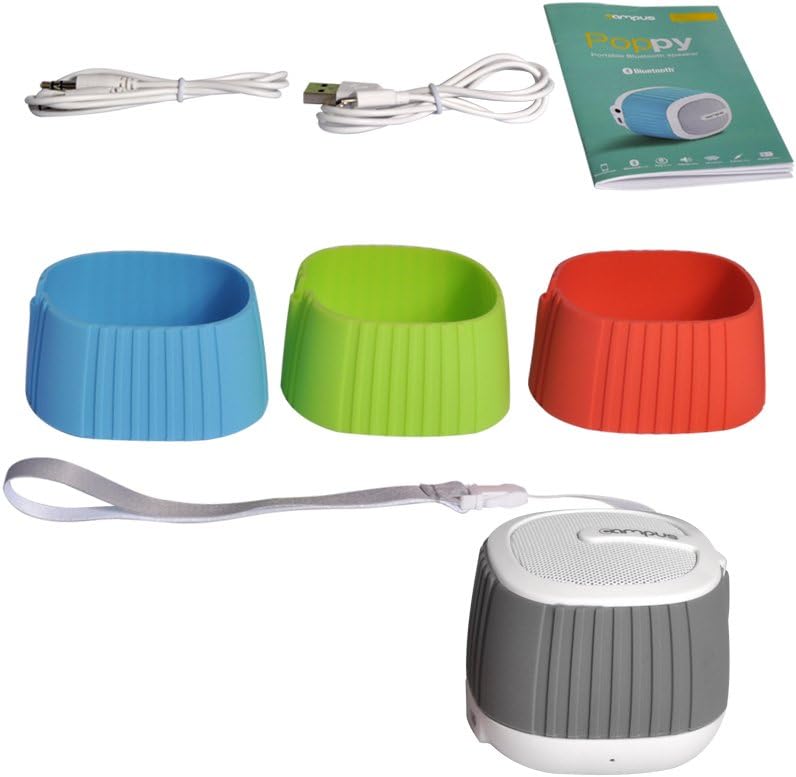
Image: The complete package contents, including the speaker, multiple silicone covers, charging cable, audio cable, and user manual.
For optimal performance, fully charge the speaker before first use.
Connect the supplied Micro-USB cable to the charging port (DC 5V) on the speaker.
Підключіть інший кінець USB-кабелю до USB-адаптера живлення (не входить до комплекту) або USB-порту комп’ютера.
Світлодіодний індикатор світитиметься під час заряджання.
Charging typically takes 2 to 3 hours. The LED indicator will change or turn off once fully charged.
3. Changing Silicone Covers
Customize your speaker's look by easily swapping the silicone covers.
Зображення: Розібраний view of the speaker, showing how the silicone cover can be removed and replaced.
Gently peel off the current silicone cover from the speaker body.
Select your desired color cover.
Align the new cover with the speaker and carefully stretch it over the body until it fits snugly.
Image: Four CAMPUS Poppy Music speakers, each with a different colored silicone cover (red, blue, green, gray), demonstrating the customization options.
Інструкція з експлуатації
1. Увімкнення/вимкнення живлення
Щоб увімкнути: Locate the power button (often integrated with play/pause or a dedicated switch) and press and hold it until you hear an audible prompt or the LED indicator lights up.
Щоб вимкнути: Press and hold the power button again until the speaker powers down.
2. Підключення Bluetooth
Connect your speaker wirelessly to your device.
Ensure the speaker is powered on and in pairing mode (the LED indicator may flash rapidly).
На смартфоні, планшеті або іншому пристрої з підтримкою Bluetooth перейдіть до налаштувань Bluetooth.
шукати available devices. The speaker should appear as "Poppy Music" or similar.
Select the speaker from the list to pair. You will hear a confirmation sound once successfully connected.
Гучномовець автоматично підключиться до останнього сполученого пристрою після ввімкнення, якщо Bluetooth пристрою активний і він знаходиться в межах досяжності.
3. Audio Playback and Controls
Control your music and calls using the speaker's integrated controls.
Відтворення/пауза: Press the Play/Pause button (often a central button) to start or pause music playback.
Регулювання гучності: Use the volume up (+) and volume down (-) buttons to adjust the audio level.
Наступний / попередній трек: Press and hold or short press (depending on model) the volume buttons or dedicated track buttons to skip tracks.
Дзвінки в режимі Hands-Free:
Відповісти на дзвінок: Натисніть кнопку відтворення/паузи один раз, щоб відповісти на вхідний дзвінок.
Завершити виклик: Натисніть кнопку відтворення/паузи один раз під час дзвінка, щоб завершити його.
Відхилити виклик: Натисніть і утримуйте кнопку «Відтворення/пауза», щоб відхилити вхідний виклик.
4. AUX Input (Wired Connection)
For devices without Bluetooth, use the 3.5mm audio cable.
Підключіть один кінець аудіокабелю 3.5 мм до вхідного порту AUX на динаміку.
Connect the other end to the headphone jack of your audio device (e.g., MP3 player, computer).
Колонка автоматично перейде в режим AUX.
Технічне обслуговування
Прибирання: Use a soft, dry cloth to wipe the speaker's surface. For silicone covers, a damp cloth with mild soap can be used, then dry thoroughly. Do not use harsh chemicals or abrasive cleaners.
Зберігання: Зберігайте динамік у прохолодному, сухому місці, подалі від прямих сонячних променів та екстремальних температур.
Догляд за акумулятором: Щоб подовжити термін служби акумулятора, уникайте частого повного розряджання акумулятора. Регулярно заряджайте динамік, навіть якщо він не використовується протягом тривалого часу.
Водонепроникність: This speaker is not water-resistant. Avoid exposure to liquids.
Усунення несправностей
проблема
Можлива причина
Рішення
Динамік не вмикається.
Батарея низького заряду або розряджена.
Заряджайте динамік протягом 2-3 годин.
Не вдається підключитися через Bluetooth.
Speaker is not in pairing mode.
Bluetooth на вашому пристрої вимкнено.
Speaker is already connected to another device.
Too far from the device.
Ensure speaker is powered on and LED is flashing (pairing mode).
Увімкніть Bluetooth на своєму пристрої.
Disconnect from other devices or turn off their Bluetooth.
Перемістіть динамік ближче до пристрою (до 10 метрів).
Ні звуку.
Гучність занадто низька.
Incorrect input mode (Bluetooth/AUX).
Device not playing audio.
Збільште гучність як на динаміку, так і на підключеному пристрої.
Ensure correct mode is active (Bluetooth connected or AUX cable inserted).
Check if audio is playing on your source device.
Погана якість звуку.
Перешкоди або відстань.
Низький заряд батареї.
Move speaker closer to the device, away from obstacles or other wireless devices.
Зарядіть динамік.
Технічні характеристики
Бренд
Campus
Назва моделі
Poppy Music
Номер моделі
SP-FY24
Технологія підключення
Bluetooth 3.0, AUX (3.5mm)
Максимальна вихідна потужність динаміка
3 Вт RMS
Термін служби батареї
5-8 годин
Час зарядки
2 to 3 hours (via Micro-USB, 5V)
Сумісні пристрої
Smartphones, Tablets, Bluetooth-enabled devices
Розміри (упаковка)
15.4 х 9.2 х 8.2 см
Вага (упаковка)
240.4 г
Тип контролера
Touchpad (Pekplatta)
Гарантія та підтримка
This product is covered by standard consumer warranty laws in your region. Please retain your proof of purchase for any warranty claims.
For technical support or further assistance, please refer to the contact information provided by your retailer or visit the official Campus webсайт.
Note: Software updates are not guaranteed for this product.
Ask a question about this manual
Ask about setup, troubleshooting, compatibility, parts, safety, or missing instructions. Manuals+ will review the question and use this page’s manual context to help answer it.