
1. Вступ
This manual provides essential information for the proper setup, operation, and maintenance of your Sony SLV-FT5 VHS Video Cassette Recorder (VCR). Please read these instructions thoroughly before using the unit to ensure optimal performance and safety.
2. Інформація про безпеку
Завжди дотримуйтесь основних запобіжних заходів під час використання цього виробу, щоб зменшити ризик пожежі, ураження електричним струмом та травмування.
- Не піддавайте пристрій впливу дощу або вологи.
- Не відкривайте шафу. Звертайтеся до обслуговування лише кваліфікованим персоналом.
- Забезпечте належну вентиляцію; не блокуйте вентиляційні отвори.
- Використовуйте лише блок живлення, зазначений для цього пристрою.
- Тримайте пристрій подалі від джерел тепла та прямих сонячних променів.
3. Налаштування
3.1 Розпакування
Carefully remove the VCR and all accessories from the packaging. Verify that all components are present: the SLV-FT5 VCR unit, remote control, and necessary connection cables (e.g., RCA audio/video cables).
3.2 Підключення до телевізора
To connect the VCR to your television, use the provided RCA audio/video cables. Match the colored plugs to the corresponding colored jacks on both the VCR and your TV (Yellow for Video, White for Left Audio, Red for Right Audio).

малюнок 1: Rear panel of the Sony SLV-FT5 VCR. This image displays the various input and output ports, including RCA jacks for audio and video, and the power input. The product label with model number SLV-FT5 and power specifications (100V 18W 50/60Hz) is also visible.
3.3 Підключення живлення
Plug the VCR's power cord into a standard electrical outlet (AC 100V, 50/60Hz). Ensure the power outlet is easily accessible.
3.4 Налаштування пульта дистанційного керування
Open the battery compartment on the back of the remote control and insert two AA batteries, observing the correct polarity (+/-). Close the compartment securely.

малюнок 2: The Sony RMT-V219 remote control, designed for the SLV-FT5 VCR. This image also shows the included RCA audio/video cables, which are typically used for connecting the VCR to a television.
4. Operating the VCR
4.1 Увімкнення/вимкнення
Натисніть ПОТУЖНІСТЬ button on the VCR's front panel or the remote control to turn the unit on or off.
4.2 Loading and Unloading a VHS Tape
- Завантаження: Insert a VHS cassette into the tape slot on the front of the VCR with the tape window facing forward. The VCR will automatically pull the tape in.
- Вивантаження: Натисніть ВИЙТИ button on the VCR or remote control. The tape will be ejected.
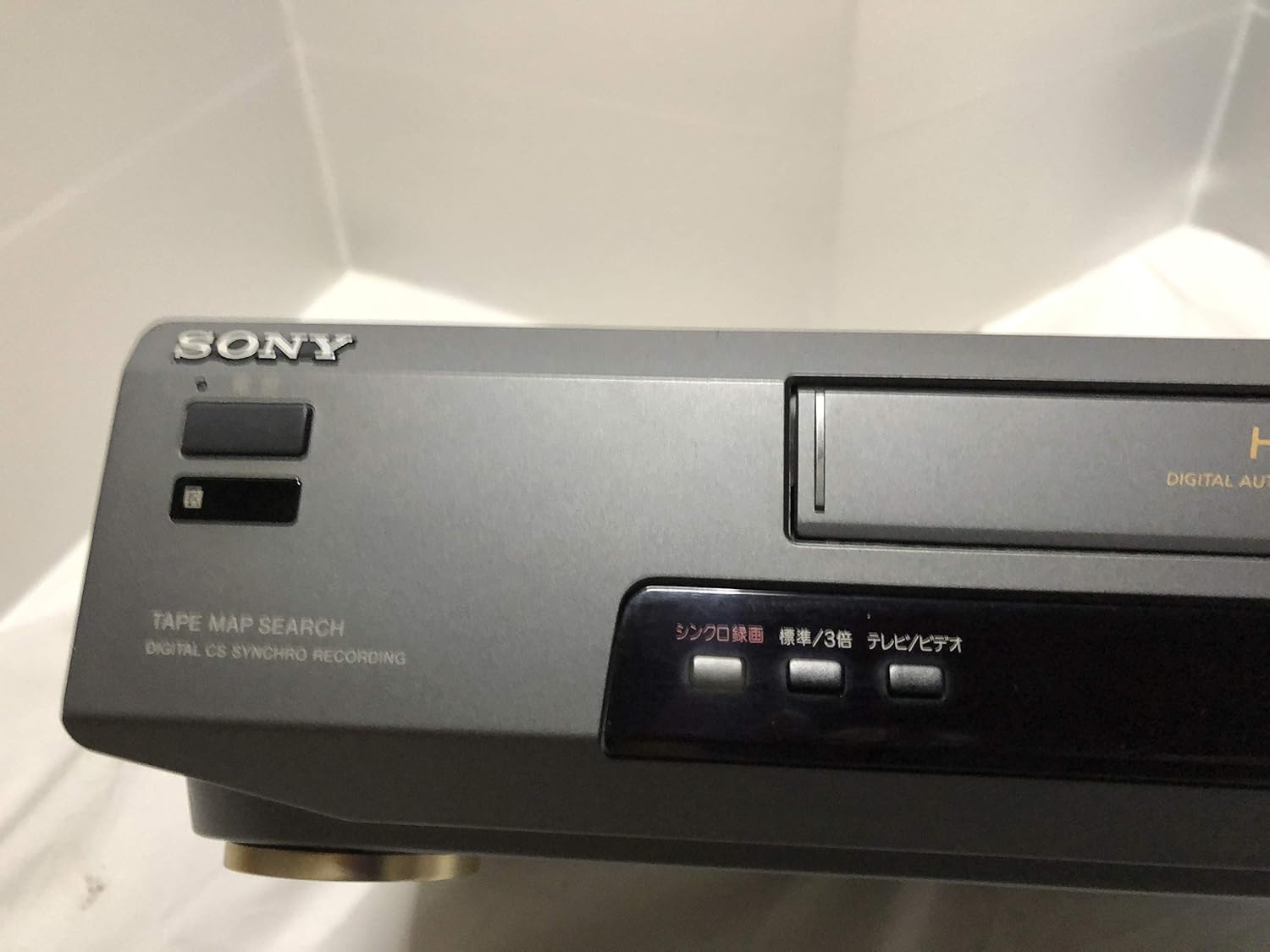
малюнок 3: Front left section of the Sony SLV-FT5 VCR. This view highlights the tape loading slot and the 'TAPE MAP SEARCH' feature, which assists in navigating recorded content on a tape.
4.3 Відтворення
After loading a tape, press the ГРАТИ button (►) on the VCR or remote control to begin playback. Use the ПАУЗА (∥), СТІЙ (■), НАЗАД (◀◀), and ШВИДКО ВПЕРЕД (►►) buttons to control playback.

малюнок 4: Front right section of the Sony SLV-FT5 VCR. This image displays the main playback controls (Play, Stop, Rewind, Fast Forward, Pause) and additional buttons for 'Quick Timer' and 'Tracking' adjustments.
4.4 Запис
To record, ensure a blank or recordable tape is inserted. Select the desired input source (e.g., TV channel). Press the REC (●) button on the VCR or remote control. Press СТІЙ (■) to end recording.
4.5 Tracking Adjustment
If the picture quality during playback is poor (e.g., horizontal lines or noise), use the ВІДСТЕЖЕННЯ buttons on the front panel or remote control to fine-tune the tape's alignment with the VCR's heads.
5. Технічне обслуговування
5.1 Очищення пристрою
Wipe the exterior of the VCR with a soft, dry cloth. For stubborn stains, use a cloth lightly dampened with a mild detergent solution, then wipe dry. Do not use abrasive cleaners or solvents.
5.2 Очищення головки
Over time, VCR heads can accumulate dirt, leading to poor picture and sound quality. Use a commercially available dry-type VHS head cleaning cassette according to its instructions. Avoid wet-type cleaners as they can damage the heads.
5.3 Зберігання
When not in use for extended periods, disconnect the VCR from the power outlet. Store the unit in a cool, dry place, away from dust and direct sunlight.
6. Вирішення проблем
If you encounter issues with your VCR, refer to the following common problems and solutions before seeking professional service.
| проблема | Можлива причина | Рішення |
|---|---|---|
| Немає живлення | Шнур живлення відключено; проблема з розеткою | Перевірте підключення шнура живлення; спробуйте іншу розетку. |
| Немає зображення/звуку | Incorrect TV input; loose A/V cables | Select correct TV input (e.g., Video 1, AV); ensure A/V cables are securely connected. |
| Poor picture quality (snowy, lines) | Dirty VCR heads; tracking issue; old/damaged tape | Clean VCR heads; adjust tracking; try a different tape. |
| Стрічка не витягується | Power issue; mechanical malfunction | Ensure power is on; try pressing EJECT multiple times. If issue persists, seek service. |
| Пульт не працює | Розряджені батарейки; засмічений датчик | Replace batteries; ensure no obstacles between remote and VCR sensor. |
7. Технічні характеристики
| Особливість | Специфікація |
|---|---|
| Бренд | Sony |
| Номер моделі | SLV-FT5 |
| Тип носія | VHS |
| роздільна здатність | 720 x 480 пікселів |
| Вага продукту | 4160 грами |
| Режим аудіовиходу | Стерео |
| Підтримувані аудіоформати | Monaural, Stereo |
| Кодування відео | Аналоговий |
| Сумісні пристрої | телебачення |
| Сумісність вхідного відео | NTSC |
| Вимоги до живлення | 100V, 18W, 50/60Hz |
8. Гарантія та підтримка
For warranty information and customer support, please refer to the documentation included with your purchase or visit the official Sony webсайт. Зберігайте чек про покупку для гарантійних претензій.