вступ
This manual provides essential instructions for the safe and efficient operation of your Yamaha HTR-2067 5.1 Channel AV Receiver. Please read this manual thoroughly before using the unit to ensure proper setup and performance. Keep this manual in a safe place for future reference.
Інформація про безпеку
- Джерело живлення: Підключайте пристрій лише до розетки змінного струмуtage вказано на задній панелі.
- Вентиляція: Забезпечте належну вентиляцію. Не блокуйте вентиляційні отвори.
- Вода і вологість: Не піддавайте пристрій впливу дощу або вологи. Не ставте на пристрій предмети, наповнені рідинами.
- Сторонні предмети: Не вставляйте сторонні предмети в отвори пристрою.
- Обслуговування: Не намагайтеся обслуговувати цей пристрій самостійно. Зверніться до кваліфікованого сервісного персоналу з усіх питань обслуговування.
- Опір динаміка: Ensure connected speakers have an impedance of 6 ohms or higher. Refer to the "CAUTION: SEE INSTRUCTION MANUAL FOR CORRECT SETTING" label near the speaker terminals.
Налаштування
Задня панель закінченаview
The following image illustrates the rear panel of the Yamaha HTR-2067 receiver, highlighting various connection points for audio, video, and speakers.
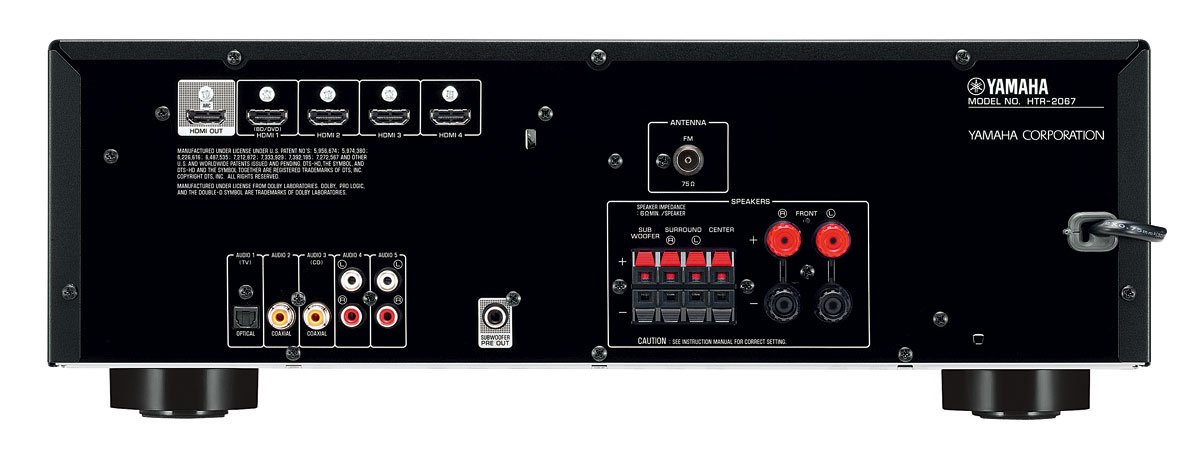
Figure 1: Rear Panel of Yamaha HTR-2067 AV Receiver
1. Розпакування
Carefully remove the receiver and all accessories from the packaging. Retain the packaging materials for future transport or storage.
2. Підключення динаміків
Connect your speakers to the corresponding terminals on the rear panel. Ensure correct polarity (+ to + and - to -) for each speaker. The HTR-2067 supports a 5.1 channel setup.
- Фронтальні динаміки (лівий/правий): Connect to the "FRONT" terminals.
- Центральний спікер: Connect to the "CENTER" terminal.
- Гучномовці об'ємного звуку (лівий/правий): Connect to the "SURROUND" terminals.
- Сабвуфер: Connect a powered subwoofer to the "SUBWOOFER PRE OUT" RCA jack.
Refer to the speaker impedance warning on the rear panel, which states "SPEAKER IMPEDANCE 6Ω MIN / SPEAKER".
3. Підключення аудіо/відео пристроїв
Use the appropriate cables to connect your source devices (e.g., Blu-ray player, game console, TV) to the receiver.
- Підключення HDMI:
- HDMI OUT (ARC): Connect to your TV's HDMI input (preferably one supporting ARC for audio return).
- HDMI 1 (BD/DVD), HDMI 2, HDMI 3, HDMI 4: Connect your video source devices here.
- Підключення цифрового аудіо:
- OPTICAL (AUDIO 1 (TV)): For optical digital audio from a TV or other device.
- COAXIAL (AUDIO 2): For coaxial digital audio from a CD player or other device.
- Аналогові аудіопідключення:
- AUDIO 3 (CD), AUDIO 4, AUDIO 5: For analog audio devices using RCA cables.
4. Connecting Antennas
For FM radio reception, connect the supplied FM antenna to the "ANTENNA FM 75Ω" terminal on the rear panel.
5. Підключення живлення
After all other connections are made, plug the power cord into an AC wall outlet.
Інструкція з експлуатації
1. Увімкнення/вимкнення живлення
Натисніть ПОТУЖНІСТЬ button on the front panel or remote control to turn the receiver on or off.
2. Вибір вхідних даних
Select the desired input source using the input selector buttons on the front panel or the remote control. For exampлі, натисніть BD / DVD for a Blu-ray player connected to HDMI 1.
The СЦЕНА buttons (BD/DVD, TV, CD, Radio) provide one-touch power-on and input selection, along with pre-set sound programs.
3. Регулювання гучності
Відрегулюйте загальну гучність за допомогою великої ручки на передній панелі або ОБ'ЄМ +/- кнопки на пульті дистанційного керування.
4. Sound Modes (CINEMA DSP)
The HTR-2067 features CINEMA DSP with 17 DSP programs. Use the ПРОГРАМА buttons on the remote control to cycle through different sound fields and enhance your listening experience.
5. Режим ECO
Activate the ECO mode to reduce power consumption by approximately 20%. This setting can be toggled via the remote control or system menu.
Технічне обслуговування
- Прибирання: Протріть пристрій м’якою сухою тканиною. Не використовуйте хімічні засоби для чищення або абразивні матеріали.
- Вентиляція: Періодично перевіряйте, чи вентиляційні отвори не засмічені пилом або сміттям.
- Шнур живлення: Регулярно перевіряйте шнур живлення на наявність пошкоджень.
Усунення несправностей
| проблема | Можлива причина | Рішення |
|---|---|---|
| Немає живлення | Power cord disconnected; unit in standby mode. | Ensure power cord is securely plugged in; press POWER button. |
| Ні звуку | Incorrect input selected; speakers not connected; volume too low; mute activated. | Виберіть правильний вхід; перевірте підключення динаміків; збільште гучність; вимкніть звук. |
| Немає відео | Incorrect input selected; HDMI cable loose or faulty; TV input incorrect. | Select correct input; check HDMI connections; ensure TV is on correct input. |
| Поганий радіоприйом | Антена не підключена або неправильно розташована. | Connect FM antenna; adjust antenna position for better reception. |
Якщо проблема не зникає, зверніться до кваліфікованого сервісного техніка.
Технічні характеристики
| Особливість | Деталь |
|---|---|
| Бренд | Yamaha |
| Модель | HTR-2067 |
| Канали | 5.1-канальний об'ємний звук |
| 4K Pass-through | Yes (4K 24/30p) |
| DSP Programs | CINEMA DSP (17 programs) |
| Режим ECO | Yes (approx. 20% less power consumption) |
| Підключення | HDMI, Optical, Coaxial, Analog RCA, FM Antenna |
| Імпеданс динаміка | Мінімум 6 Ом |
| Вага товару | 8.72 кг |
| Розміри (прибл.) | 55.7 x 41.4 x 22.4 см (розміри упаковки) |
Гарантія та підтримка
Щоб отримати інформацію про гарантію та підтримку клієнтів, зверніться до гарантійного талона, що додається до вашого продукту, або відвідайте офіційний веб-сайт Yamaha. webсайт. Зберігайте чек про покупку як підтвердження покупки.
For technical assistance or service inquiries, contact your authorized Yamaha dealer or service center.