
1. Вступ
This manual provides essential information for the safe and efficient operation, installation, and maintenance of your Carrier Durakool Plus 42KGL-024D+51MSG-024RD Split Air Conditioner. Please read this manual thoroughly before using your AC unit and retain it for future reference. Proper use and maintenance will ensure optimal performance and longevity of your appliance.
2. Інформація про безпеку
Важливі інструкції з безпеки: Завжди дотримуйтесь основних запобіжних заходів, щоб зменшити ризик пожежі, ураження електричним струмом або травмування.
- Installation must be performed by qualified personnel in accordance with all applicable national wiring standards.
- Переконайтеся, що джерело живлення відповідає об’ємуtage specified on the unit's nameplate.
- Do not operate the AC unit with wet hands or when standing on a wet surface.
- Тримайте дітей подалі від пристрою та пульта дистанційного керування.
- Не вставляйте предмети у вхідний або вихідний отвір для повітря.
- Вимкніть живлення перед чищенням або будь-яким технічним обслуговуванням.
- In case of abnormal operation (e.g., burning smell), immediately turn off the unit and disconnect the power supply. Contact a qualified service technician.
3. Продукт закінчивсяview
The Carrier Durakool Plus 42KGL-024D+51MSG-024RD is a 2 Ton, 2 Star rated split air conditioner designed for residential use. It features a robust rotary compressor and an anti-bacterial filter for improved air quality.
Ключові характеристики:
- 2 Ton Capacity, 2 Star Energy Rating
- Rotary Compressor for efficient cooling
- Anti Bacterial Filter and Electrostatic Dust Filter for cleaner air
- Sleep Mode and Auto Restart functions
- LCD Remote Control and LED Panel Display
- Auto Fan Speed, Auto Swing, Real Time Clock, Auto Mode, Turbo Mode
Включені компоненти:
- 1 x Main Unit (Indoor Unit)
- 1 x Outdoor Unit (Required, not explicitly listed in "whats_in_the_box" but implied by "Split AC" and "Is Outdoor Unit Required: Yes")
- 1 x Пульт дистанційного керування
- 1 х гарантійний талон
- Посібник користувача (цей документ)
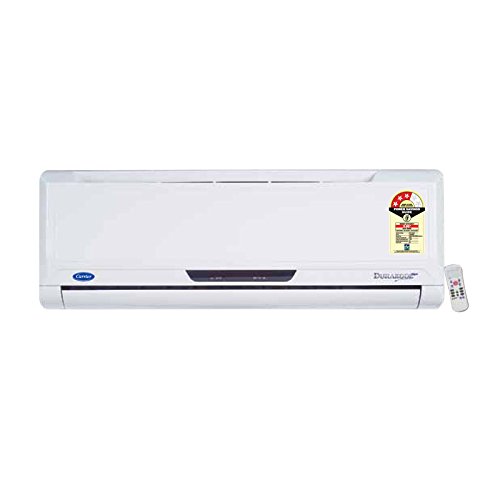
Figure 3.1: Carrier Durakool Plus Split AC Indoor Unit. This image shows the white indoor unit of the air conditioner, typically mounted on a wall.
4. Налаштування
The Carrier Durakool Plus is a split system air conditioner, requiring both an indoor and an outdoor unit. Professional installation is mandatory to ensure proper functioning, safety, and warranty validity.
4.1 Професійне встановлення
Due to the complexity of refrigerant handling, electrical connections, and structural mounting, installation must be carried out by a certified HVAC technician. Attempting self-installation may void your warranty and pose significant safety risks.
4.2 Вибір місця
- Внутрішній блок: Select a location that allows for even air distribution throughout the room, away from direct sunlight or heat sources. Ensure sufficient space around the unit for maintenance.
- Зовнішній блок: Choose a well-ventilated area, free from obstructions, and away from direct sunlight or excessive dust. Ensure the unit is placed on a stable, level surface. The outdoor unit should be easily accessible for maintenance.
4.3 Електричне підключення
The unit requires a dedicated power circuit. The electrical wiring must comply with local and national electrical codes. Ensure the power source is properly grounded. Refer to the wiring diagram provided with the outdoor unit for specific connection details.
5. Інструкція з експлуатації
Your Carrier Durakool Plus AC unit is controlled via an LCD remote control. Familiarize yourself with the remote's functions for optimal use.
5.1 Функції дистанційного керування
The remote control allows you to adjust temperature, fan speed, operating mode, and set timers. An LED display on the indoor unit will show current settings. Refer to the remote control's specific user guide for detailed button functions and display indicators.
- Кнопка живлення: Вмикає або вимикає пристрій.
- Кнопка режиму: Перемикає режими роботи: Авто, Охолодження, Осушення, Вентилятор, Обігрів (за наявності).
- Кнопки температури (▲/▼): Регулює бажану кімнатну температуру.
- Кнопка швидкості вентилятора: Вибір швидкості вентилятора (Автоматична, Низька, Середня, Висока).
- Кнопка повороту: Активує або деактивує автоматичне вертикальне коливання повітряного потоку.
- Режим сну: Optimizes temperature and fan speed for comfortable sleep and energy saving.
- Таймер УВІМК./ВИМК.: Sets a specific time for the unit to turn ON or OFF.
- Турбо режим: Provides rapid cooling by operating at maximum fan speed and cooling capacity.
- Автоматичний перезапуск: If power is interrupted, the unit will automatically restart with previous settings once power is restored.
6. Технічне обслуговування
Regular maintenance ensures efficient operation and extends the lifespan of your air conditioner. Always disconnect power before performing any maintenance.
6.1 Очищення повітряного фільтра
The unit is equipped with an electrostatic dust filter and an active carbon filter. Clean these filters regularly (every 2-4 weeks, depending on usage and air quality) to maintain cooling efficiency and air quality.
- Вимкніть блок змінного струму та від’єднайте джерело живлення.
- Відкрийте передню панель внутрішнього блоку.
- Обережно зніміть повітряні фільтри.
- Clean the filters using a vacuum cleaner or wash them with lukewarm water and a mild detergent. Rinse thoroughly.
- Дайте фільтрам повністю висохнути в затіненому місці, перш ніж вставляти їх назад.
- Закрийте передню панель та відновіть живлення.
6.2 Генеральне прибирання
- Протріть зовнішню частину внутрішнього блоку м’якою ганчіркоюamp тканина. Не використовуйте агресивні хімікати або абразивні засоби для чищення.
- Ensure the outdoor unit's coils are free from debris, leaves, and dirt. Use a soft brush or vacuum to clean the fins.
6.3 Сезонне технічне обслуговування
It is recommended to have your AC unit professionally serviced annually, especially before the cooling season, to check refrigerant levels, electrical connections, and overall system performance.
7. Вирішення проблем
Перш ніж звертатися в сервісну службу, перевірте наступні поширені проблеми:
| проблема | Можлива причина | Рішення |
|---|---|---|
| Пристрій не запускається | No power supply; Remote control batteries depleted; Circuit breaker tripped. | Перевірте підключення живлення; замініть батарейки пульта дистанційного керування; перезавантажте автоматичний вимикач. |
| Недостатнє охолодження | Dirty air filters; Doors/windows open; Temperature setting too high; Outdoor unit obstructed. | Clean air filters; Close doors/windows; Lower temperature setting; Clear obstructions from outdoor unit. |
| Незвичайний шум | Нещільно прилягаючі деталі; пристрій нерівно встановлений; сміття у вентиляторі. | Ensure unit is securely mounted; Check for and remove debris. If noise persists, contact service. |
| Витік води з внутрішнього блоку | Засмічення зливної труби; неправильне встановлення. | Clear drain pipe obstruction; Contact professional for inspection. |
If the problem persists after attempting these solutions, please contact Carrier customer support or a qualified service technician.
8. Технічні характеристики
| Особливість | Деталь |
|---|---|
| Бренд | Перевізник |
| Назва моделі | Durakool Plus 42KGL-024D+51MSG-024RD |
| Ємність | 2 тонни |
| Потужність охолодження | 6741 Вт |
| Енергоефективність | 2-зірковий рейтинг BEE |
| Особливості | Anti Bacterial Filter, Electrostatic Dust Filter, Sleep Mode, Auto Restart, Auto Swing, Turbo Mode |
| колір | Білий |
| Рівень шуму (у приміщенні) | 47 децибели |
| Тип інвертора | Без інвертора |
| Тип установки | Спліт-система |
| Тип компресора | Rotary Scroll |
| Основний матеріал | Мідь |
| Джерело живлення | Провідний електричний |
| Рекомендована площа підлоги | 180 квадратних футів |
| Спосіб контролю | Пульт дистанційного керування |
9. Гарантія та підтримка
9.1 Інформація про гарантію
Your Carrier Durakool Plus AC unit comes with a limited warranty:
- Гарантія 1 рік на продукті.
- 5 роки гарантії на компресорі.
Please retain your purchase receipt and warranty card for any warranty claims. The warranty terms and conditions are detailed on the warranty card included with your product.
9.2 Підтримка клієнтів
For technical assistance, service requests, or further inquiries, please contact Carrier customer support. Refer to your warranty card or the official Carrier website for up-to-date contact information.
You can also visit the official Carrier store for more information: Carrier Store on Amazon.in