
1. Вступ
The THOMSON CT390 is a compact and versatile radio alarm clock designed to provide timekeeping, radio entertainment, and alarm functions. It features an intuitive LCD display with touch controls, FM/MW radio tuning, dual alarms with a weekend function, and connectivity options including USB and AUX for external audio playback. This manual provides detailed instructions for setting up and operating your CT390 unit.
2. Інформація про безпеку
- Ensure the power adapter is connected to a compatible power outlet.
- Не піддавайте пристрій впливу води, вологи або екстремальних температур.
- Уникайте розміщення пристрою поблизу джерел тепла або під прямими сонячними променями.
- Протирайте пристрій м’якою сухою тканиною. Не використовуйте рідкі засоби для чищення або абразивні матеріали.
- Не намагайтеся розбирати або ремонтувати пристрій самостійно. Звертайтеся до кваліфікованого персоналу для проведення будь-яких робіт з обслуговування.
3. Вміст упаковки
Будь ласка, перевірте наявність усіх предметів у упаковці:
- THOMSON CT390 Radio Alarm Clock Unit
- Адаптер живлення
- External Temperature Sensor (for outdoor temperature display)
- Посібник користувача (цей документ)
4. Продукт закінчивсяview
4.1 Передня панель та дисплей
The front panel features a large LCD display and touch-sensitive controls for various functions.
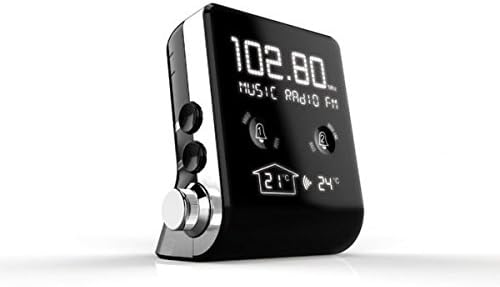
Зображення 1: Фронт view of the THOMSON CT390, showing the LCD display with radio frequency (e.g., 102.80 MHz), 'MUSIC RADIO FM' text, two alarm bell icons, and indoor (21°C) and outdoor (24°C) temperature readings.

Зображення 2: Фронт view of the THOMSON CT390, showing the LCD display with the current time (e.g., 0:20) and date (e.g., SU 01 JAN 2012). This view also shows the alarm icons and temperature readings at the bottom.
4.2 Side and Rear Controls/Ports
The side and rear panels house physical buttons, a rotary knob, and connection ports.

Зображення 3: Збоку і ззаду view of the THOMSON CT390. Visible controls include 'SYNC TIME', 'DIMMER', 'SET', 'MODE' buttons, a 'TUNING/ADJUST' rotary knob, a USB port, and an AUX input jack.
4.3 Зовнішній датчик температури
The unit includes an external sensor for displaying outdoor temperature.
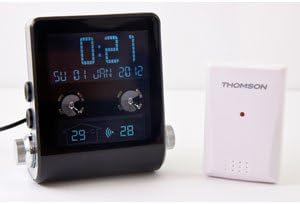
Зображення 4: The THOMSON CT390 unit displayed alongside its compact white external temperature sensor, which wirelessly transmits outdoor temperature data to the main unit.
5. Налаштування
5.1 Підключення живлення
- Connect the power adapter to the DC input jack on the rear of the CT390.
- Plug the power adapter into a standard wall outlet. The unit will power on and the display will illuminate.
5.2 Початкове налаштування часу та дати
The CT390 supports automatic time adjustment via RDS (Radio Data System) when tuned to an FM station that broadcasts time information. Manual setting is also possible.
- Automatic Setting (via RDS): Tune to an FM radio station. If the station broadcasts RDS time, the clock will automatically synchronize.
- Ручне налаштування:
- Press and hold the 'SET' button (refer to Image 3) to enter time setting mode.
- Use the 'TUNING/ADJUST' knob to adjust the hour, then press 'SET' to confirm.
- Повторіть для хвилин, року, місяця та дня.
- Press 'SET' again to exit the setting mode.
5.3 External Temperature Sensor Pairing
The external sensor should automatically pair with the main unit upon power-up. Ensure the sensor is placed in a suitable outdoor location, protected from direct rain and sunlight, for accurate readings.
6. Інструкція з експлуатації
6.1 Відображення часу та дати
The LCD display continuously shows the current time and date. Indoor and outdoor temperatures are also displayed.
6.2 Робота радіо
- Увімкнення/вимкнення живлення: Press the 'MODE' button to switch between radio and other modes.
- Вибір діапазону: In radio mode, press 'MODE' to cycle between FM and MW bands.
- Налаштування: Use the 'TUNING/ADJUST' knob to manually tune to a desired frequency.
- Автоматичне сканування: Press and hold the 'TUNING/ADJUST' knob to automatically scan for the next available station.
- Регулювання гучності: Use the dedicated volume control (if present, otherwise the 'TUNING/ADJUST' knob might double as volume in certain modes).
6.3 Налаштування будильника
The CT390 features two independent alarms (Alarm 1 and Alarm 2) and a weekend function.
- Налаштування будильника:
- Press the Alarm 1 or Alarm 2 touch icon on the front display to activate/deactivate.
- Press and hold the respective alarm icon to enter alarm setting mode.
- Use the 'TUNING/ADJUST' knob to set the alarm time (hour and minute), then press the alarm icon to confirm each step.
- Select the alarm source: Radio, Buzzer, or USB (if a USB device is connected).
- Confirm the alarm settings to exit.
- Функція вихідного дня: Activate the weekend function to disable alarms on Saturdays and Sundays. This option is typically set during the alarm setup process.
- Функція затримки: When an alarm sounds, press the 'SNOOZE' button (often a large button on top or a specific touch area) to temporarily silence the alarm for a few minutes.
- Зупинка будильника: To turn off a sounding alarm, press any button other than 'SNOOZE'. The alarm will reset for the next day.
6.4 Налаштування дисплея
Adjust the display brightness for optimal viewінж.
- Діммер: Press the 'DIMMER' button (refer to Image 3) to cycle through different brightness levels for the LCD display.
6.5 Відтворення з USB та AUX
Connect external audio devices for playback through the CT390's speaker.
- Відтворення через USB: Вставте флешку з MP3 files into the USB port. The unit should automatically switch to USB mode or require selection via the 'MODE' button.
- Вхід AUX: Connect an external audio device (e.g., smartphone, MP3 player) to the AUX input jack using a 3.5mm audio cable. Select AUX mode via the 'MODE' button.
7. Технічне обслуговування
To ensure the longevity and optimal performance of your THOMSON CT390:
- Wipe the unit with a soft, dry, lint-free cloth.
- Не використовуйте абразивні засоби для чищення, віск або розчинники, оскільки вони можуть пошкодити покриття.
- Тримайте пристрій вільним від пилу та сміття.
8. Вирішення проблем
If you encounter issues with your CT390, refer to the following common problems and solutions:
| проблема | Можлива причина | Рішення |
|---|---|---|
| Time is inaccurate or drifts. | No RDS signal; manual setting error; internal clock drift. | Tune to an FM station with RDS. Manually reset the time. Ensure the unit is not subject to frequent power interruptions. |
| Сигналізація не звучить. | Alarm not activated; volume too low; weekend function active. | Ensure the alarm icon is displayed. Increase volume. Check weekend function settings. |
| Поганий прийом радіо. | Слабкий сигнал; антена не висунута; перешкоди. | Extend the FM wire antenna fully. Reposition the unit. Avoid placing near electronic devices that may cause interference. |
| Дисплей занадто тьмяний або занадто яскравий. | Налаштування димеру. | Press the 'DIMMER' button to adjust brightness. |
| Outdoor temperature not displayed. | External sensor not paired or out of range; sensor battery low (if applicable). | Ensure the external sensor is within range of the main unit. Check for any battery compartment on the sensor. |
9. Технічні характеристики
- Бренд: Томсон
- Номер моделі: CT390
- колір: чорний
- матеріал: пластик
- Тип дисплея: Цифровий РК-дисплей
- Радіо діапазони: FM, MW
- Особливості: Calendar, Alarm Function, Integrated Speakers, Indoor/Outdoor Temperature Display, USB Port, AUX Input
- Джерело живлення: AC (Mains Power)
- Вага товару: Приблизно 760 г
- Розміри упаковки: 20.4 х 16.8 х 12.4 см
10. Гарантія та підтримка
For warranty information and customer support, please refer to the documentation provided at the time of purchase or contact your local Thomson service center. Keep your proof of purchase for warranty claims.