
вступ
This manual provides instructions for the setup, operation, and maintenance of your DIRECTV Universal Remote Control, model RC65. This remote is designed to operate your DIRECTV receiver and can be programmed to control other audio/video devices such as televisions and sound systems.
Please read this manual thoroughly before using your remote control to ensure proper functionality and to maximize your viewнабутий досвід.
Продукт закінченийview
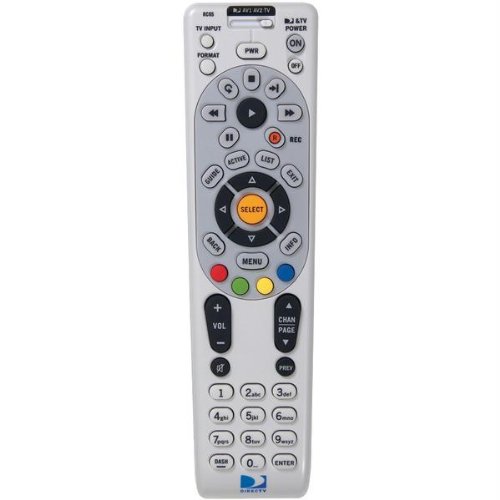
Зображення: спереду view of the DIRECTV Universal Remote Control RC65. This image displays the remote's ergonomic design and the layout of its primary control buttons, including the directional pad, channel and volume controls, and various function keys. The remote is black with white button labels.
The DIRECTV RC65 remote control is a universal remote capable of controlling multiple devices. Its design focuses on ease of use and compatibility with a wide range of audio/video equipment.
Налаштування
1. Встановлення батареї
- Знайдіть батарейний відсік на задній панелі пульта дистанційного керування.
- Press down on the tab and slide the battery cover off.
- Insert two (2) AA batteries, ensuring the positive (+) and negative (-) terminals align with the markings inside the compartment.
- Посуньте кришку батарейного відсіку на місце, доки вона не зафіксується.
Примітка: Батарейки не входять до комплекту пульта дистанційного керування.
2. Програмування для приймача DIRECTV
The remote is typically pre-programmed to operate your DIRECTV receiver. If it does not work, or if you are setting up a new remote, follow these steps:
- Направте пульт дистанційного керування на ваш ресивер DIRECTV.
- Натисніть і утримуйте ВИМКНЕНО і ВИБРАТИ одночасно натискайте кнопки, доки зелений індикатор у верхній частині пульта дистанційного керування не блимне двічі.
- Введіть код 961Зелене світло блимне двічі.
- Натисніть КАНАЛ ВГОРУ кнопка. Зелений індикатор блимне двічі.
- Натисніть ВИБРАТИ кнопка. Зелений індикатор блимне двічі.
- Перевірте пульт дистанційного керування, перемкнувши канали або відрегулювавши гучність.
3. Programming for Other Devices (TV, Audio)
To program the remote to control your television or other audio/video devices, you will need the device's brand code. Refer to the code list provided with your DIRECTV system or search online for "DIRECTV remote codes [your device brand]".
- Turn on the device you wish to program (e.g., your TV).
- Натисніть і утримуйте ВИМКНЕНО і ВИБРАТИ одночасно натискайте кнопки, доки зелений індикатор у верхній частині пульта дистанційного керування не блимне двічі.
- Press the mode button for the device you are programming (e.g., TV для телебачення, AV1 or AV2 for audio/video devices). The green light will flash once.
- Enter the 5-digit code for your device's brand. The green light will flash twice if the code is accepted.
- Направте пульт дистанційного керування на пристрій і натисніть ПОТУЖНІСТЬ кнопка. Якщо пристрій вимикається, програмування пройшло успішно.
- If the device does not turn off, repeat steps 1-5 with another code for your device's brand.
Tip: If you cannot find a code, try the "Code Search" method: After step 3, instead of entering a code, press КАНАЛ ВГОРУ repeatedly until the device turns off, then press ВИБРАТИ.
Інструкція з експлуатації
The DIRECTV RC65 remote control features a standard layout for easy navigation and control of your entertainment system.
- MODE Buttons (DIRECTV, TV, AV1, AV2): Select the device you want to control. Press the corresponding button before issuing commands for that device.
- ПОТУЖНІСТЬ: Вмикає або вимикає вибраний пристрій.
- ЗБІЛЬШЕННЯ/ЗМЕНШЕННЯ ГУЧНОСТІ: Adjusts the volume of the selected audio device (usually TV or AV receiver).
- CHANNEL UP/DOWN: Changes channels on the DIRECTV receiver.
- МУК: Вимкнення або ввімкнення звуку.
- ПОСІБНИК: Displays the DIRECTV program guide.
- МЕНЮ: Accesses the DIRECTV system menu.
- SELECT/OK: Підтверджує вибір або входить до меню.
- ARROW Buttons (UP, DOWN, LEFT, RIGHT): Navigate through menus and guides.
- ЗАПИС: Records the current program on your DIRECTV DVR.
- PLAY, PAUSE, STOP, REW, FF, SKIP: Control playback of recorded content or live TV (with DVR).
- ІНФО: Відображає інформацію про поточну програму.
- ВИХІД: Exits menus or guides.
Note: Specific button functions may vary slightly depending on your DIRECTV receiver model and programmed devices.
Технічне обслуговування
Очищення пульта дистанційного керування
- Використовуйте м’яку, суху тканину для протирання поверхні пульта дистанційного керування.
- Для стійкого бруду злегкаampПротріть тканину водою або м’яким неабразивним засобом для чищення. Не розпилюйте засіб для чищення безпосередньо на пульт дистанційного керування.
- Уникайте використання агресивних хімікатів, розчинників або абразивних губок для чищення, оскільки вони можуть пошкодити покриття пульта дистанційного керування або внутрішні компоненти.
Заміна батареї
Replace batteries when the remote's response becomes sluggish or if the green light at the top does not flash when a button is pressed. Refer to the "Battery Installation" section under Setup for detailed instructions.
- Завжди замінюйте обидва акумулятори одночасно.
- Use new AA alkaline batteries for optimal performance.
- Утилізуйте старі батарейки відповідно до місцевих правил.
Усунення несправностей
Пульт не відповідає
- Перевірте батареї: Переконайтеся, що батарейки правильно вставлені та не розряджені. За потреби замініть їх.
- Пряма видимість: Make sure there are no obstructions between the remote and the device you are trying to control. The remote uses infrared (IR) signals, which require a clear line of sight.
- Правильний режим: Verify that the correct mode button (DIRECTV, TV, AV1, AV2) is pressed for the device you intend to control.
- Скидання дистанційного керування: Remove batteries, press all buttons a few times to discharge any residual power, then reinsert batteries.
Device Not Responding After Programming
- Підтвердити код: Double-check that you entered the correct 5-digit code for your device's brand. Try other codes listed for your brand.
- Пошук коду: Attempt the "Code Search" method described in the "Programming for Other Devices" section.
- Сумісність пристрою: While the remote has an extensive code library, some older or very new devices may not be fully compatible.
Volume/Channel Control Issues
- Блокування гучності: Ensure the volume is not locked to the DIRECTV receiver if you want to control the TV volume. To unlock, press and hold ВИМКНЕНО і ВИБРАТИ until the green light flashes twice, then enter 993. Прес ВИБРАТИ.
- Контроль каналів: Ensure the remote is in DIRECTV mode to change channels on the receiver.
Технічні характеристики
| Особливість | Деталь |
|---|---|
| Бренд | DIRECTV |
| Назва / номер моделі | RC65 |
| Особливість | Універсальний |
| Колір | чорний |
| Сумісні пристрої | Television, DIRECTV Receiver, Audio/Video Devices |
| Технологія підключення | Інфрачервоний (ІЧ) |
| Тип контролера | Кнопкове керування |
| Тип батареї | 2 батарейки типу АА (не входять в комплект) |
| Вага товару | Приблизно 0.52 фунтів |
Інформація про гарантію
This DIRECTV Universal Remote Control (Model RC65) comes with a limited warranty against defects in materials and workmanship under normal use. The warranty period typically covers 90 days from the date of purchase. Please retain your proof of purchase for warranty claims.
This warranty does not cover damage caused by misuse, accident, unauthorized modification, or use with non-DIRECTV approved accessories. For specific warranty terms and conditions, please refer to the documentation included with your DIRECTV system or visit the official DIRECTV support webсайт.
Підтримка клієнтів
If you require further assistance with your DIRECTV Universal Remote Control, please contact DIRECTV customer support:
- Інтернет-підтримка: Відвідайте офіційну службу підтримки DIRECTV website for FAQs, troubleshooting guides, and programming code lists.
- Підтримка по телефону: Refer to your DIRECTV service agreement or bill for the most current customer service phone number.
When contacting support, please have your DIRECTV account information and the remote control model number (RC65) ready.