
1. Вступ
Thank you for choosing the HMF FS-20A Electronic Biometric Safe. This safe is designed to provide secure storage for your valuables using advanced fingerprint recognition technology and a robust electronic locking system. Please read this manual carefully before operating the safe to ensure proper use, optimal performance, and safety.
Збережіть цей посібник для подальшого використання.
2. Техніка безпеки
- Аварійні ключі: Always keep the emergency override keys in a secure location, separate from the safe itself. Never store them inside the safe.
- Безпека батареї: Use only the specified type and size of batteries. Do not mix old and new batteries, or different types of batteries. Remove batteries if the safe will not be used for an extended period.
- Розміщення: Ensure the safe is installed on a stable surface or securely mounted to a wall as instructed.
- діти: Зберігайте сейф та ключі від нього у недоступному для дітей місці.
- вологість: Avoid placing the safe in areas with high humidity or direct exposure to water.
3. Вміст упаковки
Будь ласка, перевірте вміст упаковки, щоб переконатися, що всі елементи присутні:
- HMF FS-20A Electronic Biometric Safe
- Клавіші аварійного відключення (2x)
- Зовнішній акумуляторний блок
- Батарейки типу АА (4 шт.)
- Mounting Bolts (2x)
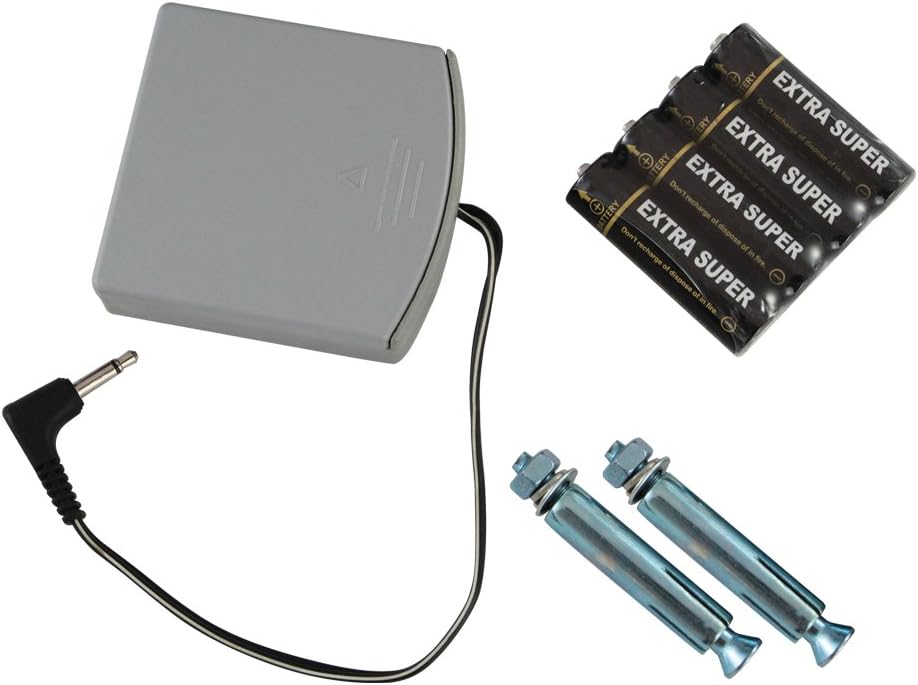
малюнок 3.1: Included accessories for the HMF FS-20A safe, featuring an external battery box, four AA batteries, and two mounting bolts for installation.
4. Налаштування
4.1 Початкове відкриття
Upon receiving your safe, it will be in a locked state. To open it for the first time:
- Locate the emergency keyhole, usually concealed behind a cover on the front panel.
- Вставте один із наданих аварійних ключів у замкову щілину та поверніть його за годинниковою стрілкою.
- Тримаючи ключ повернутим, поверніть ручку, щоб відкрити дверцята сейфа.

малюнок 4.1: The HMF FS-20A safe with its door open, revealing the internal compartment and the electronic biometric locking system on the door panel.
4.2 Встановлення батареї
The safe requires 4 AA batteries for its electronic system. The battery compartment is typically located on the inside of the safe door.
- Open the safe door using the emergency key (if not already open).
- Знайдіть кришку відсіку для батарейок на внутрішній стороні дверцят.
- Remove the cover and insert 4 AA batteries, ensuring correct polarity (+/-).
- Замініть кришку батарейного відсіку.
- You should hear a beep, indicating the safe is powered on.
4.3 Монтаж сейфа
The HMF FS-20A safe can be securely mounted to a wall or floor. This provides additional security against theft. Mounting hardware is included.
- Виберіть відповідне місце для монтажу. Переконайтеся, що поверхня достатньо міцна, щоб витримати вагу сейфа та його вміст.
- Open the safe door. Locate the pre-drilled mounting holes on the back or bottom of the safe.
- Position the safe and mark the drilling points on the wall or floor through the mounting holes.
- Drill pilot holes at the marked locations using an appropriate drill bit for your wall/floor material.
- Align the safe with the drilled holes and secure it using the provided mounting bolts. Tighten firmly.

малюнок 4.2: Rear panel of the HMF FS-20A safe, illustrating the two pre-drilled holes designed for secure mounting to a wall or floor surface.
5. Інструкція з експлуатації
5.1 Реєстрація відбитків пальців
The safe allows you to register multiple fingerprints for convenient access. Refer to your specific model's internal instructions for the exact programming button location (often a small button inside the safe door near the battery compartment).
- With the safe door open, press the internal programming button (usually a red or green button). The indicator light on the fingerprint scanner will illuminate.
- Place the pad of the finger you wish to register firmly on the fingerprint scanner.
- Lift your finger and repeat the scan approximately 3-5 times, slightly adjusting the angle each time, until the safe confirms successful registration (e.g., a long beep or green light).
- To register additional fingerprints, repeat steps 1-3 for each finger.
- Test all registered fingerprints before closing the safe door.

малюнок 5.1: A user's finger positioned on the biometric sensor of the HMF FS-20A safe, demonstrating the interaction point for fingerprint recognition.
5.2 Відкриття за допомогою відбитка пальця
To open the safe using a registered fingerprint:
- Place a registered finger firmly and completely on the fingerprint scanner.
- If the fingerprint is recognized, the indicator light will turn green, and you will hear a beep. The lock mechanism will disengage.
- Within a few seconds, rotate the handle clockwise to open the safe door.
- If the fingerprint is not recognized, the indicator light may turn red, and you will hear an error beep. Try again, ensuring your finger is clean and properly positioned.
5.3 Відкриття аварійним ключем
In case of battery failure, forgotten fingerprints, or electronic malfunction, the safe can be opened using the emergency override key:
- Locate the emergency keyhole cover on the front panel and remove it.
- Insert the emergency key into the keyhole and turn it clockwise.
- Тримаючи ключ повернутим, поверніть ручку, щоб відкрити дверцята сейфа.
- Once open, you can replace the batteries if needed.
6. Технічне обслуговування
6.1 Заміна батареї
When the batteries are low, the safe will typically indicate this with a warning light or a series of beeps during operation. Replace all 4 AA batteries promptly to ensure continuous functionality.
- Відкрийте двері сейфа.
- Зніміть кришку батарейного відсіку.
- Вийміть старі батареї та утилізуйте їх відповідально.
- Вставте 4 нових батарейок типу АА, дотримуючись правильної полярності.
- Замініть кришку батарейного відсіку.
Using the External Battery Box: If the internal batteries are completely depleted and you cannot open the safe with your fingerprint, connect the external battery box to the emergency power port on the safe's front panel. This will provide temporary power to open the safe, allowing you to replace the internal batteries.
6.2 Очищення
Щоб зберегти зовнішній вигляд та функціональність вашого сейфа:
- Протріть зовнішню поверхню м’якою, damp тканиною. Уникайте абразивних засобів для чищення або розчинників.
- Gently clean the fingerprint scanner surface with a soft, lint-free cloth to ensure optimal recognition.
7. Вирішення проблем
| проблема | Можлива причина | Рішення |
|---|---|---|
| Сейф не відкривається відбитком пальця. | Fingerprint not registered, finger dirty/wet, incorrect placement, low batteries. | Ensure finger is clean and dry. Reposition finger firmly on scanner. Re-register fingerprint if necessary. Replace batteries. Use emergency key. |
| No power/Safe is unresponsive. | Розряджені або неправильно встановлені батареї. | Replace all 4 AA batteries, ensuring correct polarity. Use the external battery box for temporary power. |
| Двері не зачиняються належним чином. | Obstruction in the door frame, locking bolts misaligned. | Check for any objects blocking the door. Ensure the safe is on a level surface or securely mounted. |
| Аварійний ключ не працює. | Key not fully inserted, wrong key, lock mechanism jammed. | Ensure the key is fully inserted and turned correctly. Do not force the key. Contact customer support if issues persist. |
8. Технічні характеристики
| Особливість | Деталь |
|---|---|
| Модель | FS-20A (Manufacturer ID: 49121) |
| Розміри (В x Ш x Г) | прибл. 19.99 см х 30.99 см х 19.99 см |
| вага | прибл. 7.02 кг |
| матеріал | легована сталь |
| Тип замка | Electronic Biometric (Fingerprint) with Emergency Key Override |
| Джерело живлення | 4 батарейок типу АА (в комплекті) |
| Тип монтажу | Wall Mountable (mounting hardware included) |
| Особливості | Portable design, External Battery Box for emergency power |
9. Гарантія та підтримка
HMF products are manufactured to high-quality standards. For warranty information or technical support, please refer to the documentation provided with your purchase or visit the official HMF webсайт. Зберігайте чек про покупку для будь-яких гарантійних претензій.
If you encounter issues not covered in this manual, please contact HMF customer service for assistance.