
1. Вступ
This manual provides comprehensive instructions for the Adesso AKB-132UY Luminous Large Print Multimedia Desktop USB Keyboard. This keyboard is designed with large, high-contrast keys to enhance readability, particularly for users with visual impairments. It also integrates multimedia controls for convenience.

Figure 1: Adesso AKB-132UY Luminous Large Print Multimedia Desktop USB Keyboard. This image displays the full keyboard with its black frame and bright yellow keys, featuring large black characters.
2. Вміст упаковки
Перевірте наявність усіх елементів в упаковці:
- Adesso EasyTouch 132 - Florescent Yellow Multimedia Desktop Keyboard
- Короткий посібник
3. Інструкції з налаштування
3.1 Підключення клавіатури
- Знайдіть вільний порт USB на комп’ютері.
- Plug the USB connector of the Adesso AKB-132UY keyboard into the USB port.
- Операційна система автоматично виявить та встановить необхідні драйвери. Зазвичай не потрібно встановлювати додаткове програмне забезпечення.
The keyboard is powered via the USB connection.
4. Робота з клавіатурою
4.1 Основні характеристики
- Fluorescent 4X Large Print Keys: The keyboard features black characters printed in a large 4X size on bright fluorescent yellow keys. This design provides high contrast for improved visibility and readability, particularly beneficial for users with visual impairments.

Малюнок 2: Збільшений план view of the keyboard's QWERTY section, highlighting the large black characters on fluorescent yellow keys.
- Елементи керування мультимедіа: Dedicated hotkeys allow for one-touch control of media functions. These include:
- Медіаплеєр
- Зменшення гучності
- Збільшення гучності
- Вимкнути звук
- Відтворення/Пауза
- Попередній трек
- Наступний трек
- СТІЙ

Малюнок 3: Збільшений план view of the numeric keypad and dedicated multimedia control keys located on the upper right side of the keyboard.
- Windows One-Touch Controls: Access common Windows applications directly with dedicated hotkeys:
- Мій комп'ютер
- Пошук
- Калькулятор
- Пошта
- Home (Browser)
- Favorites (Browser)
- Quiet Membrane Key Switches: The keyboard utilizes membrane key switches designed to provide a responsive and quiet typing experience. These switches are rated for a lifespan of up to five million keystrokes.
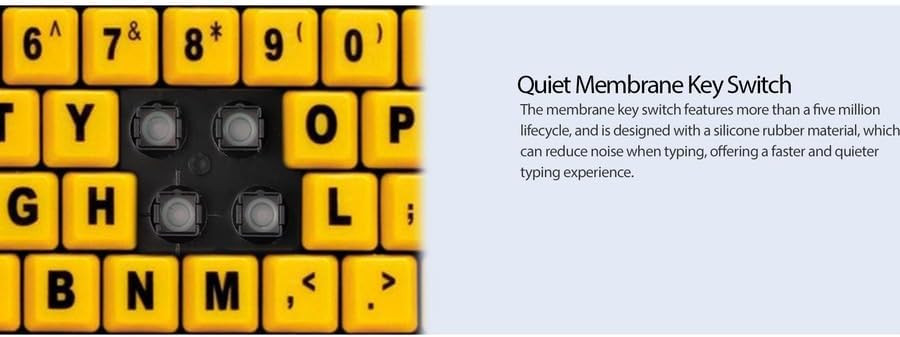
Малюнок 4: Детально view showing the internal membrane key switch mechanism beneath a keycap.
- 104-Key US Layout: The keyboard features a standard 104-key US layout, providing a familiar typing experience.
5. Технічне обслуговування
5.1 Очищення клавіатури
Щоб зберегти зовнішній вигляд та функціональність клавіатури:
- Від’єднайте клавіатуру від комп’ютера перед чищенням.
- Використовуйте м’який, злегка damp cloth to wipe the surface of the keys and the keyboard body.
- For stubborn dirt or debris between keys, use compressed air or a soft brush.
- Avoid using harsh chemicals, abrasive cleaners, or excessive moisture, as these can damage the keyboard's finish or internal components.
6. Вирішення проблем
If you encounter issues with your Adesso AKB-132UY keyboard, refer to the following troubleshooting steps:
6.1 Клавіатура не реагує
- Перевірте підключення USB: Ensure the keyboard's USB cable is securely plugged into a functioning USB port on your computer. Try unplugging and re-plugging the cable.
- Спробуйте інший USB-порт: Connect the keyboard to another USB port on your computer to rule out a faulty port.
- Перезавантажте комп'ютер: Іноді просте перезавантаження системи може вирішити проблеми з підключенням.
- Тест на іншому комп'ютері: If possible, test the keyboard on a different computer to determine if the issue is with the keyboard or your computer's setup.
6.2 Keys Sticking or Not Registering
- Чистота під клавішами: Dust, crumbs, or debris can get lodged under keys. Use compressed air to clear any obstructions.
- Уникайте розливів: Liquid spills can cause keys to stick or malfunction. If a spill occurs, disconnect the keyboard immediately and allow it to dry completely before reconnecting.
7. Технічні характеристики
| Особливість | опис |
|---|---|
| Бренд | Adesso |
| Номер моделі | АКБ-132УЙ |
| Назва моделі | EasyTouch 132 |
| Технологія підключення | USB |
| Опис клавіатури | Мембрана |
| Особливість | Large Print Keys |
| Колір | Чорний Жовтий |
| матеріал | пластик |
| Кількість клавіш | 104 |
| Розкладка клавіатури | QWERTY (розкладка США) |
| Джерело живлення | USB живлення |
| Вага товару | 1.5 фунта |
| Сумісні пристрої | PC |
8. Інформація про гарантію
The Adesso AKB-132UY keyboard comes with a 1 рік обмеженої гарантії from the date of purchase. This warranty covers defects in materials and workmanship under normal use. For specific terms and conditions, please refer to the warranty card included in your package or visit the official Adesso webсайт.
9. Підтримка
For technical support, product registration, or additional information, please visit the official Adesso webсайт за адресою www.adesso.com. You may also find FAQs and driver downloads on their support pages.