
вступ
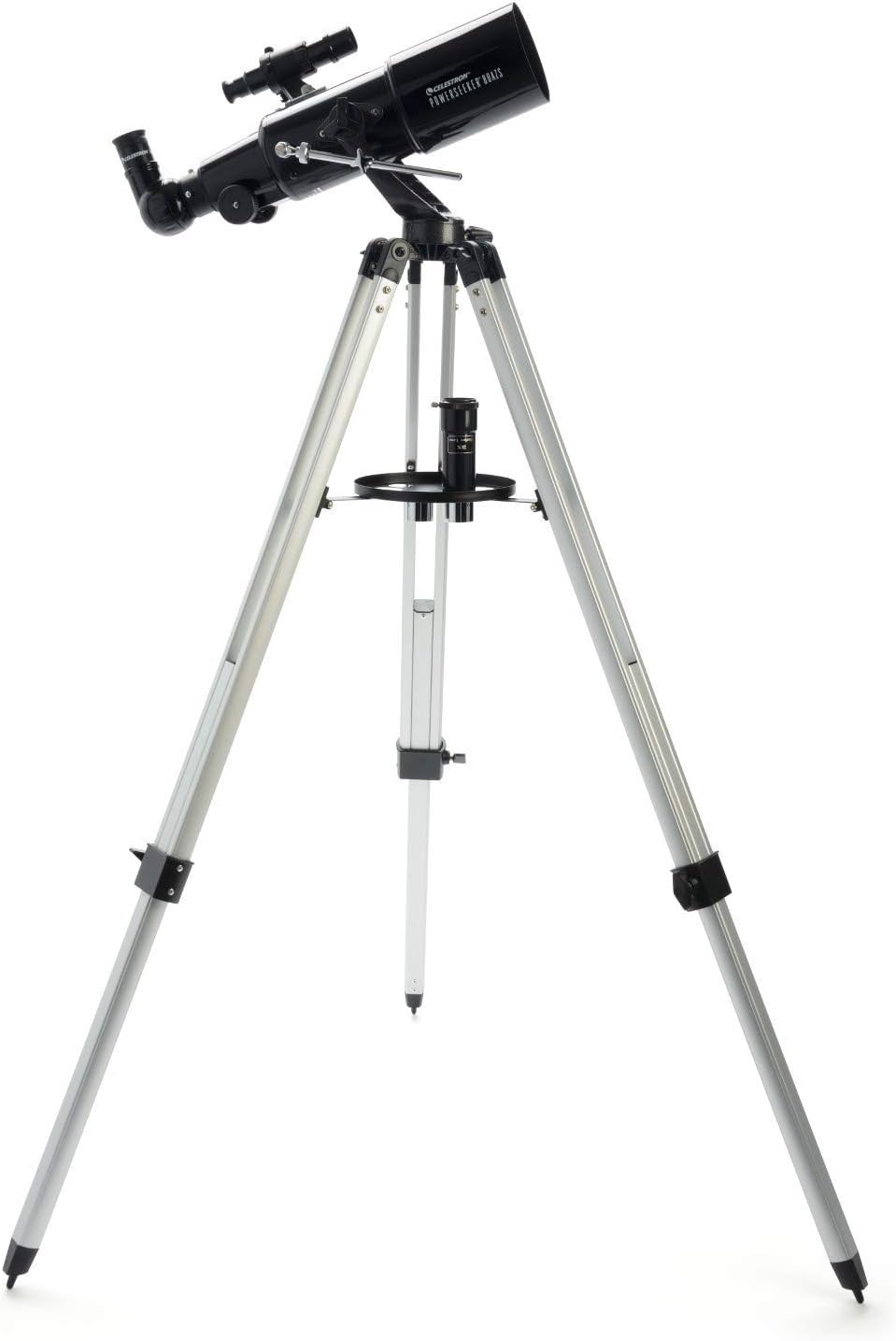
The Celestron PowerSeeker 80AZS is a powerful and user-friendly refractor telescope designed for amateur astronomers and beginners. This manual provides essential information for assembling, operating, and maintaining your telescope to ensure optimal viewing experiences of celestial objects like the Moon, planets, and distant galaxies, as well as terrestrial observations.
The PowerSeeker series combines quality, value, and user-friendly features, making it an excellent choice for exploring the night sky.
Що в коробці
- Celestron PowerSeeker 80AZS Telescope Optical Tube
- Full-Height Aluminum Tripod with Accessory Tray
- Окуляр 20 мм
- Окуляр 4 мм
- 3x лінза Барлоу
- Діагональ прямого зображення
- Область пошуку
- BONUS Starry Night Basic Edition Astronomy Software (downloadable)
Налаштування
Assembling your Celestron PowerSeeker 80AZS telescope is straightforward. Follow these steps to get started:
- Зберіть штатив: Extend the tripod legs to your desired height and secure them. Attach the accessory tray to the center brace of the tripod.
- Прикріпіть оптичну трубку: Place the telescope optical tube onto the alt-azimuth mount on the tripod. Secure it using the provided screws.
- Встановіть Finder Scope: Attach the finder scope to the optical tube using the small screws on the side. This low-powered scope helps in locating objects before viewпропускаючи їх через головний телескоп.
- Insert the Erect Image Diagonal: Insert the erect image diagonal into the focuser of the telescope. This accessory ensures that images appear correctly oriented, which is useful for terrestrial viewінж.
- Вставте окуляр: Choose either the 20mm or 4mm eyepiece and insert it into the diagonal. The 20mm eyepiece provides a wider field of view, while the 4mm eyepiece offers higher magnification. For even greater magnification, you can insert the 3x Barlow lens between the diagonal and the eyepiece.


Відеоінструкція з налаштування
Video 1: Official Celestron guide to setting up PowerSeeker AZ Telescopes, demonstrating assembly and key features.
Керування телескопом
Once assembled, your PowerSeeker 80AZS is ready for observation. Here’s how to operate it:
- Align the Finder Scope: Before observing, align the finder scope with the main telescope. Point the main telescope at a distant, easily identifiable object (e.g., a tree during the day). Look through the finder scope and adjust its screws until the object is centered in its crosshairs.
- Знайдіть об'єкт: Use the finder scope to locate the celestial or terrestrial object you wish to observe. Center the object in the finder scope's crosshairs.
- Observe through the Eyepiece: Look through the main telescope's eyepiece. Use the focuser knobs to bring the image into sharp focus.
- Налаштувати збільшення: Experiment with different eyepieces (20mm for wide views, 4mm for high magnification) and the 3x Barlow lens to achieve your desired level of detail.
- Tracking Objects: The manual alt-azimuth mount allows for smooth movement up/down and left/right. Use the slow-motion altitude rod to make fine adjustments and track objects as they move across the sky.

Відеоінструкція з експлуатації
Video 2: A complete guide to the Celestron PowerSeeker AZS, including setup and operational tips for optimal viewінж.
Технічне обслуговування
Proper maintenance will extend the life and performance of your telescope:
- Очищення оптики: Use a soft, lint-free cloth or a specialized optical cleaning solution to clean lenses. Avoid touching optical surfaces with bare hands.
- Захист від пилу: Always keep dust caps on the telescope when not in use.
- Зберігання: Store the telescope in a dry, dust-free environment. If disassembling for storage, ensure all components are clean and protected.
- Механічні частини: Periodically check all screws and knobs for tightness. Do not overtighten.
Усунення несправностей
If you encounter issues with your telescope, consider these common solutions:
- Розмиті зображення: Ensure the focuser is properly adjusted. Check if the eyepiece is securely seated. Atmospheric conditions can also affect image clarity.
- Difficulty Locating Objects: Verify that the finder scope is correctly aligned with the main telescope. Start with the lowest magnification eyepiece (20mm) for a wider field of view.
- Нестабільний View: Ensure the tripod legs are fully extended and locked, and the accessory tray is securely in place to provide stability. Avoid observing on windy days.
- Без зображення: Check that all lens caps (front of the telescope, eyepiece, diagonal) are removed.
Технічні характеристики
| Особливість | Деталь |
|---|---|
| Бренд | Celestron |
| Назва моделі | Телескоп PowerSeeker 80AZS |
| Довжина оптичної трубки | 41 дюймів |
| Діаметр лінзи об'єктива | 80 міліметрів |
| Опис кріплення телескопа | Альтазимутна гора |
| Розміри продукту | 40" Г x 19" Ш x 55" В |
| Тип фокусування | Ручне фокусування |
| шукач | рефлекс |
| Покриття | Повністю покритий |
| Опис фокусної відстані | 15.748 дюймів |
| Вага товару | 10 фунта |
Гарантія та підтримка
Your Celestron PowerSeeker 80AZS Telescope comes with a 2-Year US Warranty, ensuring peace of mind for your purchase. Celestron, a leading telescope brand since 1960, also provides unlimited access to technical support from their team of US-based experts.
For any questions or assistance, please refer to the contact information provided in your product documentation or visit the official Celestron webсайт.