
вступ
This manual provides instructions for the Rocketek RT-CR3A USB 3.0 Memory Card Reader/Writer. This device facilitates high-speed data transfer between various memory card types and your computer via a USB 3.0 interface.
Особливості продукту
- Two media slots: one for standard SD/MMC cards and one for Micro SD cards.
- Supports SDXC up to 2TB, SDHC, SD, MMC, RS-MMC, Micro SDXC, Micro SD, Micro SDHC card, and UHS-I cards.
- Built-in card cover design for secure storage of inserted cards.
- Plug and play functionality; supports hot swapping.
- USB powered (no external power or battery required).
- Super speed USB 3.0, backward compatible with USB 2.0/1.1.
- Automatic memory card detection.
- LED status indicator: solid when connected, flashing during data transfer.

Image: The Rocketek RT-CR3A card reader showing its compact design and a blue LED indicator when connected.
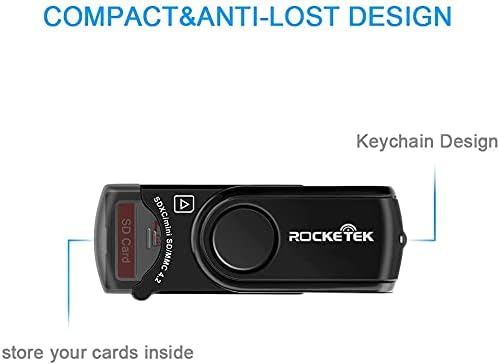
Image: The Rocketek RT-CR3A card reader illustrating its 360-degree rotatable protective cover for the USB connector.
Налаштування
- Підключення до комп'ютера: Insert the USB 3.0 connector of the RT-CR3A into an available USB port on your computer. For optimal performance, use a USB 3.0 port. The device is backward compatible with USB 2.0 and 1.1 ports.
- Встановлення драйвера: The device is plug-and-play and typically does not require additional driver installation on most operating systems (Windows, Mac OS). Your computer should automatically detect and configure the device.
- Світлодіодний індикатор: A blue LED light will illuminate when the device is successfully connected and powered.

Image: The Rocketek RT-CR3A card reader connected to a laptop, demonstrating its use for high-speed data transfer.
Інструкція з експлуатації
Вставлення карти пам'яті
The RT-CR3A features two card slots: one for standard SD/MMC cards and one for Micro SD cards.
- For SD/MMC Cards: Open the built-in card cover. Gently insert your SD, SDHC, SDXC, MMC, or RS-MMC card into the larger slot with the contacts facing down until it clicks into place. Close the cover for secure storage.
- For Micro SD Cards: Gently insert your Micro SD, Micro SDHC, or Micro SDXC card into the smaller slot with the contacts facing down until it clicks into place.
The LED indicator will flash when data is being accessed or transferred.
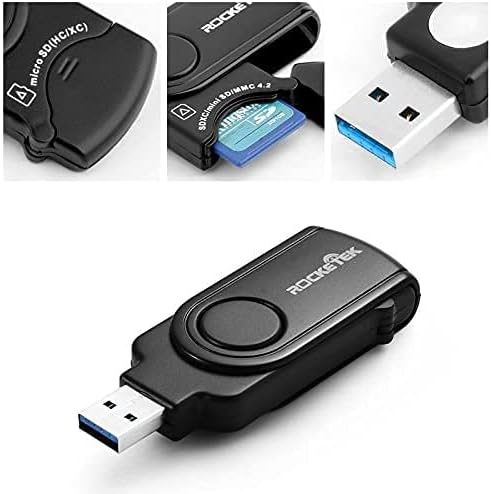
Зображення: Крупний план view of the Rocketek RT-CR3A, illustrating an SD card partially inserted into its slot with the protective cover open.
Передача даних
Once a memory card is inserted and detected, it will appear as a removable drive in your computer's file explorer. You can then drag and drop files, copy, paste, or cut data between your computer and the memory card.
Note: While the device has two slots, it may only read one card at a time. If both are inserted, remove one and reinsert the device if only one card is detected.
Підтримувані типи карток
The Rocketek RT-CR3A supports a wide range of memory card formats:
- SD Card (Secure Digital)
- SDHC (Secure Digital High Capacity)
- SDXC (Secure Digital eXtended Capacity) up to 2TB
- UHS-I SD cards
- MMC (MultiMediaCard)
- RS-MMC (Reduced Size MultiMediaCard)
- Карта Micro SD
- Micro SDHC
- Картка Micro SDXC
- Mini SD (requires an adapter, not included)
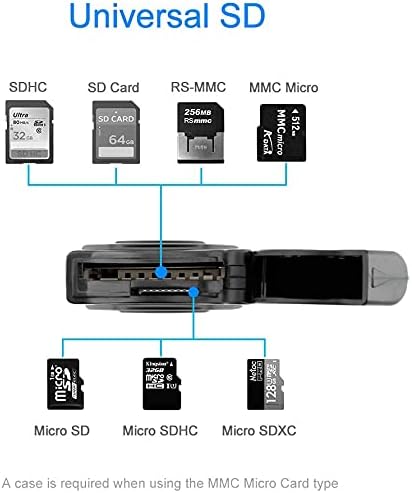
Image: A visual representation of the different types of SD and Micro SD cards compatible with the Rocketek RT-CR3A card reader.
Технічне обслуговування
- Прибирання: Використовуйте м’яку суху тканину для очищення зовнішньої частини пристрою. Уникайте використання рідких засобів для чищення або розчинників.
- Зберігання: When not in use, keep the card reader in a clean, dry place. Utilize the built-in card cover to protect inserted cards and the USB connector.
- Обробка: Уникайте падіння пристрою або впливу екстремальних температур чи вологи.

Image: The Rocketek RT-CR3A highlighting its compact and anti-lost design, including a keychain loop for portability.
Усунення несправностей
Пристрій не виявлено
- Ensure the card reader is fully inserted into a functional USB port.
- Спробуйте інший порт USB на комп’ютері.
- If using a USB hub, try connecting the reader directly to the computer.
- Перезавантажте комп'ютер.
Memory Card Not Detected
- Ensure the memory card is correctly inserted into the appropriate slot with contacts facing down.
- Спробуйте вийняти та знову вставити карту пам’яті.
- Test the memory card in another device to confirm it is functional.
- If multiple cards are inserted, remove one and reinsert the card reader into the USB port.
Повільна передача даних
- Ensure the card reader is connected to a USB 3.0 port on your computer for optimal speed. USB 2.0/1.1 ports will result in slower transfer rates.
- The speed of data transfer also depends on the speed class of your memory card.
Технічні характеристики
| Особливість | Специфікація |
|---|---|
| Модель | RT-CR3A |
| Інтерфейс | USB 3.0 (зворотно сумісний з USB 2.0/1.1) |
| Підтримувані типи карток | SD, SDHC, SDXC, UHS-I, MMC, RS-MMC, Micro SD, Micro SDHC, Micro SDXC |
| Максимальна місткість | SDXC up to 2TB |
| Операційна система | Mac OS, Windows |
| Розміри (ДxШxВ) | 4.72 x 2.56 x 0.71 дюйма (приблизно 120 x 65 x 18 мм) |
| Вага товару | 1.44 унції (приблизно 40.8 грамів) |
| Особливості | Plug & Play, Built-in Card Cover, LED Status Indicator |

Image: A diagram illustrating the physical dimensions of the Rocketek RT-CR3A card reader.
Гарантія та підтримка
Rocketek provides a 24-month manufacturer's warranty for this product.
For technical support or warranty claims, please contact Rocketek customer service. Refer to the product packaging or the official Rocketek webсайт для контактної інформації.
Free lifetime technical support is also available.
Інформація про безпеку
- Не намагайтеся розібрати чи модифікувати пристрій.
- Зберігати в недоступному для дітей місці.
- Уникайте контакту з водою чи іншими рідинами.
- Dispose of the device responsibly according to local electronic waste regulations.