
1. Продукт закінчивсяview
The Monoprice Stage and Studio Patch Cable (Model 601297) is an 8-channel audio snake cable designed for connecting professional audio equipment. It features 1/4-inch TRS male connectors on one end and XLR male connectors on the other, allowing for versatile connections between devices with different jack types. Each channel is color-coded for easy identification and setup.

Image 1: Monoprice 8-channel Stage and Studio Patch Cable, coiled, displaying both 1/4-inch TRS and XLR male connectors.
2. Ключові характеристики
- 8-канальний дизайн: Connects up to eight individual audio signals.
- Connector Versatility: Features 1/4-inch TRS male plugs on one end and XLR male plugs on the other.
- Кольорове кодування проводів: Each of the eight lines is color-coded (red, white, green, yellow, black, blue, gray, brown) for easy channel identification.
- Високоякісні провідники: Constructed with 26 AWG conductors for reliable signal transmission.
- Aluminum Foil Shielding: Provides protection against electromagnetic (EM) and radio frequency (RF) interference, ensuring clear audio.
- Balanced/Unbalanced Support: Supports both balanced mono and unbalanced stereo lines.
3. Інструкції з налаштування
This cable is designed for straightforward connection between audio devices. Follow these steps for proper setup:
- Визначте сполучники: Locate the 1/4-inch TRS male plugs and the XLR male plugs on the cable.
- Connect TRS Ends: Insert the 1/4-inch TRS male plugs into the corresponding 1/4-inch TRS input/output jacks on your equipment (e.g., audio interface, mixer, patch bay). Ensure each color-coded cable matches the intended channel.
- Connect XLR Ends: Insert the XLR male plugs into the corresponding XLR input/output jacks on your other audio equipment (e.g., microphones, preamps, powered speakers). Again, match the color-coded cables to maintain channel integrity.
- Безпечні з'єднання: Ensure all connections are firm and fully seated to prevent signal loss or intermittent audio.
- Управління кабелем: Route the cable neatly to avoid tripping hazards and reduce strain on the connectors.
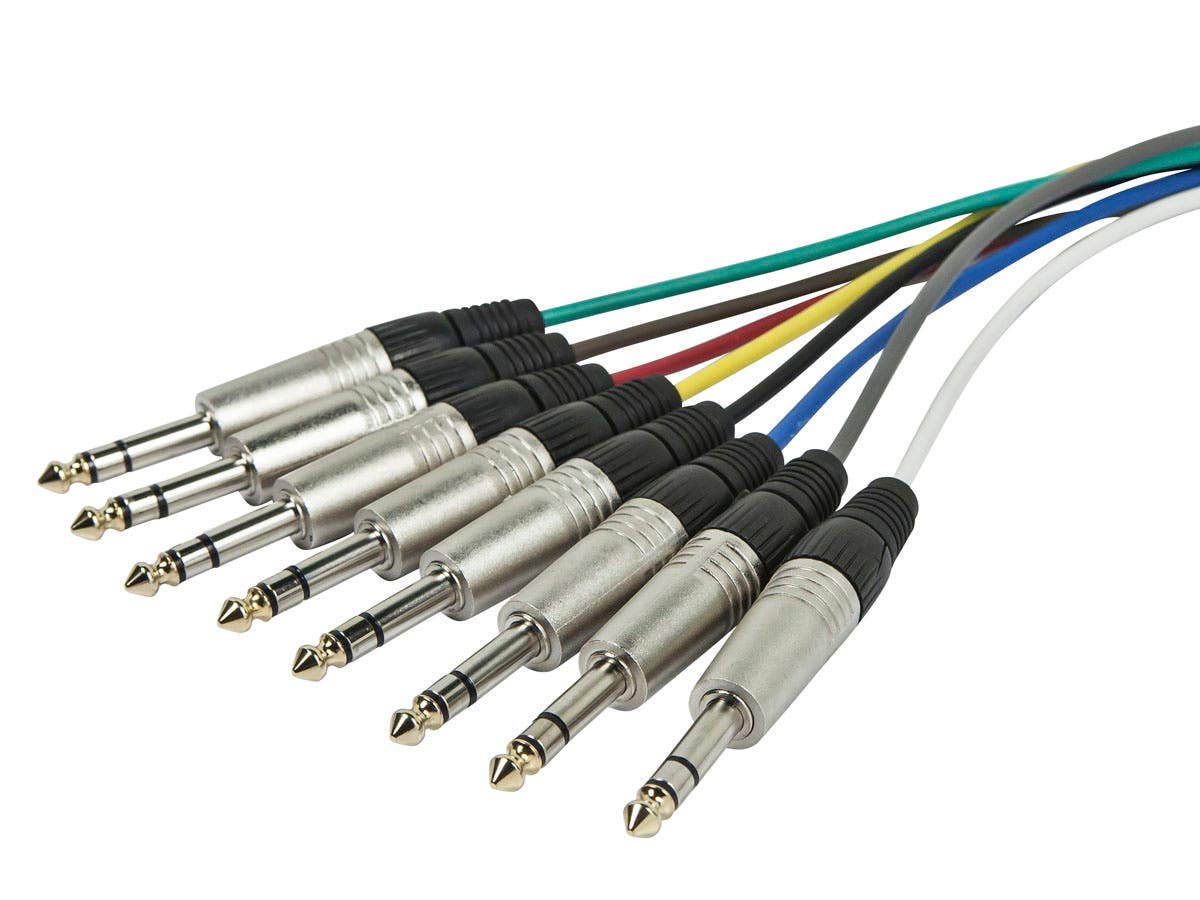
Зображення 2: Детальний опис view of the 1/4-inch TRS male connectors, showing their individual color-coded cables.

Зображення 3: Детальний опис view of the XLR male connectors, each connected to a color-coded cable.
4. Інструкція з експлуатації
Once the cable is properly connected, it facilitates the transmission of audio signals between your devices. This cable is suitable for various professional audio applications:
- Audio Recording Sessions: Connect microphones, instruments, or other audio sources to recording interfaces or mixers.
- Живий Сtage Performances: Route multiple audio signals from stage equipment to a front-of-house mixer.
- Studio Production Work: Integrate various studio components, such as preamps, compressors, and effects units.
The aluminum foil shielding helps maintain signal integrity by protecting against external interference, which is crucial in environments with multiple electronic devices.
5. Технічне обслуговування
Proper care and maintenance will extend the life of your Monoprice Stage and Studio Patch Cable:
- Зберігання: When not in use, coil the cable loosely. Avoid tight coiling or sharp bends, which can damage the internal conductors and shielding.
- Прибирання: Keep connectors free of dust and debris. Use a dry, lint-free cloth to wipe down the cable and connectors. Avoid using liquid cleaners directly on the connectors.
- Огляд: Periodically inspect the cable for any signs of wear, cuts, or damage to the jacket or connectors.
- Умови навколишнього середовища: This cable is suitable for both indoor and outdoor use. However, avoid prolonged exposure to extreme temperatures or moisture.
6. Вирішення проблем
If you encounter issues with your patch cable, consider the following troubleshooting steps:
- Немає сигналу:
- Ensure all connectors are fully seated in their respective jacks.
- Перевірте, чи на вашому аудіообладнанні вибрано правильні вхідні/вихідні канали.
- Test the cable with different equipment or use a known working cable to isolate the issue.
- Періодичний сигнал:
- Перевірте наявність нещільних з'єднань на обох кінцях кабелю.
- Inspect the cable for any visible damage or kinks that might be causing internal breaks.
- Гул або шум:
- Переконайтеся, що кабель не проходить паралельно з силовими кабелями або іншими джерелами електромагнітних перешкод.
- Verify that all equipment in the signal chain is properly grounded.
- Confirm that you are using balanced connections where appropriate, as TRS and XLR connectors support balanced signals which are less susceptible to noise.
7. Технічні характеристики
| Особливість | Деталь |
|---|---|
| Бренд | Моноціна |
| Номер моделі | 601297 |
| Назва типу елемента | Stage And Studio Patch Cable |
| Довжина кабелю | 10 футів |
| Кількість каналів | 8 |
| Connector Type (End 1) | 1/4-inch TRS Male |
| Connector Type (End 2) | Мужчина XLR |
| Стать з'єднувача | Від чоловіка до чоловіка |
| Дротяний датчик | 26 AWG |
| Екранування | Алюмінієва фольга |
| Рекомендоване використання | Audio recording sessions, live stage performances, studio production work |
| Використання в приміщенні/зовні | В приміщенні, на відкритому повітрі |
| Вага товару | 2.7 фунта |
8. Гарантія та підтримка
Monoprice offers a Довічна гарантія on all cables, including this Stage and Studio Patch Cable. This warranty ensures that Monoprice stands behind the quality and durability of its products.
For technical support, warranty claims, or further assistance, please visit the official Monoprice webсайт або зверніться безпосередньо до їхнього відділу обслуговування клієнтів. Зверніться до документації щодо придбання, щоб отримати конкретну контактну інформацію.