
1. Вступ
This manual provides instructions for the setup, operation, and maintenance of your Uniden AS7412 Corded Phone. Please read this manual thoroughly before using your new phone.
The Uniden AS7412 is a corded telephone featuring a large LCD display and a speakerphone function, designed for clear communication and ease of use.
2. Продукт закінчивсяview
Ключові характеристики:
- FSK/DTMF Caller ID Display
- Large LCD Display with Clock and Call Timer
- Функція гучного зв'язку
- Pre-Dial Function and Last Number Redial
- Функція захисту від крадіжки
- Memory for 50 Incoming Calls and 15 Outgoing Calls
- 8 One-Touch Memory and 10 Two-Touch Memory Functions
- IDD Code and PABX Dial Out Code Setting
- Adjustable LCD Contrast
- Музика на утриманні
- Adjustable Flash Timing (90/95/100/120/180/300/600/1000mS)
Phone Components:
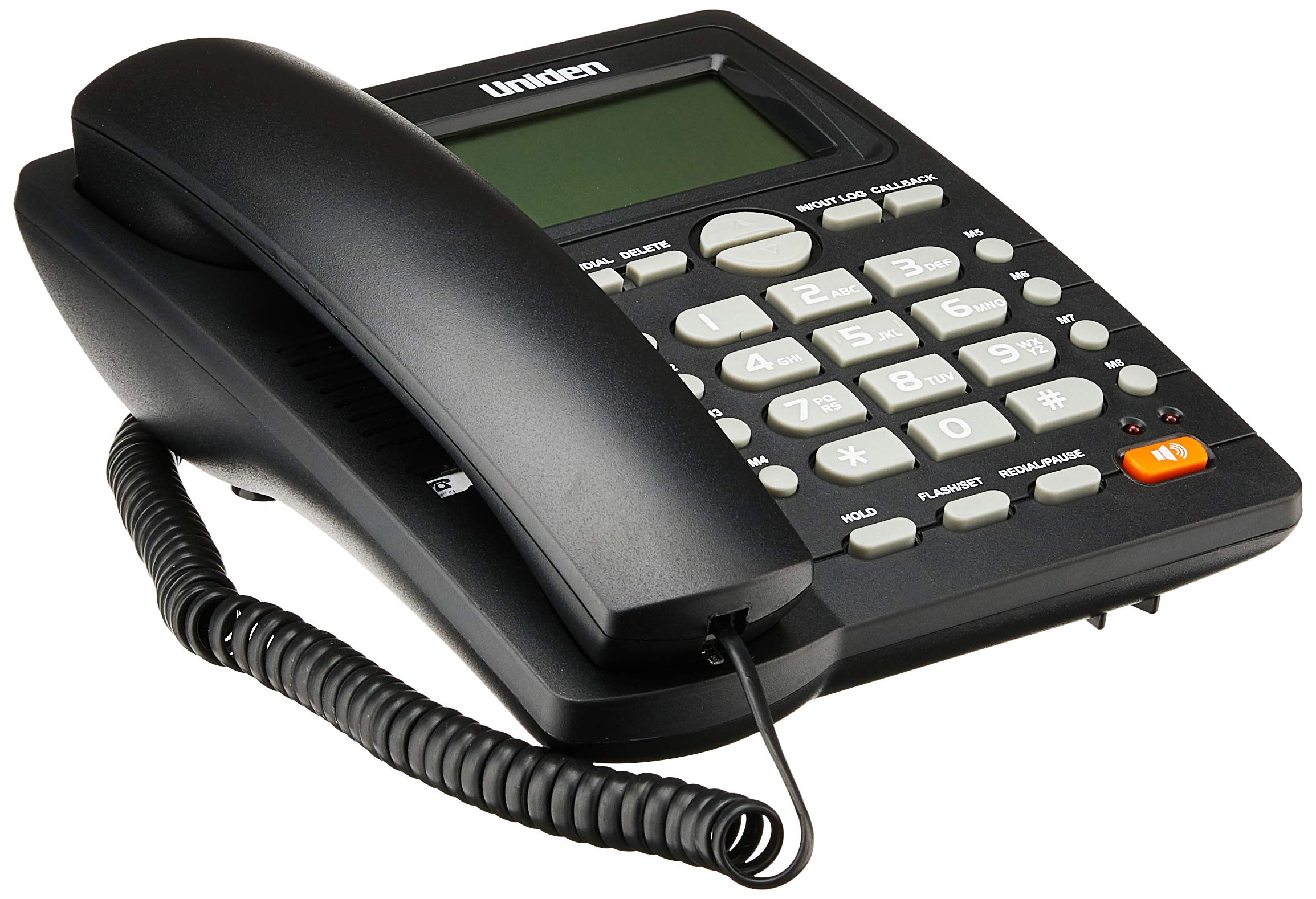
The phone features a standard handset, a numeric keypad, dedicated function buttons, and a large LCD display for caller information and settings. A prominent speakerphone button allows for hands-free communication.

On the rear of the unit, you will find the telephone line input port and a switch for adjusting the ringer volume.
3. Налаштування
- Підключіть телефон: Plug one end of the coiled cord into the handset and the other end into the handset jack on the side of the phone base unit.
- Підключення телефонної лінії: Plug one end of the telephone line cord into the "LINE" jack on the rear of the phone base unit (refer to Figure 2). Plug the other end into your telephone wall jack.
- Підключення живлення: The phone is powered by the telephone line. No external power adapter is required for basic operation.
- Початковий дисплей: Upon connection, the LCD display should illuminate and show the current time or a default standby screen.
4. Інструкція з експлуатації
Здійснення дзвінка:
- Використання трубки: Lift the handset, wait for a dial tone, then dial the desired number using the keypad.
- Використання гучномовця: Натисніть Спікер button, wait for a dial tone, then dial the desired number. To end the call, press the Спікер кнопку знову.
- Попередній набір номера: Dial the number first, then lift the handset or press the Спікер кнопку, щоб розпочати дзвінок.
Отримання дзвінка:
- Коли телефон дзвонить, підніміть слухавку або натисніть Спікер кнопку для відповіді.
Повторний набір останнього номера:
- Підніміть слухавку або натисніть Спікер потім натисніть кнопку ПОВТОРНИЙ НАБІР/ПАУЗА кнопку.
Caller ID Function:
- When a call comes in, the caller's number (and name, if available and subscribed to service) will be displayed on the LCD screen.
- Використовуйте IN/OUT LOG buttons (up/down arrows) to scroll through the incoming call history.
- To call back a number from the call log, select the number and press the CALLBACK кнопку.
Memory Dialing (One-Touch and Two-Touch):
- Зберігання номерів:
- Прес STORE/DIAL.
- Наберіть номер телефону, який ви хочете зберегти.
- Прес STORE/DIAL знову.
- Press the desired memory button (M1-M8 for one-touch, or a numeric key for two-touch).
- Набір з пам'яті:
- One-Touch: Підніміть слухавку або натисніть Спікер, then press the desired memory button (M1-M8).
- Two-Touch: Підніміть слухавку або натисніть Спікер, потім натисніть STORE/DIAL followed by the numeric key where the number is stored.
Adjusting LCD Contrast:
- Refer to the on-screen menu or specific button combination (often involving FLASH/SET or similar) to access display settings and adjust contrast for optimal readability.
5. Технічне обслуговування
- Прибирання: Протріть телефон м’якою ганчіркоюamp тканина. Не використовуйте агресивні хімікати або абразивні засоби для чищення.
- Розташування: Place the phone on a stable surface, away from direct sunlight, heat sources, and moisture.
- Шнури: Переконайтеся, що всі шнури надійно підключені та не переплутані та не затиснуті.
6. Вирішення проблем
| проблема | Можлива причина | Рішення |
|---|---|---|
| Немає гудка | Телефонний кабель відключений або несправний. | Check the telephone line connection at both the phone and the wall jack. Try a different line cord if available. |
| РК-дисплей порожній або тьмяний | Contrast setting is too low or phone line power issue. | Adjust the LCD contrast setting. Ensure the phone line is active. |
| Не вдається здійснювати або приймати дзвінки | Incorrect line connection or service issue. | Verify all connections. Contact your telephone service provider if the issue persists. |
| Ringer does not sound | Ringer volume is set to OFF. | Adjust the ringer volume switch on the rear of the phone to LOW or HI (refer to Figure 2). |
7. Технічні характеристики
| Особливість | Деталь |
|---|---|
| Бренд | Uniden |
| Модель | AS7412 |
| колір | чорний |
| Тип телефону | Проводиться |
| матеріал | пластик |
| Джерело живлення | Corded Electric (Line Powered) |
| Dialler Type | Одна клавіатура |
| Розміри (Д x Ш x В) | 21.8 х 7 х 22 сантиметрів |
| Вага товару | 650 грамів |
| Багаторядкова робота | Однорядкова операція |
| Ідентифікація абонента | Yes (FSK/DTMF) |
| Виробник | UNIDEN |
8. Гарантія та підтримка
For warranty information and technical support, please refer to the warranty card included with your product or visit the official Uniden webсайт. Зберігайте чек про покупку як підтвердження покупки.
Примітка: Характеристики та характеристики продукту можуть бути змінені без попередження.