
Надзвуковий SC-25
SuperSonic SC-25 2.0 Channel DVD Player with USB Input User Manual
Модель: SC-25
вступ
Дякуємо за покупкуasing the SuperSonic SC-25 2.0 Channel DVD Player with USB Input. This manual provides essential information for the safe and efficient operation of your new device. Please read it thoroughly before use and retain it for future reference.
Техніка безпеки
- Не піддавайте пристрій впливу дощу або вологи, щоб запобігти пожежі або ураженню електричним струмом.
- Не відкривайте casing. Звертайтеся до кваліфікованого персоналу з усіх питань технічного обслуговування.
- Забезпечте належну вентиляцію навколо пристрою.
- Уникайте розміщення пристрою на нестійких поверхнях.
- Від’єднуйте шнур живлення під час грози або якщо пристрій не використовується протягом тривалого часу.
Вміст упаковки
Before setup, please verify that all items are present:
- 1 SuperSonic SC-25 DVD Player Unit
- 1 Пульт дистанційного керування
- 1 Посібник користувача (цей документ)
- Кабель живлення
- Audio/Video (AV) Cable
Інструкції з налаштування
1. Підключення до телевізора
- Ensure both the DVD player and your television are powered off.
- Connect one end of the AV cable (red, white, yellow connectors) to the corresponding output jacks on the back of the DVD player.
- Connect the other end of the AV cable to the corresponding input jacks on your television.
- For optimal video quality, ensure the television input is set to the correct AV channel (e.g., Video 1, AV1). The player supports NTSC video format.
2. Підключення живлення
- Plug the power cable into the AC IN port on the back of the DVD player.
- Підключіть інший кінець кабелю живлення до стандартної електричної розетки.
3. Початкове увімкнення
- Натисніть кнопку живлення на передній панелі DVD-програвача або на пульті дистанційного керування.
- Turn on your television and select the correct input source (e.g., AV1, Video 1) to see the DVD player's display.
Інструкція з експлуатації
1. Відтворення диска
- Натисніть кнопку OPEN/CLOSE на передній панелі або пульті дистанційного керування, щоб відкрити лоток для дисків.
- Place a compatible disc (DVD, CD, VCD, SVCD, MP3, Picture CD, CD-R, CD-RW) onto the disc tray with the label side facing up.
- Press the OPEN/CLOSE button again to close the disc tray. The player will automatically begin reading the disc.
- Використовуйте кнопки ВІДТВОРЕННЯ, ПАУЗА, СТОП, ПЕРЕМОТУВАННЯ ВПЕРЕД та ПЕРЕМОТУВАННЯ НАЗАД на пульті дистанційного керування для керування відтворенням.
- The player supports multi-level fast forward and backward scan functionalities.
2. Відтворення через USB
- Insert a USB flash drive into the USB input port on the front of the DVD player.
- The player should automatically detect the USB device and display its contents. If not, use the SOURCE or USB button on the remote to switch to USB mode.
- Переглядайте свої files using the arrow keys and SELECT/ENTER button on the remote.
- The player supports MP3 file format for audio playback.
3. Language and Subtitle Settings
- During DVD playback, press the AUDIO button on the remote to cycle through available audio languages (up to 8 languages supported).
- Press the SUBTITLE button on the remote to cycle through available subtitle languages (up to 32 subtitles supported).
Технічне обслуговування
1. Очищення пристрою
- Wipe the exterior of the DVD player with a soft, dry cloth.
- Do not use liquid cleaners or aerosol sprays, as they may damage the finish or internal components.
2. Очищення дисків
- Тримайте диски за краї, щоб уникнути відбитків пальців.
- If a disc is dirty, wipe it gently from the center outwards with a soft, lint-free cloth.
- Не використовуйте абразивні засоби для чищення або розчинники для дисків.
3. Зберігання
- Зберігайте DVD-програвач у прохолодному, сухому місці, подалі від прямих сонячних променів та екстремальних температур.
- When not in use, store discs in their cases to protect them from dust and scratches.
Усунення несправностей
| проблема | Можлива причина | Рішення |
|---|---|---|
| Немає живлення | Шнур живлення не підключено; розетка неактивна. | Переконайтеся, що шнур живлення надійно підключений. Перевірте розетку за допомогою іншого пристрою. |
| Немає зображення чи звуку | AV cables incorrectly connected; Incorrect TV input selected. | Check AV cable connections. Select the correct input source on your TV. |
| Диск не відтворюється | Disc is dirty or scratched; Disc is incompatible; Disc inserted incorrectly. | Clean the disc. Ensure the disc type is supported. Insert disc with label side up. |
| USB-пристрій не розпізнано | USB device not properly inserted; Unsupported file format on USB. | Re-insert the USB device. Ensure files у форматі MP3. |
Технічні характеристики
- Бренд: надзвуковий
- Номер моделі: SC-25
- Тип носія: CD, DVD (Compatible with DVD/CD/VCD/SVCD/MP3/Picture/CD-R/CD-RW)
- Технологія підключення: Powerline (Implies standard AC power connection)
- колір: чорний
- Вага товару: 1.9 фунта
- Сумісні пристрої: телебачення
- Input Video Compatibility: NTSC
- Кількість каналів: 2
- Формат аналогового відео: NTSC
- Тип контролера: Пульт дистанційного керування
- File Format (USB): MP3
- UPC: 639131000254
- Виробник: SUPERSONIC INC.
- Розміри упаковки: 7.874 В x 24.13 Д x 24.13 Ш (сантиметрів)
- Вага упаковки: 2.160 фунта
- Країна походження: Китай
Гарантія та підтримка
This SuperSonic SC-25 DVD Player is covered by a Гарантія від виробника. For specific details regarding warranty terms and conditions, please refer to the documentation included with your purchase or contact SuperSonic customer support.
For technical assistance or customer service inquiries, please visit the official SuperSonic website or contact their support channels. Keep your purchase receipt for warranty claims.
Продукт закінченийview
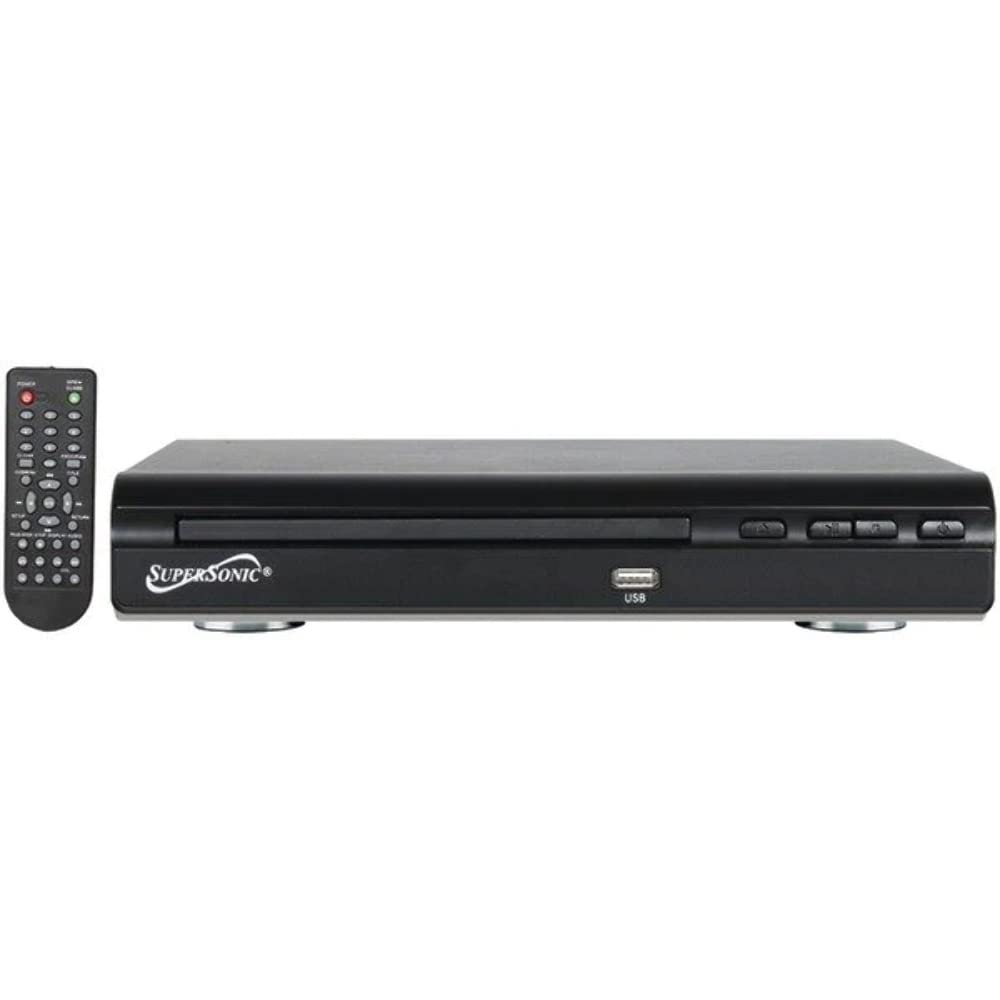
Фронт view of the SuperSonic SC-25 DVD player, showing the disc tray, USB port, and control buttons.
Пов'язані документиSC-25


Ask a question about this manual
Ask about setup, troubleshooting, compatibility, parts, safety, or missing instructions. Manuals+ will review the question and use this page’s manual context to help answer it.