
вступ
Дякуємо за покупкуasing the Lexibook Disney Planes Portable Color Game Console JL2800PL. This console offers a collection of 120 games, including 10 Disney Planes themed games and 110 classic titles, all displayed on a vibrant 2.4-inch (6.1 cm) color LCD screen. Designed for portability, it features a 16-bit processor and a rechargeable battery for extended playtime. This manual provides essential information for safe and effective use of your new device.
Важлива інформація з безпеки
Будь ласка, прочитайте всі попередження та інструкції з техніки безпеки перед використанням цього виробу, щоб забезпечити безпечну експлуатацію та запобігти пошкодженням. Зберігайте цей посібник для подальшого використання.
- This device is not suitable for children under 3 years due to small parts that may present a choking hazard.
- Do not expose the console to extreme temperatures, direct sunlight, or moisture.
- Avoid dropping or subjecting the console to strong impacts.
- Only use the provided charging cable or a compatible charger specified by Lexibook.
- Do not attempt to open, disassemble, or modify the console. This will void the warranty and may cause damage or injury.
- If the console becomes hot, emits smoke, or produces unusual odors, immediately discontinue use and disconnect from any power source.
- Dispose of the battery and console responsibly according to local regulations.
Вміст упаковки
Будь ласка, перевірте наявність усіх предметів у упаковці:
- Lexibook Disney Planes Portable Color Game Console JL2800PL
- USB-кабель для зарядки
- Посібник користувача (цей документ)
Налаштування
1. Заряджання консолі
Before first use, fully charge the console's built-in Lithium-ion battery. Connect the supplied USB charging cable to the console's charging port and the other end to a USB power adapter (not included) or a computer's USB port. The charging indicator light will typically show red while charging and turn off or change color when fully charged. A full charge may take approximately 2-3 hours.
2. Увімкнення/вимкнення живлення
To power on the console, press and hold the потужність button for a few seconds until the screen illuminates. To power off, press and hold the потужність знову натисніть кнопку, доки екран не вимкнеться.
Інструкція з експлуатації
Console Layout and Controls
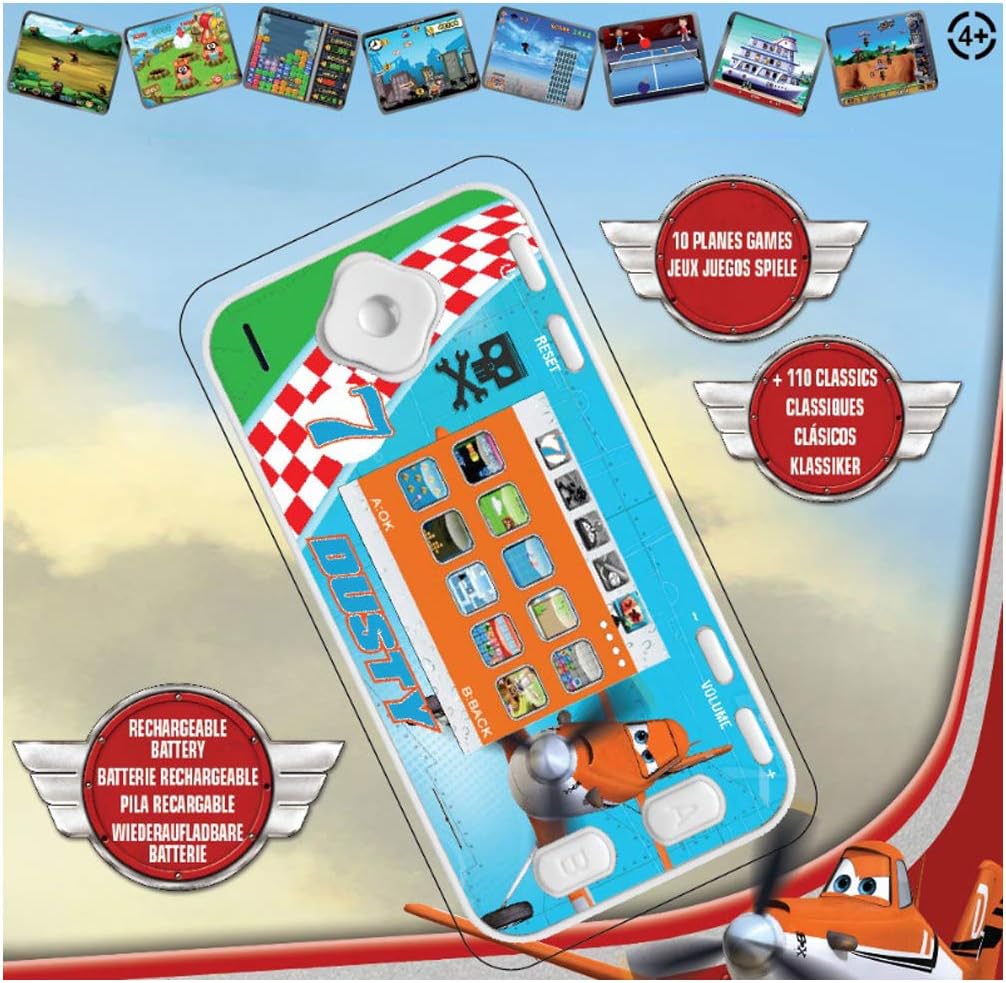
The console features a D-pad for movement, A/B/C/D action buttons, Start/Pause, Select, Reset, and Volume controls. Familiarize yourself with the button layout for optimal gameplay.
- D-Pad (клавіша напрямку): Used for moving characters or navigating menus (Up, Down, Left, Right).
- Action Buttons (A, B, C, D): Perform in-game actions such as jumping, shooting, or confirming selections. Functions vary by game.
- Кнопка Пуск/Пауза: Starts a game or pauses gameplay.
- Кнопка вибору: Used for various in-game options or menu selections.
- Кнопка скидання: Resets the console to the main menu. Use a thin object like a paperclip to press the recessed reset button.
- Регулювання гучності: Adjusts the sound level of the console.
Navigating Menus and Selecting Games
Once powered on, the console will display the main menu. Use the D-Pad to scroll through the available game categories or individual games. Press the A button (or equivalent action button) to select a game and begin playing.
Геймплей
Each game has its own specific controls and objectives. Refer to the on-screen instructions within each game, if available, to understand how to play. The console includes 10 Disney Planes games and 110 classic games covering action, sports, racing, and more.
Технічне обслуговування
Очищення консолі
To clean the console, gently wipe the surface with a soft, dry cloth. Do not use liquid cleaners, solvents, or abrasive materials, as these can damage the finish or internal components. Ensure no moisture enters the console's ports or openings.
Догляд і зберігання акумулятора
To prolong battery life, avoid fully discharging the console frequently. If storing the console for an extended period, charge it to approximately 50% before storage and recharge it every few months. Store the console in a cool, dry place away from direct sunlight and extreme temperatures.
Усунення несправностей
| проблема | Можлива причина | Рішення |
|---|---|---|
| Консоль не вмикається. | Акумулятор розрядився. | Charge the console using the provided USB cable. Ensure the charging indicator light is active. |
| Екран порожній або завислий. | Програмний збій або тимчасова помилка. | Натисніть на заглиблене Скинути button using a thin object (e.g., paperclip). If the issue persists, ensure the battery is charged. |
| Немає звуку або гучність низька. | Volume is turned down or muted. | Відрегулюйте Обсяг control on the console. |
| Console not charging. | Несправний кабель, джерело живлення або порт зарядки. | Try a different USB cable or power adapter. Ensure the charging cable is securely connected to both the console and the power source. |
Технічні характеристики
- Номер моделі: JL2800PL
- Бренд: Лексикбук
- Розмір екрана: 2.4 дюйма (6.1 см)
- Тип дисплея: Колір LCD
- Процесор: 16-бітний
- Кількість ігор: 120 (10 Disney Planes + 110 Classic)
- Тип батареї: 1 Lithium-ion (rechargeable)
- Джерело живлення: Працює від батареї
- Тип контролера: Кнопкове керування
- Розміри продукту: 12.1 Д x 6.1 Ш x 1.3 В сантиметрів
- матеріал: пластик
- Рекомендований вік: 3+ років

Інформація про гарантію
This Lexibook product is covered by a manufacturer's warranty for a period of 2 роки з дати покупки. Ця гарантія поширюється на дефекти матеріалів та виготовлення за умов нормального використання. Вона не поширюється на пошкодження, спричинені неправильним використанням, нещасними випадками, несанкціонованими модифікаціями або нормальним зносом. Будь ласка, збережіть підтвердження покупки для пред'явлення претензій по гарантії.
Підтримка клієнтів
If you encounter any issues not covered in the troubleshooting section or require further assistance, please contact Lexibook customer support. You can find contact information on the official Lexibook webсайті або через вашого продавця.
For more information, visit the official Lexibook webсайт: www.lexibook.com