
1. Вступ
This manual provides comprehensive instructions for the proper use and maintenance of your Horizon SF-400D Digital Precision Scale. Please read this manual thoroughly before operating the device to ensure accurate measurements and prolong its lifespan.
The Horizon SF-400D is a versatile digital precision scale designed for various weighing applications, including jewelry, coins, herbs, spices, and medication. It offers high accuracy and multiple weighing modes, along with a convenient counting function.

малюнок 1: Horizon SF-400D Digital Precision Scale. This image shows the overall design of the scale, featuring a black body, a stainless steel weighing platform, and a blue backlit LCD display with control buttons.
2. Заходи безпеки
- Do not overload the scale beyond its maximum capacity of 500g.
- Уникайте впливу екстремальних температур, вологості або прямих сонячних променів на ваги.
- Тримайте ваги подалі від сильних електромагнітних полів.
- Очистіть накип м’якою, damp тканиною. Не використовуйте абразивні засоби для чищення та не занурюйте пристрій у воду.
- Ensure the scale is placed on a stable, level surface during operation to ensure accuracy.
3. Компоненти продукту
Familiarize yourself with the main parts of your SF-400D scale:
- Платформа для зважування: Stainless steel surface for placing items.
- РК-дисплей: Backlit screen showing weight, units, and other indicators.
- Кнопка ON/OFF: Вмикає або вимикає ваги.
- Кнопка MODE: Changes weighing units (g, oz, ct, dwt, gn, T).
- Кнопка TARE: Resets the display to zero, useful for weighing items in a container.
- PCS Button: Activates the piece counting function.
- Кнопка CAL: Used for calibration.
- Регульовані ніжки: Located on the bottom for leveling the scale.
- Рівень бульбашки: Integrated on the scale to assist with leveling.
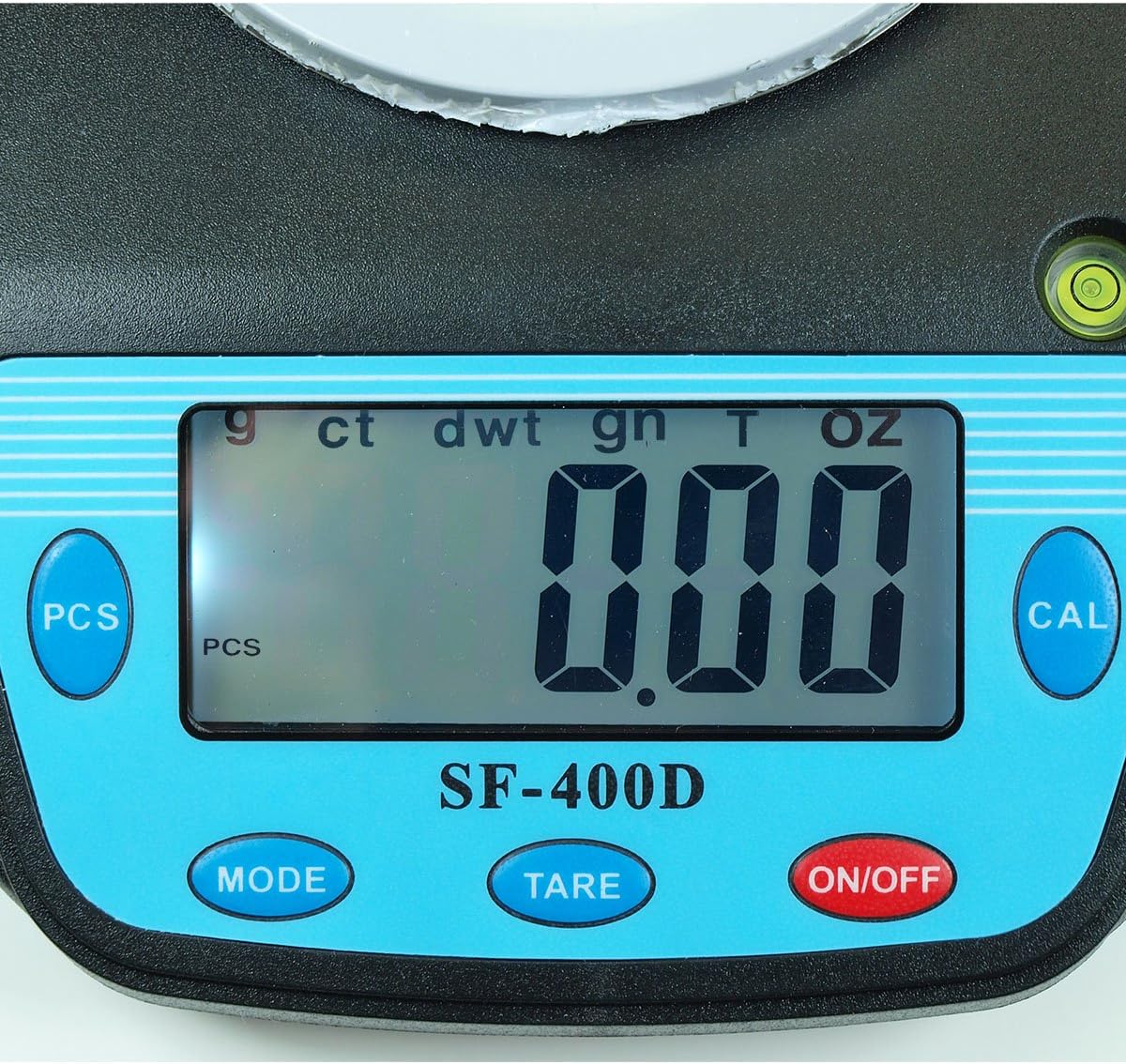
малюнок 2: Close-up of the SF-400D display and control buttons. This image highlights the LCD screen, showing various unit indicators (g, ct, dwt, gn, T, oz), and the function buttons: PCS, MODE, TARE, ON/OFF, and CAL.

малюнок 3: Underside of the SF-400D scale showing adjustable legs. Green arrows indicate the location of the four adjustable feet, which are used to level the scale for accurate measurements.
4. Налаштування
4.1. Джерело живлення
The SF-400D scale operates on two AA batteries (included) or an optional AC power adapter (not included).
- Відкрийте кришку відсіку для батарейок на нижній стороні ваг.
- Вставте дві батарейки типу АА, дотримуючись правильної полярності (+/-).
- Закрийте батарейний відсік.
- Alternatively, connect a compatible AC power adapter (6V, amperage not specified in product details, consult manufacturer if needed) to the power port.
4.2. Розміщення та вирівнювання
For optimal accuracy, the scale must be placed on a stable, flat, and level surface.
- Place the scale on your desired weighing surface.
- Observe the integrated bubble level.
- Adjust the four adjustable legs on the bottom of the scale by rotating them until the bubble is centered within the level indicator.
5. Інструкція з експлуатації
5.1. Базове зважування
- Натисніть УВІМК./ВИМК button to turn on the scale. The display will show "88888" and then "0.00" (or "0.0" depending on the unit).
- If the display does not show zero, press the ТАРЕ кнопку, щоб обнулити шкалу.
- Натисніть РЕЖИМ button to select your desired weighing unit (g, oz, ct, dwt, gn, T).
- Gently place the item(s) to be weighed on the center of the stainless steel platform.
- Зчитайте стабільну вагу, що відображається на РК-екрані.
- Щоб вимкнути ваги, натисніть і утримуйте УВІМК./ВИМК button for a few seconds. The scale also features an auto shut-off function to conserve battery power.
5.2. Функція тари
The Tare function allows you to subtract the weight of a container, so only the contents are weighed.
- Поставте порожню ємність на платформу для зважування.
- Wait for the display to stabilize and show the container's weight.
- Натисніть ТАРЕ button. The display will reset to "0.00" (or "0.0").
- Add the items you wish to weigh into the container. The display will now show only the net weight of the items.
- Щоб скинути вагу тари, зніміть усі предмети з платформи та натисніть ТАРЕ again if the display does not return to zero automatically.
5.3. Piece Counting Function (PCS)
This function is useful for counting multiple identical items.
- Turn on the scale and ensure it is zeroed.
- Натисніть PCS button. The display will show "PCS" and a sample size (e.g., "25", "50", "75", "100").
- Натисніть РЕЖИМ button to cycle through the available sample sizes (25, 50, 75, 100 pieces). Select the sample size that matches the number of items you will place on the scale for sampлінг.
- Place the exact number of sample items (e.g., 25 pieces) onto the weighing platform according to your selected sampрозмір le.
- Натисніть PCS button again to confirm the sample. The display will now show the number of pieces.
- You can now add more items of the same type, and the scale will display the total count.
- To exit the counting mode, press the РЕЖИМ кнопку.
5.4. Калібрування
Calibration ensures the accuracy of your scale. It is recommended to calibrate the scale periodically or if you suspect inaccurate readings. You will need a known calibration weight (e.g., 500g) for this process.

малюнок 4: SF-400D display showing "CAL" during calibration mode. This image illustrates the scale's screen indicating it is in calibration mode, prompting the user to place a calibration weight.
- Ensure the scale is on a stable, level surface and turned off.
- Натисніть і утримуйте CAL потім натисніть кнопку УВІМК./ВИМК button simultaneously. Release both buttons when the display shows "CAL".
- The display will then show a flashing weight value (e.g., "500.00g"). This is the required calibration weight.
- Place the exact calibration weight (e.g., 500g) onto the center of the weighing platform.
- Wait for the display to stabilize and show "PASS" or return to normal weighing mode. This indicates successful calibration.
- Remove the calibration weight. The scale is now calibrated and ready for use.
- If "FAIL" or an error message appears, repeat the calibration process.
6. Технічне обслуговування
6.1. прибирання
- Wipe the scale surface with a soft, slightly damp тканина.
- Не використовуйте агресивні хімікати, абразивні засоби для чищення та не занурюйте ваги у воду.
- Переконайтеся, що ваги повністю сухі перед зберіганням або наступним використанням.
6.2. Зберігання
- Зберігайте ваги в прохолодному, сухому місці, подалі від прямих сонячних променів та екстремальних температур.
- Якщо зберігатиметься протягом тривалого часу, вийміть батарейки, щоб запобігти витіканню.
7. Вирішення проблем
| проблема | Можлива причина | Рішення |
|---|---|---|
| Ваги не вмикаються. | Low or dead batteries; incorrect battery installation; no power from AC adapter. | Replace batteries; check battery polarity; ensure AC adapter is properly connected and functional. |
| Неточні показання. | Scale not level; unstable surface; needs calibration; overloaded; strong air currents or vibrations. | Ensure scale is level using adjustable legs and bubble level; place on stable surface; perform calibration; do not exceed 500g capacity; operate in a stable environment. |
| "O_Ld" or "EEEE" displayed. | Ваги перевантажені. | Remove excess weight immediately. Do not exceed 500g capacity. |
| На дисплеї відображається «UNST». | Unstable environment or surface. | Move the scale to a more stable location, away from vibrations or drafts. |
| Counting function not working correctly. | Неправильне sample size selected; sample items not identical in weight. | Переконайтеся, що сample size matches the number of items placed for sampling; use identical items for accurate counting. |
8. Технічні характеристики
| Особливість | Деталь |
|---|---|
| Модель | SF-400D |
| Ємність | 500 grams (g) / 17.5 ounces (oz) |
| Accuracy (Readability) | 0.01 grams (g) / 0.0005 ounces (oz) |
| Режими зважування | g (grams), oz (ounces), ct (carats), dwt (pennyweights), gn (grains), T (troy ounces), pcs (pieces) |
| Матеріал платформи | Нержавіюча сталь |
| Platform Diameter | 4.2 дюймів |
| Дисплей | LCD з підсвічуванням |
| потужність | 2 x AA batteries (included) or 6V AC adapter (not included) |
| Розміри (Д x Ш x В) | 8.25 см x 6.0 см x 1.75 см |
| особливості | Tare function, Piece Counting, Auto Shut-Off, Backlit Display, Adjustable Legs, Bubble Level |
9. Гарантія та підтримка
For warranty information or technical support, please refer to the documentation included with your purchase or contact the retailer. Specific warranty terms may vary by region and retailer.
Для отримання загальних запитів або ознайомлення з іншими продуктами ви можете відвідати Horizon Store on Amazon.