
1. Вступ
This manual provides instructions for the OEM RMT-B119A remote control, designed as a replacement or secondary remote for various Sony Blu-ray player models. This remote offers full functionality for controlling your Blu-ray player's features.
Compatible Sony Blu-ray Player Models:
- BDP-BX59
- BDP-S390
- BDP-S590
- BDP-BX110
- BDP-S1100
- BDP-S3100
- BDP-BX310
2. Налаштування
2.1 Встановлення батареї
Для пульта дистанційного керування потрібні дві (2) батарейки типу AAA (не входять до комплекту). Щоб встановити батарейки, виконайте такі дії:
- Знайдіть кришку батарейного відсіку на задній панелі пульта дистанційного керування.
- Натисніть на язичок і посуньте кришку вниз, щоб відкрити відсік.
- Вставте дві батарейки типу AAA, переконавшись, що позитивний (+) та негативний (-) полюси правильно збігаються з позначками всередині відсіку.
- Засуньте кришку батарейного відсіку назад на місце, доки вона надійно не клацне.
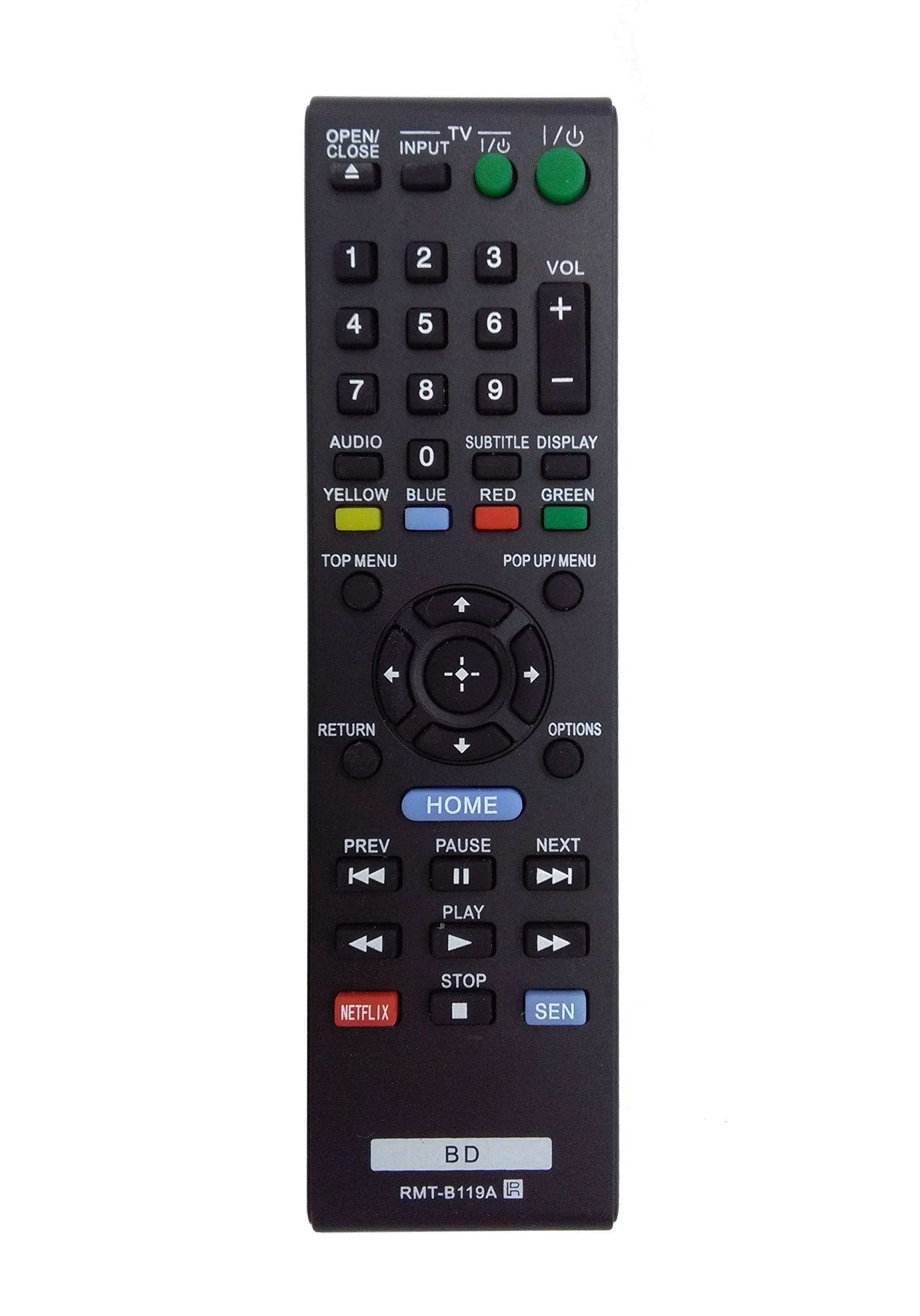
Image: The OEM RMT-B119A remote control, showing the full button layout on the front and a partial view of the open battery compartment on the back, revealing the battery terminals.
3. Інструкція з експлуатації
3.1 Розташування пульта дистанційного керування та функції кнопок
Familiarize yourself with the buttons on your RMT-B119A remote control. Below is a description of each button's primary function.
Image: The OEM RMT-B119A remote control, displaying all buttons and their labels.
- Power (I/O): Turns the Blu-ray player on or off.
- OPEN/CLOSE (▲): Відкриває або закриває лоток для дисків.
- ВХОД: Switches the input source on the connected TV (if programmed).
- телевізор: Switches the remote to TV control mode (if programmed).
- Цифрова клавіатура (0-9): Used for direct track selection, chapter selection, or entering numerical data.
- ГУЧНІСТЬ (+/-): Adjusts the volume level (typically for the connected TV, if programmed).
- АУДІО: Changes the audio track or language during playback.
- SUBTITLE DISPLAY: Toggles subtitle display on or off, or cycles through available subtitle languages.
- YELLOW, BLUE, RED, GREEN: Color-coded function buttons, typically used for specific features within menus or interactive content. Their function varies depending on the disc or menu.
- ТОП МЕНЮ: Accesses the main menu of the Blu-ray disc.
- POP UP/MENU: Displays the pop-up menu during disc playback.
- Directional Pad (↑↓←→): Навігація в меню та параметрах.
- Center Button (Enter/Select): Підтверджує вибір або входить до пункту меню.
- ПОВЕРНЕННЯ: Повернення до попереднього екрана або меню.
- ВАРІАНТИ: Displays context-sensitive options or settings.
- ГОЛОВНА: Accesses the Blu-ray player's home menu.
- ПОПЕРЕДНЄ (◀◀): Skips to the beginning of the current track/chapter or the previous track/chapter.
- PAUSE (▌▌): Призупиняє відтворення.
- ДАЛІ (▶▶): Перехід до наступного треку або розділу.
- PLAY (▶): Початок або відновлення відтворення.
- СТОП (■): Зупинка відтворення.
- NETFLIX: Direct access button for the Netflix streaming service.
- SEN: Direct access button for the Sony Entertainment Network (now PlayStation Video/Music).
- BD: Likely a dedicated button for Blu-ray Disc functions or to switch to Blu-ray mode.
4. Технічне обслуговування
Щоб забезпечити довговічність та належну роботу вашого пульта дистанційного керування, дотримуйтесь цих інструкцій з технічного обслуговування:
- Прибирання: Протріть пульт дистанційного керування м’якою сухою тканиною. Для стійкого бруду злегкаampПротріть тканину водою або м’яким неабразивним засобом для чищення. Уникайте використання агресивних хімікатів або розчинників.
- Заміна батареї: Replace batteries when the remote's response becomes sluggish or it stops functioning. Always replace both batteries at the same time with new ones of the same type.
- Зберігання: Зберігайте пульт дистанційного керування у прохолодному, сухому місці, подалі від прямих сонячних променів, екстремальних температур та високої вологості. Якщо пульт дистанційного керування не використовуватиметься протягом тривалого часу, вийміть батарейки, щоб запобігти витіканню.
- Уникайте крапель: Захищайте пульт від фізичних ударів, оскільки падіння можуть пошкодити внутрішні компоненти.
5. Вирішення проблем
If you experience issues with your remote control, refer to the following table for common problems and solutions:
| проблема | Можлива причина | Рішення |
|---|---|---|
| Пульт не працює. | Розряджені або неправильно вставлені батарейки. | Замініть батарейки новими, дотримуючись правильної полярності (+/-). |
| Дистанційне керування працює з перебоями. | Низький заряд батареї або перешкода. | Replace batteries. Ensure no objects are blocking the remote's signal path to the Blu-ray player. |
| Remote does not control the TV. | Remote not programmed for TV or TV mode not selected. | This remote is primarily for Blu-ray players. TV control functionality may require specific programming not covered by this manual, or may not be supported by this OEM model. |
| Кнопки не реагують або залипають. | Бруд або сміття під кнопками. | Clean the remote control surface. Avoid spilling liquids on the remote. |
6. Технічні характеристики
- Бренд: OEM
- Номер моделі: RMT-B119A
- Технологія підключення: Інфрачервоний (ІЧ)
- Сумісні пристрої: Sony Blu-ray Players (specific models listed in Introduction)
- Джерело живлення: 2 батареї AAA (не входять в комплект)
- Максимальний діапазон: Приблизно 10 метрів (33 футів)
- Особливість: Ергономічний дизайн
7. Гарантія та підтримка
This OEM RMT-B119A remote control comes with a Гарантія 30 днів з дати покупки, що покриває виробничі дефекти. Будь ласка, збережіть підтвердження покупки для пред'явлення гарантійних претензій.
For technical support or warranty inquiries, please contact the retailer or manufacturer directly. Refer to your purchase documentation for specific contact information.