
1. Вступ
The D-Link GO-SW-5G is a 5-Port Unmanaged Gigabit Desktop Switch designed for home and small office environments. This device provides a simple and cost-effective solution to expand your network connectivity, offering high-speed Gigabit Ethernet ports for reliable data transfer. It incorporates D-Link's Green Technology for energy efficiency, reduced heat generation, and extended product lifespan.
This switch is a plug-and-play device, requiring no complex configuration or software installation, making it easy to integrate into an existing network.
2. Вміст упаковки
Будь ласка, перевірте, чи всі перелічені нижче предмети входять до вашої упаковки:
- D-Link GO-SW-5G 5-Port Gigabit Desktop Switch
- Адаптер живлення
- Посібник із швидкого встановлення
Якщо будь-які елементи відсутні або пошкоджені, зверніться за допомогою до свого продавця.
3. Інструкції з налаштування
The D-Link GO-SW-5G switch is designed for easy plug-and-play installation. Follow these steps to set up your device:
3.1. Підключіть адаптер живлення
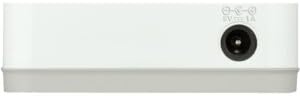
- Locate the power input port on the side of the D-Link GO-SW-5G switch.
- Підключіть наданий адаптер живлення до цього порту.
- Підключіть інший кінець адаптера живлення до стандартної електричної розетки.
- The power LED on the front of the switch will illuminate, indicating that the device is receiving power.

малюнок 1: сторона view of the D-Link GO-SW-5G switch with the power input port.
3.2. Підключіться до вашої мережі
- Using a standard Ethernet cable (RJ45), connect one end to an available LAN port on your router (not your modem).
- Connect the other end of this Ethernet cable to any of the five available ports on the back of the D-Link GO-SW-5G switch.
- The corresponding LED on the front of the switch will light up, indicating an active connection.
малюнок 2: Задня view of the D-Link GO-SW-5G switch with five Ethernet ports.
3.3. Connect Network Devices
- Connect your network devices (e.g., computers, gaming consoles, network printers, smart TVs) to the remaining available Ethernet ports on the D-Link GO-SW-5G switch using Ethernet cables.
- Each connected device will have its corresponding LED on the front of the switch illuminate, confirming a successful connection.

малюнок 3: Фронт view of the D-Link GO-SW-5G switch showing active port LEDs.
4. Інструкція з експлуатації
The D-Link GO-SW-5G is an unmanaged switch, meaning it operates automatically without requiring user configuration. Once connected as described in the Setup section, it will begin forwarding network traffic between connected devices.
- Автоматичне узгодження: The switch automatically detects the network speed (10/100/1000 Mbps) and duplex mode (half/full) of connected devices and adjusts accordingly.
- Автоматичний MDI/MDIX: All ports support automatic MDI/MDIX crossover, eliminating the need for crossover cables when connecting to other switches or hubs.
- Світлодіодні індикатори: Each port has an LED indicator on the front panel. A lit LED indicates an active link, and blinking indicates network activity.
5. Технічне обслуговування
To ensure optimal performance and longevity of your D-Link GO-SW-5G switch, consider the following maintenance guidelines:
- Розміщення: Розмістіть комутатор у прохолодному, сухому місці, подалі від прямих сонячних променів, джерел тепла та надмірної вологи. Забезпечте належну вентиляцію навколо пристрою.
- Прибирання: Use a soft, dry cloth to clean the exterior of the switch. Avoid using liquid or aerosol cleaners, as they may damage the device.
- Управління кабелем: Акуратно укладайте кабелі Ethernet, щоб запобігти заплутуванню та випадковому відключенню.
- Цикл живлення: If you experience network issues, a simple power cycle (unplugging the power adapter for 10 seconds and then plugging it back in) can often resolve minor problems.
6. Вирішення проблем
If you encounter issues with your D-Link GO-SW-5G switch, refer to the following common troubleshooting steps:
- Немає світлодіодного індикатора живлення:
- Переконайтеся, що адаптер живлення надійно підключено як до комутатора, так і до справної електричної розетки.
- Перевірте справність електричної розетки, підключивши інший пристрій.
- No Link/Activity LED for a Connected Device:
- Перевірте, чи кабель Ethernet надійно підключено як до порту комутатора, так і до мережевого пристрою.
- Спробуйте інший кабель Ethernet, щоб виключити несправність кабелю.
- Переконайтеся, що підключений пристрій увімкнено, а його мережевий адаптер працює належним чином.
- Спробуйте підключити пристрій до іншого порту комутатора.
- Низька швидкість мережі:
- Verify that all connected devices and cables support Gigabit Ethernet (1000 Mbps) for optimal performance. The switch will operate at the lowest common speed.
- Ensure your router and internet service provider (ISP) plan support the desired speeds.
- Perform a power cycle on the switch and your router.
- Переривчасте підключення:
- Перевірте, чи не закріплені кабелі.
- Ensure the switch is not overheating; provide adequate ventilation.
- Перевірте з різними кабелями Ethernet.
7. Технічні характеристики
| Бренд | D-Link |
| Номер моделі | GO-SW-5G/B |
| Кількість портів | 5 |
| Тип перемикача | Некерований |
| Швидкість передачі даних | 1 гігабіт за секунду (10/100/1000 Мбіт/с) |
| Інтерфейс | RJ45 |
| Колір | Білий |
| Вага товару | 0.22 фунта |
| томtage | 100-240 Вольт |
| Сумісні пристрої | PC, Mac, and other Ethernet-enabled devices |
| Тканина для комутації | 10 Гбіт/с |
| UPC | 790069365669 |
8. Гарантія та підтримка
Обмежена гарантія: The D-Link GO-SW-5G switch comes with a 3-year limited warranty. For detailed terms and conditions, please refer to the warranty information included in your package or visit the official D-Link webсайт.
Технічна підтримка: For technical assistance, product registration, or to download the latest firmware and documentation, please visit the Підтримка D-Link Webсайт or contact D-Link customer service.