
1. Вступ
Дякуємо за покупкуasing the Medeli M30 61-Key Professional Keyboard. This instrument is designed to provide a rich musical experience with its touch-sensitive keys, extensive voice library, and versatile accompaniment styles. This manual will guide you through the setup, operation, and maintenance of your new keyboard.
Вміст упаковки
- Medeli M30 61-Key Professional Keyboard
- Адаптер живлення
- Музичний відпочинок
- Посібник користувача (цей документ)
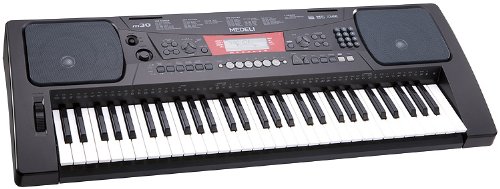
Figure 1: Medeli M30 61-Key Professional Keyboard. This image shows the keyboard from a front-angle view, highlighting its 61 keys, control panel, and display.
2. Техніка безпеки
- Джерело живлення: Використовуйте лише зазначений адаптер живлення. Переконайтеся, що гучністьtage відповідає вашому місцевому джерелу живлення.
- Вода і вологість: Do not expose the keyboard to water or moisture. Avoid placing liquids near the instrument.
- Вентиляція: Do not block ventilation openings. Ensure adequate airflow around the keyboard.
- Джерела тепла: Тримайте клавіатуру подалі від джерел тепла, таких як радіатори, обігрівачі, плити чи інші прилади (включаючи ampліфікатори), які виробляють тепло.
- Прибирання: Протирайте лише сухою ганчіркою. Не використовуйте рідкі засоби для чищення або аерозолі.
- Обслуговування: Не намагайтеся самостійно обслуговувати цей виріб. Зверніть усі послуги до кваліфікованого обслуговуючого персоналу.
3. Налаштування
3.1 Розпакування
Обережно вийміть усі компоненти з упаковки. Зберігайте упаковку для подальшого транспортування або зберігання.
3.2 Підключення живлення
- Ensure the keyboard's power switch is in the "OFF" position.
- Connect the power adapter to the DC IN jack on the rear panel of the keyboard.
- Підключіть адаптер живлення до стандартної розетки змінного струму.
- Turn the power switch to the "ON" position to power on the keyboard.
3.3 Встановлення пюпітра
Insert the music rest into the designated slots on the top panel of the keyboard. Ensure it is securely seated.
4. Інструкція з експлуатації
4.1 Основи відтворення
- Увімкнення: Press the [POWER] button to turn on the keyboard.
- Регулювання гучності: Use the [MASTER VOLUME] knob to adjust the overall sound level.
- Гра на клавішах: The M30 features 61 touch-sensitive keys. The harder you press, the louder the sound.
4.2 Вибір тембрів
The M30 offers 359 different voices (instrument sounds).
- Натисніть кнопку [VOICE].
- Use the numeric keypad or the [+] / [-] buttons to select a voice number.
- The selected voice name will appear on the display.
4.3 Selecting Styles
The keyboard includes 150 accompaniment styles.
- Натисніть кнопку [STYLE].
- Use the numeric keypad or the [+] / [-] buttons to select a style number.
- Press [START/STOP] to begin the accompaniment.
- Adjust the style volume using the [ACCOMPANIMENT VOLUME] button (if available, or general volume).
4.4 Playing Songs
The M30 has 100 built-in songs and 2 demo songs.
- Натисніть кнопку [SONG].
- Use the numeric keypad or the [+] / [-] buttons to select a song number.
- Press [PLAY/PAUSE] to start or pause the song.
- Press [STOP] to stop the song.
5. Підключення
5.1 Підключення USB
The Medeli M30 features a USB port for connecting to a computer. This allows for MIDI data transfer, enabling the keyboard to be used as a MIDI controller or to connect with music software.
- Connect a standard USB cable (Type B to Type A, not included) from the keyboard's USB port to your computer's USB port.
- Your computer should automatically recognize the keyboard as a MIDI device.
- Refer to your music software's documentation for instructions on setting up MIDI input devices.
6. Технічне обслуговування
6.1 Очищення
- Протріть поверхню клавіатури м’якою сухою тканиною.
- Для стійкого бруду злегкаampпротріть тканину водою з м’яким мийним засобом, а потім негайно витріть насухо.
- Не використовуйте абразивні засоби для чищення, віск або розчинники.
6.2 Зберігання
- Якщо пристрій не використовується протягом тривалого часу, від’єднайте адаптер живлення.
- Зберігайте клавіатуру в прохолодному, сухому місці, подалі від прямих сонячних променів та екстремальних температур.
- Consider using a dust cover to protect the keys and control panel.
7. Вирішення проблем
| проблема | Можлива причина | Рішення |
|---|---|---|
| Ні звуку | Гучність занадто низька або вимкнена. | Increase the [MASTER VOLUME] knob. |
| Клавіатура не включається | Адаптер живлення не підключений або несправний. | Ensure power adapter is securely connected and plugged into a working outlet. Check power switch position. |
| Ключі не реагують | Keyboard may be in a specific mode (e.g., demo mode). | Try powering off and on again. Refer to the operating section for specific mode exits. |
8. Технічні характеристики
| Особливість | Деталь |
|---|---|
| Ключі | 61, Touch-Sensitive |
| Голоси | 359 |
| Стилі | 150 |
| Пісні | 100 (plus 2 Demo Songs) |
| Підключення | USB (MIDI) |
| Розміри (Д x Ш x В) | 93.98 х 35.56 х 15.24 см |
| вага | 6.8 кг |
| Номер моделі | M30 |
| UPC/GTIN | 857285003529 |
9. Гарантія та підтримка
Щоб отримати інформацію про гарантію та технічну підтримку, зверніться до гарантійного талона, що додається до вашого продукту, або відвідайте офіційний веб-сайт Medeli. webсайт. Зберігайте чек про покупку для будь-яких гарантійних претензій.
Виробник: Меделі
Webсайт: www.medeli.com (Примітка: Це тимчасовий фрагмент URL, будь ласка, зверніться до документації до продукту, щоб дізнатися про правильні контакти служби підтримки.)