
вступ
This manual provides essential instructions for the setup, operation, maintenance, and troubleshooting of your Insignia 6.1-Channel 600W Digital Home Theater Receiver, model IS-HC040917. Please read this manual thoroughly before using the receiver to ensure proper and safe operation.
Важливі інструкції з безпеки
- Не блокуйте вентиляційні отвори. Встановлюйте відповідно до інструкцій виробника.
- Не встановлюйте поблизу будь-яких джерел тепла, таких як радіатори, обігрівачі, печі або інші пристрої (включаючи ampліфікатори), які виробляють тепло.
- Захищайте шнур живлення від наступання або защемлення, особливо біля вилок, розеток і в місці виходу з пристрою.
- Використовуйте лише насадки/аксесуари, зазначені виробником.
- Відключайте цей пристрій від мережі під час грози або якщо він не використовується протягом тривалого часу.
- Зверніть усі послуги до кваліфікованого обслуговуючого персоналу. Технічне обслуговування вимагається, якщо прилад будь -яким чином пошкоджений.
Посібник із налаштування
1. Розпакування
Carefully remove the receiver and all accessories from the packaging. Ensure all components are present:
- Insignia IS-HC040917 Receiver
- Пульт дистанційного керування
- AM Рамкова антена
- FM дротова антена
- Посібник користувача (цей документ)
2. Підключення динаміків
The IS-HC040917 receiver supports a 6.1-channel speaker configuration. Connect your speakers to the corresponding terminals on the rear panel. Ensure correct polarity (+ to + and - to -) for each speaker.
- Передній лівий/правий: Для основного стереозвуку.
- центр: Для діалогу.
- Surround Left/Right: For ambient sound effects.
- Об'ємне звучання: For additional rear channel effects in 6.1 setups.
- Subwoofer (Pre-out): Connect to a powered subwoofer's LFE input.
Note: The receiver is designed for speakers with an impedance of 8 ohms.
3. Connecting Audio/Video Sources
Connect your external devices (e.g., DVD player, Blu-ray player, game console, cable box) to the appropriate input jacks on the receiver.
- HDMI: Use HDMI cables for high-definition audio and video signals. The receiver has 3 HDMI input ports.
- Цифровий аудіо (оптичний/коаксіальний): For digital audio from devices like CD players or set-top boxes.
- Аналоговий аудіо (RCA): For standard stereo audio connections from devices like VCRs or older CD players.
- S-відео: For video signals from compatible devices.
4. Підключення антени
Connect the supplied AM loop antenna and FM wire antenna to their respective terminals on the rear panel for radio reception.
5. Підключення живлення
Once all audio/video and speaker connections are made, plug the receiver's power cord into a standard AC wall outlet.
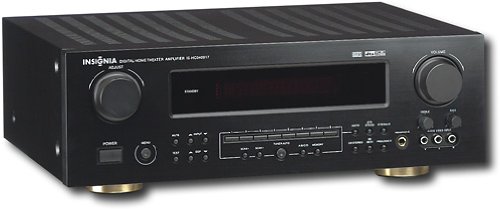
зображення: Rear panel of the Insignia IS-HC040917 receiver, showing various input and output connections for speakers, audio/video sources (HDMI, RCA, S-Video, Digital), and antenna terminals. This diagram is crucial for correctly wiring the home theater system.
Інструкція з експлуатації
1. Увімкнення/вимкнення живлення
Натисніть ПОТУЖНІСТЬ кнопку на передній панелі або на пульті дистанційного керування, щоб увімкнути або вимкнути приймач.
2. Вибір вхідних даних
Використовуйте ВИБІР ВХОДУ knob/buttons on the front panel or the remote control to choose the desired audio/video source (e.g., HDMI 1, DVD, CD, Tuner).
3. Регулювання гучності
Відрегулюйте загальну гучність за допомогою великого ОБ'ЄМ ручку на передній панелі або ОБ'ЄМ +/- кнопки на пульті дистанційного керування.
4. Аудіорежими
The receiver supports various audio modes, including 6.1-channel surround sound. Use the РЕЖИМ or DSP buttons on the remote to cycle through available sound modes (e.g., Stereo, Dolby Digital, DTS, Pro Logic).
5. Tuner Operation (AM/FM Radio)
Select the "Tuner" input. Use the БЕНД button to switch between AM and FM. Use the НАСТРОЙКА +/- buttons to manually tune to stations or ПРЕДУСТАНОВЛЕНО +/- to select stored stations. Refer to the remote control for specific tuner functions.
Технічне обслуговування
1. прибирання
Wipe the exterior of the receiver with a soft, dry cloth. Do not use liquid cleaners or aerosol sprays, as they may damage the finish or internal components. Ensure the unit is unplugged before cleaning.
2. Вентиляція
Ensure that the ventilation openings on the top and sides of the receiver are not blocked. Proper airflow is essential to prevent overheating and ensure long-term performance.
3. Кабельний менеджмент
Periodically check all cable connections to ensure they are secure. Loose connections can lead to poor audio or video quality.
Усунення несправностей
| проблема | Можлива причина | Рішення |
|---|---|---|
| Немає живлення | Power cord unplugged; power outlet not active. | Перевірте підключення шнура живлення; спробуйте іншу розетку. |
| Ні звуку | Incorrect input selected; speaker wires loose; volume too low; mute activated. | Виберіть правильний вхід; перевірте підключення динаміків; збільште гучність; вимкніть звук. |
| Немає відео | Incorrect input selected; video cables loose or incorrect. | Select correct input; check video cable connections (HDMI, S-Video, RCA). |
| Пульт не працює | Batteries depleted; obstruction between remote and receiver; incorrect remote mode. | Replace batteries; remove obstructions; ensure remote is in the correct operating mode. |
Технічні характеристики
- модель: IS-HC040917
- Бренд: ІНСІГНІЯ
- Вихідна потужність: 600 Вт
- Кількість каналів: 6.1 канал
- Режим аудіовиходу: Об'ємний
- Загальна кількість портів HDMI: 3
- Типи роз'ємів: 3.5mm Jack, HDMI, RCA, USB
- Сумісні пристрої: Спікер
- Метод контролю: Дистанційний
- колір: чорний
- UPC: 799530659962
- ASIN: B0075C3DN2
Гарантія та підтримка
For warranty information and customer support, please refer to the warranty card included with your product or visit the official Insignia webсайт. Зберігайте чек про покупку для гарантійних претензій.
For further assistance, you may contact Insignia customer service. Contact details are typically available on the manufacturer's webсайту або в упаковці продукту.