
вступ
Дякуємо за покупкуasing the Edifier Tick Tock Retro Multifunctional Alarm Clock. This device combines a retro design with modern functionality, offering an alarm clock, FM radio, and media playback from SD cards, USB drives, and auxiliary input. This manual provides detailed instructions for setup, operation, and maintenance to ensure optimal performance and longevity of your device.
Особливості продукту
- SD card reader and USB input port for media playback.
- LCD display screen for time, date, alarm status, and input mode (SD/USB/FM/AUX).
- Alarm clock function with customizable audio sources: SD card, USB drive, FM radio, or Auxiliary input.
- Auxiliary 3.5mm input jack for connecting external audio devices.
- FM radio function with 24 preset channels for easy access to your favorite stations.
- Two 360° omni-directional full-range speakers for rich, multi-directional sound.
Елементи керування та порти
Порти на задній панелі
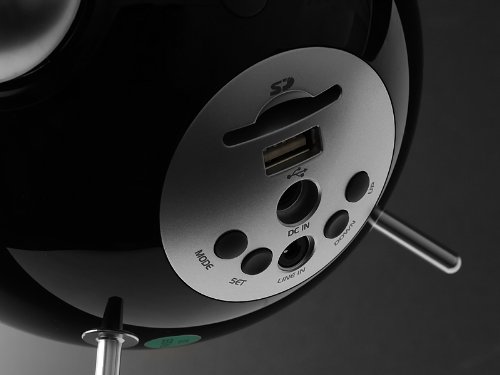
This image displays the rear panel of the Edifier Tick Tock alarm clock. Visible ports and buttons include:
- Слот для SD-карти: Insert an SD card for music playback.
- Порт USB: Підключіть USB-флеш-накопичувач для відтворення музики.
- DC IN: Вхід живлення для адаптера змінного струму, що входить до комплекту.
- ЛІНІЙНИЙ ВХІД (AUX): 3.5-мм аудіовхід для підключення зовнішніх пристроїв.
- Кнопка MODE: Cycles through input modes (SD, USB, FM, AUX).
- Кнопка SET: Used for entering settings menus (e.g., time, alarm).
- Кнопки ВГОРУ/ВНИЗ: Navigate menus, adjust volume, or change settings.
Елементи керування на верхній панелі
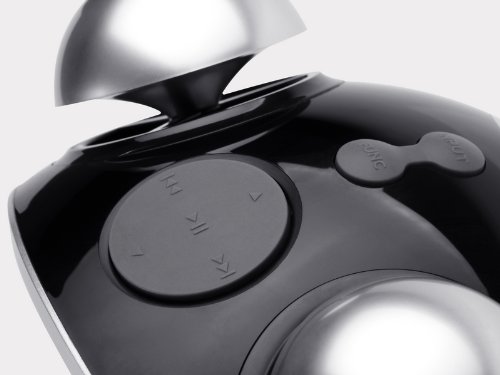
This image shows the top panel controls of the Edifier Tick Tock alarm clock. These include:
- Кнопка відтворення/паузи: Починає або призупиняє відтворення медіафайлів.
- Кнопки попереднього/наступного треку: Skips to the previous or next track during media playback. Also used for tuning FM radio.
- Кнопки збільшення / зменшення гучності: Регулює гучність аудіовиходу.
- Кнопка SNOOZE/PICTURES: Активує повтор будильника під час будильника або регулює яскравість дисплея.
Налаштування
- Розпакування: Carefully remove the alarm clock and all accessories from the packaging. Ensure all components are present: the alarm clock unit, AC power adapter, and this user manual.
- Підключення живлення: Connect the AC power adapter to the "DC IN" port on the rear of the alarm clock. Plug the adapter into a standard wall outlet. The display should illuminate.
- Початкове ввімкнення: The unit should power on automatically. If not, press the power button (if available, otherwise it's always on when plugged in).
- Антена (FM-радіо): Extend the FM antenna located at the back of the unit for optimal radio reception.
Інструкція з експлуатації
Налаштування часу та дати
- Натисніть і утримуйте НАБІР кнопку, доки дисплей часу не почне блимати.
- Використовуйте UP і ВНИЗ кнопки для налаштування години. Натисніть НАБІР щоб підтвердити та перейти до хвилин.
- Налаштуйте хвилини за допомогою UP і ВНИЗ. Прес НАБІР для підтвердження.
- Continue this process to set the year, month, and day. Press НАБІР to exit the time/date setting mode.
Налаштування будильника
- Натисніть НАБІР один раз натисніть кнопку (не утримуйте), щоб увійти в режим налаштування будильника. Час будильника блиматиме.
- Використовуйте UP і ВНИЗ кнопки для налаштування години будильника. Натисніть НАБІР щоб підтвердити та перейти до хвилин.
- Налаштуйте хвилини за допомогою UP і ВНИЗ. Прес НАБІР для підтвердження.
- Next, select the alarm source (FM, SD, USB, AUX). Use UP і ВНИЗ to cycle through options. Press НАБІР для підтвердження.
- If FM is selected, use UP і ВНИЗ to select a preset FM station (P01-P24).
- If SD or USB is selected, ensure a card/drive with audio is inserted. The alarm will play the first track.
- If AUX is selected, ensure an external device is connected and playing audio.
- Прес НАБІР again to activate the alarm. An alarm icon will appear on the display.
- To deactivate the alarm, press НАБІР until the alarm icon disappears.
- Коли пролунає будильник, натисніть кнопку СНУЗ / СВІТЛО button to activate snooze (typically 9 minutes). To turn off the alarm completely, press any other button.
Робота FM-радіо
- Натисніть РЕЖИМ кілька разів, доки на дисплеї не з’явиться напис «FM».
- Автоматичне сканування та попередньо встановлені налаштування: Натисніть і утримуйте ВІДТВОРЕННЯ/ПАУЗА button. The radio will automatically scan for available stations and save them to presets (P01-P24).
- Ручна настройка: Використовуйте ПОПЕРЕДНІЙ/НАСТУПНИЙ ТРЕК кнопки для точного налаштування частоти.
- Вибір пресетів: У режимі FM коротко натисніть ПОПЕРЕДНІЙ/НАСТУПНИЙ ТРЕК кнопки для перемикання між збереженими попередньо встановленими станціями.
- Відрегулюйте гучність за допомогою UP і ВНИЗ buttons on the rear panel.
SD Card / USB Playback
- Insert an SD card into the SD card slot or a USB flash drive into the USB port on the rear panel.
- Натисніть РЕЖИМ button repeatedly until "SD" or "USB" appears on the display. The device will automatically start playing audio files.
- Використовуйте ВІДТВОРЕННЯ/ПАУЗА кнопку, щоб призупинити або продовжити відтворення.
- Використовуйте ПОПЕРЕДНІЙ/НАСТУПНИЙ ТРЕК buttons on the top panel to skip tracks.
- Відрегулюйте гучність за допомогою UP і ВНИЗ buttons on the rear panel.
Auxiliary Input (LINE IN)
- Connect an external audio device (e.g., smartphone, MP3 player) to the "LINE IN" (3.5mm) port on the rear panel using an audio cable (not included).
- Натисніть РЕЖИМ кілька разів, доки на дисплеї не з’явиться напис «AUX».
- Розпочніть відтворення на підключеному зовнішньому пристрої.
- Відрегулюйте гучність за допомогою UP і ВНИЗ buttons on the rear panel, and also control volume from your external device.
Яскравість дисплея
Коротко натисніть СНУЗ / СВІТЛО button on the top panel to cycle through different display brightness levels.
Технічне обслуговування
- Прибирання: Use a soft, dry cloth to clean the surface of the alarm clock. Do not use abrasive cleaners, waxes, or solvents.
- Розміщення: Place the unit on a stable, flat surface. Avoid direct sunlight, high temperatures, humidity, or dusty environments.
- Потужність: Від’єднайте адаптер живлення від розетки, якщо пристрій не використовуватиметься протягом тривалого часу.
Усунення несправностей
| проблема | Можлива причина / рішення |
|---|---|
| Немає живлення / Дисплей вимкнений |
|
| Немає звуку з динаміків |
|
| Поганий прийом FM-радіо |
|
| Alarm does not sound or plays static |
|
| Дисплей занадто яскравий вночі |
|
Технічні характеристики
| Бренд | Едифікатор |
| Номер моделі | MF240Reto |
| Тип дисплея | ЖК |
| Технологія підключення | AUX, USB |
| Особливості | Alarm, Radio, SD Card Reader, USB Playback |
| Джерело живлення | Провідний електричний |
| матеріал | пластик |
| Вага товару | 0.74 фунта (приблизно 0.34 кг) |
| Виробник | Edifier США |
Гарантія та підтримка
This Edifier product comes with a Гарантія від виробника 2 рік. For warranty claims, technical support, or further assistance, please contact Edifier USA customer service. Please retain your proof of purchase for warranty validation.
Щоб отримати найактуальнішу інформацію про підтримку, відвідайте офіційний сайт Edifier. webсайт.