
1. Вступ
This manual provides detailed instructions for the installation, operation, and maintenance of your PHONOCAR VM016 DAB+ Bluetooth Car Radio. Please read this manual thoroughly before using the product to ensure correct operation and to prevent damage. Keep this manual for future reference.
2. Інформація про безпеку
- Ensure the vehicle's ignition is off and the negative battery terminal is disconnected before installation to prevent electrical shorts.
- Connect the unit only to a 12V or 24V DC power supply with a negative ground.
- Не розбирайте та не модифікуйте пристрій. Це може призвести до ураження електричним струмом, пожежі або інших несправностей.
- Avoid installing the unit in locations where it would obstruct the driver's view або заважати роботі автомобіля.
- Protect the unit from direct sunlight, excessive heat, humidity, and dust.
- Always use the correct fuse rating as specified.
3. Продукт закінчивсяview
The PHONOCAR VM016 is a versatile car radio designed for 12V and 24V vehicles, offering a range of audio playback options including DAB+ digital radio, FM radio, Bluetooth connectivity, USB, SD card, and AUX-IN. It features a detachable front panel for security and an amplified output of 4x30 Watts.

Малюнок 3.1: Спереду view of the PHONOCAR VM016 Car Radio.
Ключові характеристики:
- Приймач DAB+: Насолоджуйтесь високоякісними цифровими радіопередачами.
- Bluetooth A2DP: Wireless audio streaming and hands-free calling.
- USB & SD/MMC Card Slot: Відтворити MP3 files from external storage (up to 16 GB for SD).
- Передній AUX-IN: Підключіть зовнішні аудіопристрої через 3.5-мм роз'єм.
- Знімна передня панель: Покращена функція безпеки.
- Encoder Volume Control: Intuitive volume adjustment.
- Automatic Memory Preset: Stores radio stations automatically.
- RDS System: Radio Data System for FM broadcasts.
- 27 FM Preset Stations: Quick access to your favorite FM stations.
- Last Position Memory: Resumes playback from where it left off.
- Ampліфікований вихід: 4 x 30 Watt for clear audio.
- 12V-24V Power: Compatible with both standard car and truck electrical systems.
- Ampліфікована антена: Included for improved reception.
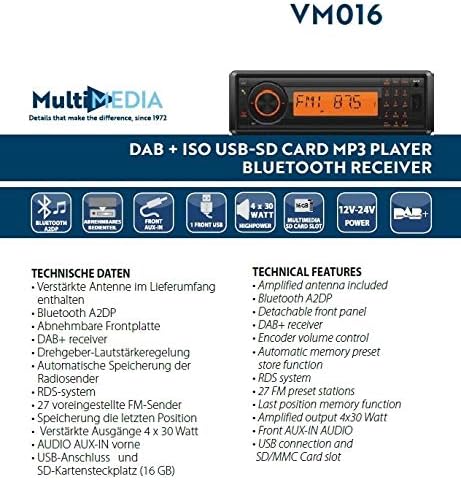
Figure 3.2: Diagram illustrating the technical features and connections of the PHONOCAR VM016.
4. Монтаж
4.1 Перевірка перед встановленням
- Verify that your vehicle's electrical system is 12V or 24V DC with a negative ground.
- Ensure you have all necessary tools and accessories for installation.
4.2 Підключення проводів
The unit uses standard ISO connectors for power and speaker connections. Refer to your vehicle's wiring diagram for specific connections if not using standard ISO.
- Підключення живлення: Connect the yellow wire to the constant 12V/24V supply, the red wire to the accessory (switched) 12V/24V supply, and the black wire to a good chassis ground.
- Підключення динаміків: Connect the speaker wires according to their polarity (positive and negative) to the corresponding vehicle speakers. Ensure no speaker wires are shorted to each other or to the vehicle chassis.
- Підключення антени: Підключіть amplified DAB+/FM antenna (included) to the antenna input on the rear of the unit. Ensure proper placement of the antenna for optimal reception.
4.3 Монтаж
Insert the unit into the DIN-sized opening in your vehicle's dashboard. Secure it using the provided mounting sleeve and brackets. Ensure the unit is firmly seated to prevent movement during driving.
5. Інструкція з експлуатації
5.1 Основні елементи керування
- Увімкнення/вимкнення живлення: Натисніть ПОТУЖНІСТЬ кнопку, щоб увімкнути або вимкнути пристрій.
- Регулювання гучності: Обертайте Кнопка кодування (main rotary knob) to adjust the volume level.
- Вибір режиму: Натисніть РЕЖИМ button to cycle through available sources: DAB+, FM, Bluetooth, USB, SD, AUX-IN.
5.2 Робота радіо (DAB+ / FM)
- Вибір діапазону: У режимі радіо натисніть БЕНД button to switch between DAB+ and FM bands.
- Автоматичне сканування: Натисніть і утримуйте СКАНУВАТИ кнопку для автоматичного пошуку та збереження доступних станцій.
- Ручна настройка: Використовуйте НАСТРОЙКА +/- кнопки для ручного налаштування частоти.
- Попередньо встановлені станції: Use the numeric buttons (1-6) to select stored preset stations. To store a station, tune to the desired frequency, then press and hold a numeric button until you hear a confirmation beep.
- RDS System (FM): When available, the Radio Data System will display station information such as program type and station name.
5.3 Робота Bluetooth
- Сполучення: Select Bluetooth mode. On your mobile device, search for Bluetooth devices and select "PHONOCAR VM016". Enter "0000" if a PIN is required. Once paired, the Bluetooth icon will illuminate.
- Потокове аудіо (A2DP): Play audio from your paired device. Use the unit's controls or your device to manage playback (play/pause, skip tracks).
- Дзвінок без використання рук: Коли надходить дзвінок, пристрій відображатиме ідентифікатор абонента. Натисніть кнопку ДЗВОНІТЬ button to answer, and press it again to end the call.
5.4 Media Playback (USB, SD Card, AUX-IN)
- USB/SD-карта: Insert a USB drive or SD card into the respective slot. The unit will automatically switch to USB/SD mode and begin playing compatible MP3 files. Використовувати ПРОПУСТИТИ кнопки для навігації по треках.
- ВХІД: Connect an external audio device (e.g., MP3 player, smartphone) to the front AUX-IN jack using a 3.5mm audio cable. Select AUX-IN mode to listen to audio from the connected device.
5.5 Detachable Front Panel
To remove the front panel, press the ЗВІЛЬНІТЬ button. Gently pull the panel away from the main unit. To reattach, align the panel with the main unit and push until it clicks into place.
6. Технічне обслуговування
- Прибирання: Використовуйте м’яку суху тканину для очищення поверхні пристрою. Для видалення стійкого брудуampen the cloth with a small amount of mild detergent. Do not use abrasive cleaners or solvents.
- Front Panel Care: Handle the detachable front panel with care. Avoid touching the contacts on the back of the panel. Store it in the provided case when removed.
- Заміна запобіжника: If the unit does not power on, check the fuse. Replace it with a fuse of the same rating only.
7. Вирішення проблем
- Немає живлення: Check the power connections (yellow, red, black wires) and the fuse. Ensure the vehicle's ignition is on if connected to a switched power source.
- Немає звуку: Check speaker connections. Ensure the volume is not at minimum and the MUTE function is not active. Verify the correct audio source is selected.
- Поганий радіоприйом: Check the antenna connection. Ensure the amplified antenna is properly installed and positioned. Try performing an automatic scan again.
- Проблеми з підключенням Bluetooth: Ensure Bluetooth is enabled on your mobile device and the unit is in Bluetooth mode. Delete previous pairings and try pairing again.
- USB/SD Playback Errors: Ensure the USB drive or SD card is formatted correctly (FAT32) and contains compatible MP3 files. Check for file corruption. The maximum supported SD card size is 16 GB.
8. Технічні характеристики
| Особливість | Специфікація |
|---|---|
| Номер моделі | VM016 |
| Джерело живлення | 12V - 24V DC (Negative Ground) |
| Вихідна потужність аудіо | 4 х 30 Вт |
| Підключення | Bluetooth (A2DP), USB, SD/MMC Card, Front AUX-IN |
| Радіо тюнер | DAB+, FM (з RDS) |
| FM-пресети | 27 станцій |
| Підтримувані носії | MP3 (via USB/SD) |
| Ємність SD-карти | До 16 Гб |
| Особливості | Detachable Front Panel, Last Position Memory, Amplified Antenna Included |
| Колір | чорний |
9. Гарантія та підтримка
For warranty information and technical support, please refer to the documentation provided with your purchase or contact your authorized PHONOCAR dealer. Keep your proof of purchase for warranty claims.