
1. Вступ
This manual provides essential information for the safe and efficient operation of your Datalogic PowerScan M8300-AR910RB Handheld Laser Bar Code Reader. Please read this manual thoroughly before using the device to ensure proper setup, operation, and maintenance. Keep this manual for future reference.
2. Інформація про безпеку
Завжди дотримуйтесь наступних запобіжних заходів, щоб запобігти травмуванню або пошкодженню пристрою:
- Лазерна безпека: This device emits a laser beam. Do not stare directly into the laser beam or point it at others. Avoid direct eye exposure.
- Безпека батареї: Use only Datalogic-approved batteries and charging accessories. Do not expose batteries to extreme temperatures, puncture, or disassemble them. Dispose of batteries according to local regulations.
- Умови навколишнього середовища: Do not operate the device in explosive atmospheres or near flammable materials. Keep the device dry and away from extreme temperatures.
- Технічне обслуговування: Refer all servicing to qualified service personnel. Do not attempt to open or modify the device.
3. Вміст упаковки
Перевірте наявність усіх елементів в упаковці:
- Datalogic PowerScan M8300-AR910RB Handheld Laser Bar Code Reader
- Знімний акумулятор
- Charging/Communication Cradle (may be sold separately depending on configuration)
- USB or Serial Cable (for cradle connection, may be sold separately)
- Power Supply (for cradle, may be sold separately)
- Короткий посібник
4. Продукт закінчивсяview
The Datalogic PowerScan M8300 is a robust, cordless handheld laser bar code reader designed for industrial applications. It features a durable casing and a 910MHz radio for reliable wireless communication.
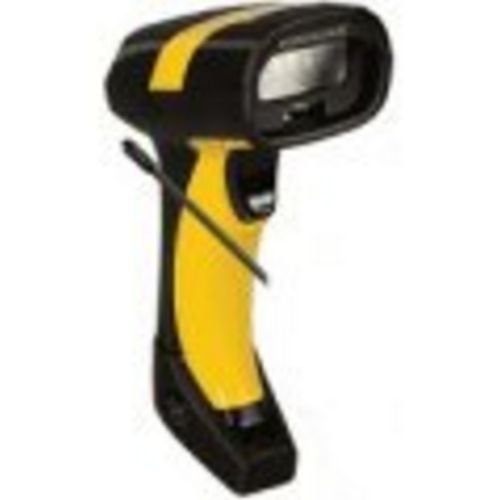
Зображення 1: Datalogic PowerScan M8300 Handheld Laser Bar Code Reader. This image displays the front view of the scanner, highlighting its ergonomic design, scan window, and trigger button.
Ключові компоненти:
- Вікно сканування: Located at the front, where the laser beam exits to read barcodes.
- Тригер: Activates the laser for scanning.
- Світлові індикатори: Provide feedback on scan status, battery level, and communication.
- Батарейний відсік: Located at the base of the handle, housing the removable battery.
- Інтерфейс зв'язку: For wireless data transmission via the 910MHz radio.
5. Налаштування
5.1. Встановлення батареї
- Переконайтеся, що сканер вимкнено.
- Locate the battery compartment cover at the bottom of the handle.
- Open the cover and insert the removable battery, ensuring correct polarity.
- Надійно закрийте кришку батарейного відсіку.
5.2. Зарядка батареї
- Place the scanner into its charging cradle. Ensure the contacts on the scanner align with those on the cradle.
- Connect the power supply to the charging cradle and plug it into an electrical outlet.
- Індикатор сканера показуватиме стан заряджання (зазвичай жовтий – заряджання, зелений – повна зарядка).
- Перед першим використанням дайте акумулятору повністю зарядитися (приблизно 4 години).
5.3. Connecting to a Host System
The PowerScan M8300 uses a 910MHz radio for wireless communication. It typically connects to a host system (e.g., PC, laptop) via a base station or cradle connected by a USB or serial cable.
- Connect the communication cable (USB or serial) from the charging/communication cradle to your host system.
- Connect the power supply to the cradle and plug it in.
- Place the scanner in the cradle. The scanner and cradle will automatically establish a wireless link.
- Install any necessary drivers or software on your host system as prompted or as instructed by Datalogic documentation for your specific cradle model.
6. Інструкція з експлуатації
6.1. Увімкнення/вимкнення живлення
- Щоб увімкнути: The scanner typically powers on automatically when removed from the cradle or when the trigger is pressed.
- Щоб вимкнути: The scanner will enter a low-power sleep mode after a period of inactivity. To fully power off, remove the battery.
6.2. Сканування штрих-кодів
- Aim the scan window at the barcode you wish to read.
- Press and hold the trigger button. A laser line will appear.
- Position the laser line across the entire barcode.
- Once the barcode is successfully read, the scanner will emit an audible beep and/or an indicator light will illuminate.
- Release the trigger. The scanned data will be transmitted to the connected host system.
6.3. Передача даних
The PowerScan M8300 transmits scanned data wirelessly to its paired base station/cradle. Ensure the scanner is within range of its base station for successful data transfer. Out-of-range scanning capabilities may vary by configuration; refer to advanced programming guides for details.
7. Технічне обслуговування
7.1. Очищення пристрою
- Використовуйте м’яку, чисту тканину dampпромити водою або м’яким миючим розчином.
- Не використовуйте абразивні засоби для чищення, розчинники або агресивні хімікати.
- Обережно протріть вікно сканування та зовнішню частину сканера.
- Переконайтеся, що рідина не потрапляє в отвори пристрою.
7.2. Догляд за акумулятором
- Регулярно заряджайте акумулятор.
- Уникайте частого повного розряджання акумулятора.
- Store the scanner and spare batteries in a cool, dry place when not in use.
7.3. Зберігання
When storing the scanner for extended periods, ensure the battery is partially charged (around 50%) and remove it from the device if possible. Store in a temperature-controlled environment.
8. Вирішення проблем
If you encounter issues with your PowerScan M8300, refer to the following common problems and solutions:
| проблема | Можлива причина | Рішення |
|---|---|---|
| Сканер не вмикається. | Розряджений або неправильно встановлений акумулятор. | Check battery installation. Charge the battery. Replace battery if necessary. |
| Сканер не зчитує штрих-коди. | Barcode damaged or poorly printed; scan window dirty; incorrect symbology enabled. | Try scanning a different barcode. Clean the scan window. Refer to the programming guide to enable/disable symbologies. |
| Дані не передаються на хост. | Scanner out of range; base station not connected; communication issue. | Move scanner closer to the base station. Verify base station connection to host. Check base station power. |
| Термін служби батареї короткий. | Battery nearing end of life; frequent use; improper charging. | Replace battery. Ensure full charges. Reduce backlight/power settings if configurable. |
If the problem persists, contact Datalogic technical support.
9. Технічні характеристики
The following specifications apply to the Datalogic PowerScan M8300-AR910RB model:
- Номер моделі: PM8300-AR910RB
- Розміри продукту: 2.72 x 4.49 x 8.15 дюймів
- Вага товару: 13.9 унції
- Виробник: Datalogic ADC
- Джерело живлення: Працює від батареї
- Технологія підключення: Бездротовий (910 МГц)
- Сумісні пристрої: Настільний комп'ютер, ноутбук
- UPC: 053926383351
10. Інформація про гарантію
Datalogic products are covered by a limited warranty against defects in materials and workmanship. The specific terms and duration of the warranty may vary by region and product. Please refer to the warranty card included with your product or visit the official Datalogic webсайт для отримання детальної інформації про гарантію та процедури реєстрації.
11. Підтримка
For technical assistance, product inquiries, or to report issues, please contact Datalogic customer support:
- Webсайт: Visit the official Datalogic website for support resources, FAQs, and driver downloads.
- Контакти: Refer to the 'Contact Us' section on the Datalogic webсайт для номерів телефонів та адрес електронної пошти, що стосуються вашого регіону.
When contacting support, please have your product model number (PM8300-AR910RB) and serial number ready.