
1. Вступ
This manual provides detailed instructions for the installation, operation, and maintenance of the Supermicro CSE-827HD-R1400B 1400W 2U Rackmount Server Chassis. This high-performance chassis is designed to house server components, offering robust power delivery and efficient cooling for demanding applications. Please read this manual thoroughly before proceeding with installation or operation.
2. Інформація про безпеку
Завжди дотримуйтесь наступних запобіжних заходів, щоб запобігти травмам та пошкодженню обладнання:
- Перед будь-яким встановленням або технічним обслуговуванням переконайтеся, що живлення відключено.
- Wear anti-static wrist straps when handling internal components to prevent electrostatic discharge (ESD).
- Do not operate the chassis with the cover removed unless specifically instructed for troubleshooting.
- Забезпечте належне заземлення всіх електричних з'єднань.
- This chassis is heavy. Use appropriate lifting techniques or assistance when moving or installing it in a rack.
- Maintain adequate ventilation around the chassis to prevent overheating.
3. Вміст упаковки
Перевірте наявність усіх елементів в упаковці:
- Supermicro CSE-827HD-R1400B 2U Rackmount Server Chassis
- 1400W High-Efficiency (1+1) Redundant Power Supply (pre-installed)
- 4x 80mm PWM Cooling Fans (pre-installed)
- Rack mounting rails (if included with your specific purchase)
- Accessory kit (screws, cables, standoffs)
- Посібник зі швидкого встановлення (цей документ)
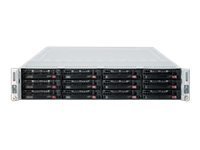
малюнок 3.1: Supermicro CSE-827HD-R1400B 2U Rackmount Server Chassis. This image shows the front view of the server chassis, highlighting its rackmount design and general appearance.
4. Налаштування та встановлення
Follow these steps for proper installation of the server chassis and its components.
4.1. Монтаж в стійку
- Attach the provided rack rails to the server chassis sides using the designated screws.
- Mount the other end of the rack rails to the server rack posts, ensuring they are securely fastened.
- Slide the chassis into the rack until it locks into place.
4.2. Встановлення материнської плати
The chassis supports ATX motherboards.
- Remove the chassis top cover by unscrewing the retaining screws.
- Install the I/O shield into the chassis rear panel.
- Align the motherboard with the standoffs inside the chassis.
- Закріпіть материнську плату відповідними гвинтами.
4.3. Встановлення жорсткого диска
The chassis supports 3.5-inch hard drives.
- Locate the drive bays.
- Mount each 3.5-inch hard drive into a drive tray.
- Slide the drive tray with the installed hard drive into the designated bay until it clicks into place.
- Connect the SATA/SAS data and power cables to each hard drive.
4.4. Підключення живлення
- Connect the main 24-pin ATX power connector from the power supply to the motherboard.
- Підключіть 8-контактний (або 4-контактний) роз'єм живлення процесора до материнської плати.
- Ensure all peripheral power connectors (e.g., for GPUs, additional fans) are properly connected.
- Connect the AC power cords from the redundant power supplies to separate, grounded power outlets.
5. Інструкція з експлуатації
5.1. Увімкнення/вимкнення живлення
- Увімкнення: After all connections are secure, press the power button on the front panel. The power LED should illuminate.
- Звичайне вимкнення: Виконайте коректне завершення роботи через операційну систему.
- Примусове відключення: Press and hold the power button for 5-7 seconds. Use only when necessary to prevent data loss.
5.2. Світлодіодні індикатори
Refer to your motherboard manual for specific LED indicator meanings. Common indicators on the chassis front panel include:
- Світлодіод живлення: Indicates system power status (On/Off/Standby).
- HDD Activity LED: Flashes when hard drives are being accessed.
- Network Activity LED: Indicates network traffic (if integrated on the front panel).
6. Технічне обслуговування
Regular maintenance ensures optimal performance and longevity of your server chassis.
- Видалення пилу: Periodically clean dust from the chassis interior, especially fan blades and heatsinks, using compressed air. Ensure the system is powered off and unplugged before cleaning.
- Перевірка вентилятора: Check cooling fans for proper operation and excessive noise. Replace any failing fans promptly.
- Управління кабелем: Ensure internal cables are neatly routed to avoid obstructing airflow.
7. Вирішення проблем
У цьому розділі розглядаються поширені проблеми, з якими ви можете зіткнутися.
| проблема | Можлива причина | Рішення |
|---|---|---|
| Система не вмикається. | Power cables disconnected, faulty power supply, faulty power button. | Check all power connections. Verify power supply status LEDs. Test power button functionality. |
| Надмірний шум вентилятора. | Dust accumulation, failing fan bearing. | Clean fans. Replace noisy or failing fans. |
| Перегрів системи. | Poor airflow, fan failure, dust buildup. | Ensure proper ventilation. Check fan operation. Clean dust from components. |
| Hard drives not detected. | Loose data/power cables, incorrect BIOS settings, faulty drive. | Verify all data and power cables are securely connected. Check BIOS/UEFI settings. Test drives in another system if possible. |
8. Технічні характеристики
| Особливість | Деталь |
|---|---|
| Бренд | Супермікро |
| Назва моделі | CSE-827HD-R1400B |
| Форм-фактор | Монтаж у стійку 2U |
| Сумісність материнської плати | ATX |
| Джерело живлення | 1400W High-Efficiency (1+1) Redundant, 80 PLUS Gold Certified |
| Вентилятори охолодження | 4x 80mm PWM |
| Форм-фактор жорсткого диска | 3.5 дюймів |
| Колір | чорний |
| Вага товару | 68 фунта |
| Розміри продукту (Д x Ш x В) | 28.5" Г x 28.5" Ш x 28.5" В |
| UPC | 672042062768 |
| ASIN | B005KFBPBS |
9. Гарантія та підтримка
For warranty information, please refer to the documentation provided with your purchase or visit the official Supermicro website. For technical support, product inquiries, or to report issues, please contact Supermicro customer service through their official channels.
Інтернет-підтримка: www.supermicro.com/support
Контактна інформація: Зверніться до Supermicro webсайт для отримання регіональної контактної інформації.