
1. Вступ
This manual provides essential instructions for the safe and efficient operation of your Sharp CD-DH950P 240W Mini-Component System. This system features a 5-disc CD changer, a cassette deck, an iPod/iPhone docking station, a USB host for digital audio playback, and an AM/FM tuner. Please read this manual thoroughly before using the system and retain it for future reference.
2. Інформація про безпеку
- Джерело живлення: Підключайте пристрій лише до розетки змінного струму зазначеної потужності.tage.
- Вентиляція: Забезпечте належну вентиляцію. Не блокуйте вентиляційні отвори.
- Вода і вологість: Не піддавайте пристрій впливу дощу, вологи або крапель/бризок рідин.
- Тепло: Тримайте пристрій подалі від джерел тепла, таких як радіатори, обігрівачі, печі або інші прилади, що виробляють тепло.
- Прибирання: Unplug the unit from the wall outlet before cleaning. Use a soft, dry cloth.
- Обслуговування: Не намагайтеся самостійно обслуговувати цей виріб. Зверніть усі послуги до кваліфікованого обслуговуючого персоналу.
3. Вміст упаковки
Переконайтеся, що ваш пакет містить такі елементи:
- Main Unit (CD-DH950P)
- Лівий динамік
- Правий динамік
- Пульт дистанційного керування з батарейками
- AM Рамкова антена
- FM дротова антена
- Шнур живлення
4. Налаштування
4.1 Підключення динаміків
Connect the speaker wires from the main unit to the corresponding terminals on the back of each speaker. Ensure correct polarity (red to red, black to black) for optimal sound quality. The left speaker connects to the left speaker output, and the right speaker to the right speaker output.
4.2 Connecting the Antennas
- FM антена: Connect the supplied FM wire antenna to the FM antenna terminal on the rear of the main unit. Extend the wire for better reception.
- AM антена: Connect the supplied AM loop antenna to the AM antenna terminals on the rear of the main unit. Position the antenna for best reception.
4.3 Підключення живлення
Plug the power cord into the AC IN jack on the rear of the main unit, then plug the other end into a standard AC wall outlet.
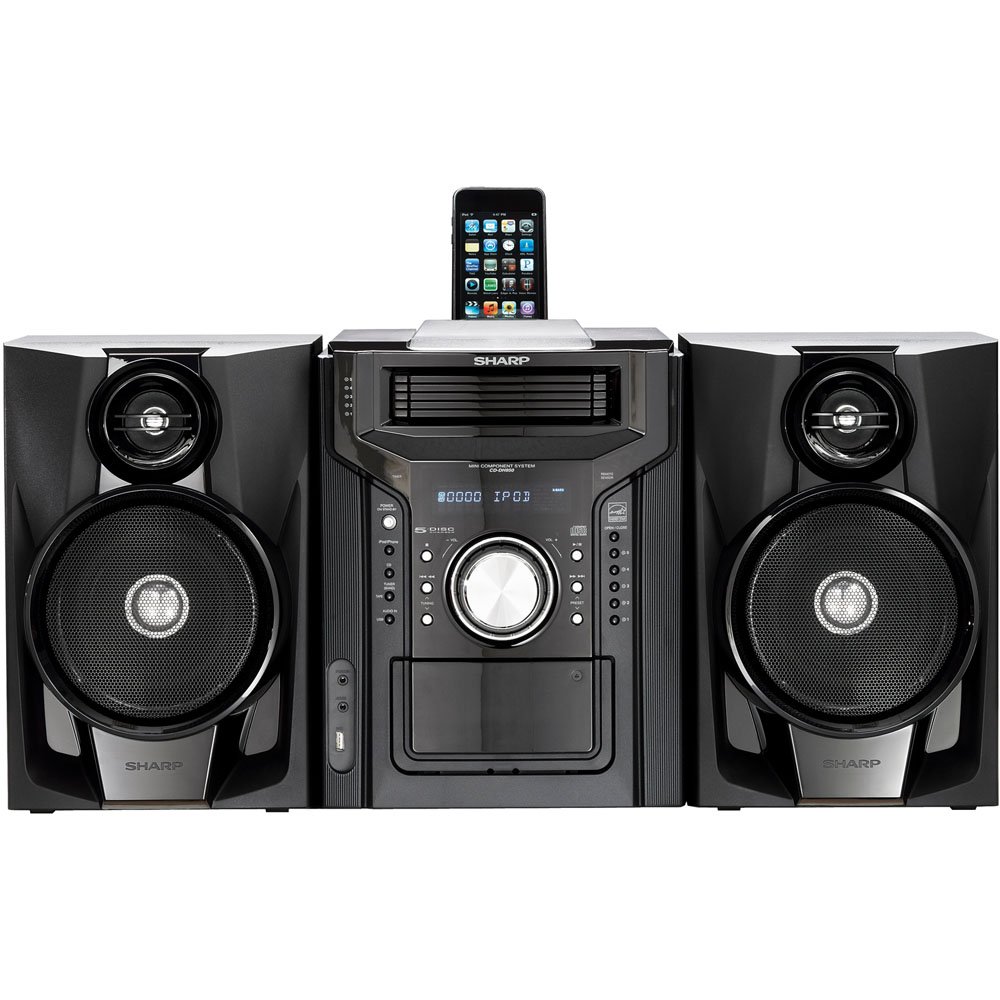
Рисунок 4.3.1: Загалом view of the Sharp CD-DH950P Mini-Component System, showing the main unit flanked by two speakers, with an iPhone docked on top of the main unit.
5. Інструкція з експлуатації
5.1 Увімкнення/вимкнення живлення та регулювання гучності
- Натисніть ПОТУЖНІСТЬ кнопку на передній панелі або пульті дистанційного керування, щоб увімкнути або вимкнути пристрій.
- Обертайте ОБ'ЄМ ручку на передній панелі або скористайтеся ГУЧНІСТЬ +/- кнопки на пульті дистанційного керування для регулювання рівня звуку.
5.2 Відтворення CD
This system features a 5-disc CD changer.
- Натисніть ВІДКРИТИ/ЗАКРИТИ кнопку, щоб відкрити лоток для компакт-дисків.
- Place up to five CDs on the disc trays, label side up.
- Прес ВІДКРИТИ/ЗАКРИТИ знову, щоб закрити лоток.
- Натисніть CD кнопку, щоб вибрати функцію компакт-диска.
- Натисніть ВІДТВОРЕННЯ/ПАУЗА , щоб розпочати відтворення.
- Використовуйте ПРОПУСТИТИ buttons to navigate between tracks or discs.
5.3 Робота касетної деки
- Натисніть TAPE OPEN/CLOSE button to open the cassette deck.
- Вставте касету.
- Натисніть ЛИСТКА button to select the cassette function.
- Прес ГРАТИ щоб розпочати відтворення.
- To record, ensure the source is selected (e.g., CD, Tuner) and press the ЗАПИС button on the cassette deck.
5.4 iPod/iPhone Docking
The system includes a top-mounted docking slot for compatible iPod and iPhone devices (30-pin connector).
- Carefully place your iPod or iPhone into the docking slot.
- The system will automatically switch to iPod/iPhone mode or you may need to press the iPod / iPhone кнопку.
- Use the system's controls or your device's controls to play music. The device will also charge while docked.
5.5 USB Host Playback
Connect a USB storage device containing MP3 or WMA audio fileдо USB-порту на передній панелі.
- Вставте USB-пристрій у USB-порт.
- Натисніть USB кнопку, щоб вибрати функцію USB.
- Use the playback controls to navigate and play files.
5.6 AM/FM-тюнер
- Натисніть ТЮНЕР кнопку, щоб вибрати AM або FM-радіо.
- Використовуйте НАСТРОЙКА +/- кнопки для ручного налаштування станції.
- To auto-scan, press and hold the НАСТРОЙКА +/- кнопки.
- To store a preset, tune to the desired station, then press ПАМ'ЯТЬ followed by a preset number.
5.7 Аудіовхід
Connect an external audio device (e.g., MP3 player, smartphone) to the AUDIO IN jack on the front panel using a 3.5mm stereo cable.
- Connect your device to the AUDIO IN jack.
- Натисніть АУДІО ВХОД кнопку, щоб вибрати це джерело.
- Керуйте відтворенням з підключеного пристрою.
6. Технічне обслуговування
6.1 Очищення пристрою
Wipe the exterior of the unit with a soft, dry cloth. Do not use abrasive cleaners, waxes, or solvents. Ensure the unit is unplugged before cleaning.
6.2 Догляд за компакт-дисками та касетами
- Handle CDs by their edges to avoid fingerprints and scratches. Clean discs with a soft, lint-free cloth from the center outwards.
- Store cassette tapes away from strong magnetic fields and direct sunlight.
7. Вирішення проблем
| проблема | Можлива причина | Рішення |
|---|---|---|
| Немає живлення | Шнур живлення не підключено; розетка несправна | Переконайтеся, що шнур живлення надійно підключений; спробуйте іншу розетку |
| Ні звуку | Занадто низька гучність; Динаміки не підключені; Вибрано неправильне джерело | Збільште гучність; Перевірте підключення динаміків; Виберіть правильне джерело вхідного сигналу |
| Компакт-диск не відтворюється | Disc inserted incorrectly; Disc is dirty or scratched | Insert disc correctly (label side up); Clean or replace disc |
| Поганий радіоприйом | Antenna not positioned correctly; Weak signal | Adjust position of AM/FM antennas; Try auto-tuning or manual fine-tuning |
| iPod/iPhone not charging/playing | Device not properly docked; Device not compatible (e.g., newer connector) | Re-dock the device; Note that this system uses a 30-pin connector, newer devices may require an adapter (not included) |
8. Технічні характеристики
- Бренд: Гострий
- модель: CD-DH950P
- Загальна вихідна потужність: 240 Watts RMS (85W/ch FTC)
- Конфігурація динаміка: 2.1 канал
- Підтримувані аудіоформати: CD, MP3, WMA
- Коефіцієнт сигнал-шум: 100 дБ
- Сумісні пристрої: MP3 Player, Smartphone (via 30-pin dock or USB/Audio In)
- Розміри (Д x Ш x В): 27.6 x 13.6 x 13.5 дюймів
- Вага товару: 24.4 фунта
- UPC: 074000369863, 074000369290
9. Інформація про гарантію
This product is covered by a 1-year limited warranty from the date of purchase. Please refer to the warranty card included with your product for full terms and conditions, or contact Sharp customer service for details.
10. Підтримка
For further assistance, technical support, or service inquiries, please contact Sharp customer service. Contact information can typically be found on the Sharp official webсайті або в документації, що надається разом із вашим продуктом.