
Coby CAM3002
Coby SNAPP CAM3002 Mini Camcorder User Manual
Модель: CAM3002
1. Вступ
Thank you for choosing the Coby SNAPP CAM3002 Mini Camcorder. This compact device is designed for easy video recording and photo capture, offering portability and user-friendly operation. This manual provides detailed instructions to help you set up, operate, and maintain your camcorder effectively.
2. Вміст упаковки
Будь ласка, перевірте упаковку на наявність наступних предметів:
- Coby SNAPP CAM3002 Mini Camcorder
- 2 x лужні батарейки типу АА
- TV Connection Cable (RCA/Composite Video Cable)
- Muvee Software (on CD or via download link)
- Посібник користувача (цей документ)
3. Camcorder Overview
Familiarize yourself with the main components of your Coby SNAPP CAM3002 Mini Camcorder:
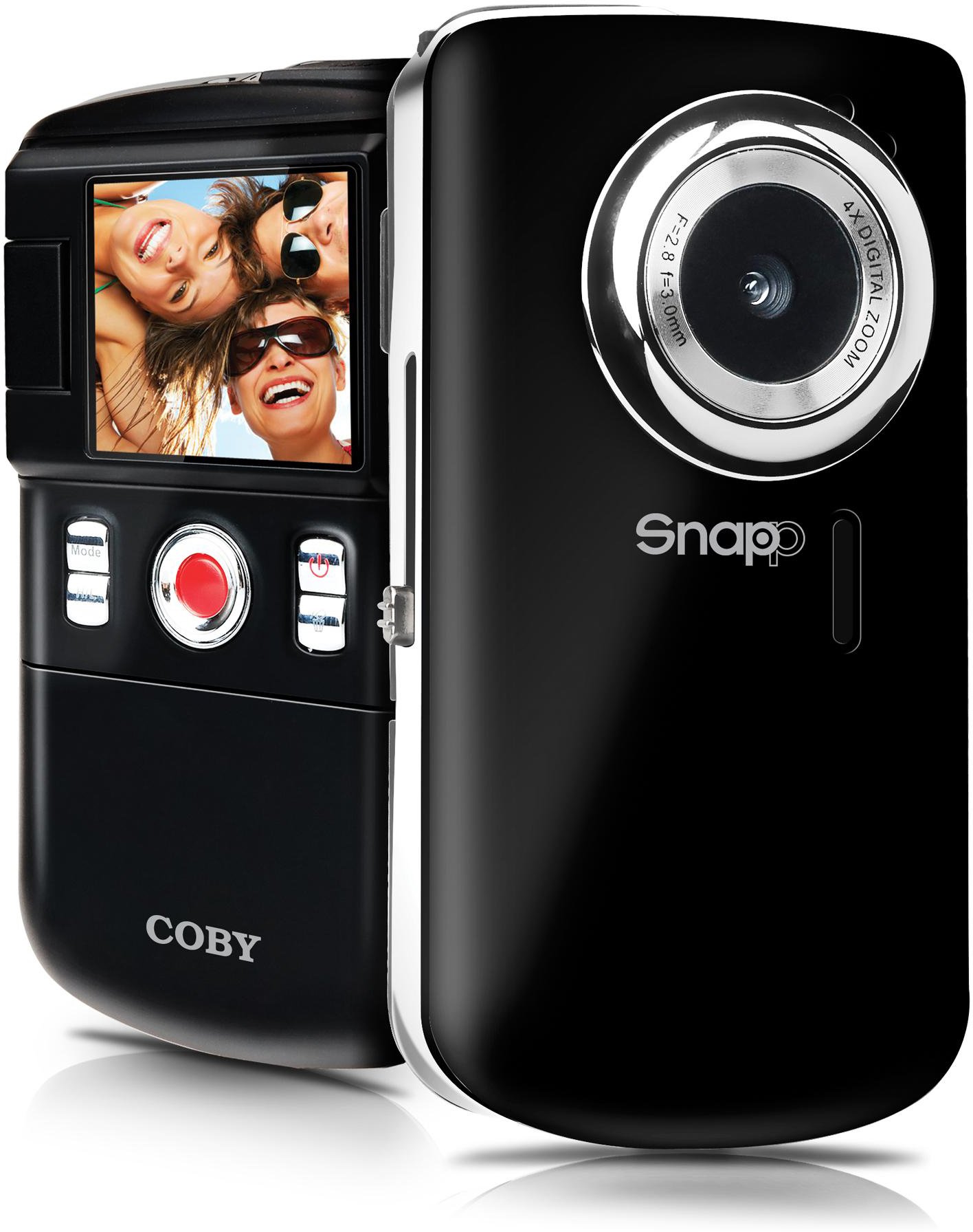
This image displays the front of the Coby SNAPP CAM3002 Mini Camcorder. Visible features include the camera lens, a small microphone opening, and several control buttons on the side, indicating its compact and portable design.
- Об'єктив камери: Записує відео та фотографії.
- Мікрофон: Записує звук під час відеозйомки.
- 1.8-дюймовий РК-екран: Displays menus, live view, and playback. This screen can flip out for self-portraits.
- Кнопки управління: For power, mode selection, recording, photo capture, and navigation.
- Батарейний відсік: Holds 2 AA alkaline batteries.
- Слот для карт SD/SDHC: Для встановлення карти пам'яті (до 16 ГБ).
- Integrated USB Plug: Для прямого підключення до комп'ютера file transfer and charging (if rechargeable batteries are used).
- Вихідний порт для телевізора: For connecting to a television using the included cable.
4. Налаштування
4.1. Встановлення батарей
- Locate the battery compartment cover on the camcorder.
- Посуньте або підніміть кришку, щоб відкрити її.
- Вставте дві (2) лужні батарейки типу АА, дотримуючись правильної полярності (+/-), як зазначено всередині відсіку.
- Надійно закрийте кришку батарейного відсіку.
4.2. Вставлення карти пам'яті
The camcorder requires an SD or SDHC memory card (up to 16GB) to store videos and photos.
- Locate the SD/SDHC card slot on the camcorder.
- Insert the memory card with the metal contacts facing down (or as indicated by a diagram near the slot) until it clicks into place.
- Щоб вийняти карту, обережно натисніть на неї до клацання, потім відпустіть, і вона трохи висунеться.
4.3. Увімкнення/вимкнення живлення
- Щоб увімкнути живлення, натисніть і утримуйте кнопку живлення, доки не засвітиться РК-екран.
- To power off, press and hold the Power button again until the screen turns off. The camcorder may also power off automatically after a period of inactivity to conserve battery life.
5. Керування відеокамерою
5.1. Вибір режиму
Use the Mode button to switch between the following functions:
- Режим запису відео: For capturing moving images with sound.
- Режим фотозйомки: For taking single photographs.
- Режим відтворення: Для повторногоviewing recorded videos and photos.
5.2. Запис відео
- Переключіться в режим відеозапису.
- Frame your subject using the 1.8-inch LCD screen. The screen can be flipped out for self-recording.
- Press the Record/Capture button to start recording. A red indicator or timer will appear on the screen.
- Press the Record/Capture button again to stop recording.
5.3. Фотографування
- Switch to Still Photo Mode.
- Скомпонуйте об'єкт зйомки за допомогою РК-екрана.
- Press the Record/Capture button to take a photo. The image will be saved to the memory card.
5.4. Відтворення
- Switch to Playback Mode.
- Використовуйте кнопки навігації для перегляду записаних відео та фотографій.
- Press the Record/Capture button to play a video or view фото на весь екран.
5.5. Підключення до телевізора
Ви можете view your recorded content on a larger screen using the included TV connection cable.
- Ensure both the camcorder and the television are powered off.
- Connect one end of the TV connection cable to the TV Out port on the camcorder.
- Connect the other end of the cable to the corresponding video (yellow) and audio (white) input jacks on your television.
- Power on the television and select the correct AV input source.
- Power on the camcorder and switch to Playback Mode to view ваші медіа.
5.6. Перенесення Files до комп’ютера
The camcorder features an integrated USB plug for easy file передача.
- Переконайтеся, що відеокамеру увімкнено.
- Extend the integrated USB plug from the camcorder.
- Plug the camcorder directly into an available USB port on your computer (Mac or PC).
- Your computer should recognize the camcorder as a removable storage device. You can then access the files (videos and photos) and copy them to your computer.
5.7. Using Muvee Software
The included Muvee software is designed to help you edit your videos and photos, and facilitate uploading them to online platforms.
- Install the Muvee software on your computer using the provided CD or download link.
- Follow the software's on-screen instructions for editing and sharing your media.
6. Технічне обслуговування
6.1. прибирання
- Використовуйте м’яку суху тканину для очищення зовнішньої частини відеокамери.
- Для об’єктива та РК-екрана використовуйте спеціальну тканину та розчин для чищення об’єктивів, щоб уникнути подряпин.
- Не використовуйте агресивні хімікати або абразивні миючі засоби.
6.2. Зберігання
- Якщо пристрій не використовується протягом тривалого часу, виймайте батарейки, щоб запобігти витіканню.
- Store the camcorder in a cool, dry place, away from direct sunlight and extreme temperatures.
7. Вирішення проблем
Якщо у вас виникли проблеми з відеокамерою, зверніться до наведених нижче поширених проблем та способів їх вирішення.
| проблема | Можливе рішення |
|---|---|
| Відеокамера не вмикається. | Check if batteries are correctly inserted and fully charged. Replace with fresh AA alkaline batteries if necessary. |
| Poor video or photo quality. | Ensure sufficient lighting in the environment. Hold the camcorder steady during recording/capture. Clean the lens if it appears smudged. |
| Неможливо передати fileдо комп'ютера. | Ensure the camcorder is powered on and correctly connected via the integrated USB plug. Try a different USB port on your computer. Verify your computer's operating system recognizes the device. |
| Короткий час автономної роботи. | Use fresh, high-quality AA alkaline batteries. Reduce screen brightness if possible (check settings). |
| Помилка карти пам'яті. | Ensure the memory card is correctly inserted. Try reformatting the card (this will erase all data). Try a different compatible SD/SDHC card. |
8. Технічні характеристики
| Особливість | Специфікація |
|---|---|
| Назва моделі | CAM3002 |
| Дисплей | 1.8-inch Full-color LCD Electronic Viewfinder (flips out) |
| Роздільна здатність відео | 480p (640x480) |
| Still Photo Resolution | 0.3 Мп |
| Цифровий зум | 4x |
| Носії інформації | SD/SDHC Memory Card (up to 16GB) |
| Підключення | Integrated Hi-speed USB 2.0 plug, TV Out (RCA) |
| Джерело живлення | 2 x лужні батарейки типу АА |
| Підтримується File Формати | Video: MP4, Photo: JPEG |
| Особливості | Built-in speaker, Muvee software included |
9. Гарантія та підтримка
Coby products are manufactured to high-quality standards. This product is covered by a limited warranty against defects in materials and workmanship. Please refer to the warranty card included with your purchase for specific terms and conditions.
For technical support or customer service inquiries, please visit the official Coby website or contact their customer support line. Keep your purchase receipt as proof of purchase for warranty claims.
Ask a question about this manual
Ask about setup, troubleshooting, compatibility, parts, safety, or missing instructions. Manuals+ will review the question and use this page’s manual context to help answer it.