
1. Вступ
This manual provides detailed instructions for the installation, operation, and maintenance of your Foxconn TSAA725 ATX Tower Case. Please read this manual thoroughly before beginning installation to ensure proper setup and safe use of the product. Keep this manual for future reference.
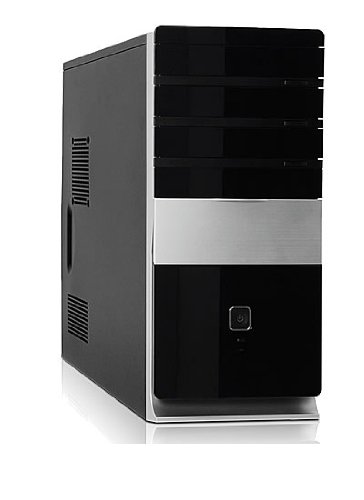
Зображення: спереду view of the Foxconn TSAA725 ATX Tower Case, showcasing its design and front panel ports.
2. Інформація про безпеку
Дотримуйтесь наступних запобіжних заходів, щоб запобігти пошкодженню виробу або травмуванню себе:
- Always disconnect the power supply from the wall outlet before opening the computer case or performing any installation/maintenance.
- Handle internal components with care to avoid electrostatic discharge (ESD) damage. Use an anti-static wrist strap if available.
- Забезпечте належну вентиляцію навколо корпусу, щоб запобігти перегріву.
- Do not expose the case to moisture or extreme temperatures.
- Тримайте дрібні деталі подалі від дітей.
3. Вміст упаковки
Перевірте наявність усіх елементів в упаковці:
- Foxconn TSAA725 ATX Tower Case
- 350W Power Supply (pre-installed)
- Комплект аксесуарів (гвинти, стійки, кабельні стяжки)
- Ця інструкція з експлуатації
4. Ключові характеристики
The Foxconn TSAA725 ATX Tower Case offers the following features:
- матеріал: 0.5mm SGCC Alloy Steel construction for durability.
- Підтримка материнської плати: Compatible with ATX and Micro ATX motherboards.
- Відсіки для дисків:
- 3x 5.25" External Bays
- 2x 3.5" External Bays
- 4x 3.5" Internal Bays
- Система охолодження:
- 1x 80/92/120mm rear fan support (fan not included)
- Optional 1x 80/92/120mm front fan support (fan not included)
- 80mm Air Duct for CPU cooling.
- Передня панель введення/виведення:
- 2 порти USB 2.0
- 1x Headphone jack
- 1x Microphone jack
- Джерело живлення: Integrated 350W Power Supply.
5. Налаштування та встановлення компонентів
Follow these steps to install your computer components into the Foxconn TSAA725 case:
- Підготуйте справу:
Place the case on a flat, stable surface. Remove the side panel(s) by unscrewing the thumbscrews at the rear of the case and sliding the panel backward.
- Встановити материнську плату:
Install the necessary standoffs onto the motherboard tray according to your motherboard's form factor (ATX or Micro ATX). Carefully place the motherboard onto the standoffs, aligning the screw holes. Secure the motherboard with screws provided in the accessory kit.
- Install Drives (HDD/SSD):
For 3.5" internal drives, slide the drive into an available 3.5" internal bay and secure it with screws from the side. For 5.25" external drives (e.g., optical drives), remove the front panel bay cover, slide the drive in from the front, and secure it with screws.
- Встановлення плат розширення:
Remove the appropriate expansion slot covers at the rear of the case. Insert your graphics card or other expansion cards into the PCIe/PCI slots on the motherboard and secure them with screws.
- Підключіть кабелі:
Connect the power supply cables to the motherboard (24-pin ATX, 4/8-pin CPU), graphics card (if applicable), and drives (SATA power). Connect the front panel cables (USB, audio, power switch, reset switch, LED indicators) to the corresponding headers on the motherboard. Refer to your motherboard manual for header locations.
- Управління кабелем:
Route cables neatly to improve airflow and aesthetics. Use cable ties from the accessory kit if needed.
- Закрийте справу:
Once all components are installed and cables are connected, reattach the side panel(s) and secure them with the thumbscrews.
6. Інструкція з експлуатації
After successful assembly, connect your peripherals (monitor, keyboard, mouse) and power cable to the case. Press the power button on the front panel to start your computer.
Порти вводу/виводу на передній панелі:
- Порти USB 2.0: For connecting USB devices such as keyboards, mice, and external storage.
- Роз'єм для навушників: Для підключення навушників або динаміків.
- Роз'єм для мікрофона: Для підключення мікрофона.
- Кнопка живлення: Щоб увімкнути або вимкнути комп’ютер.
- Кнопка скидання: To restart the computer.
7. Технічне обслуговування
Regular maintenance helps ensure optimal performance and longevity of your computer case:
- Очищення від пилу: Periodically clean dust from inside the case, especially from fans and heatsinks, using compressed air. Ensure the computer is powered off and unplugged before cleaning.
- Зовнішнє очищення: Протріть зовнішню частину корпусу м’якою тканиноюamp тканиною. Уникайте абразивних засобів для чищення або розчинників.
- Управління кабелем: Періодично перевіряйте прокладання кабелів, щоб переконатися, що вони не перешкоджають потоку повітря або роботі вентилятора.
8. Вирішення проблем
Якщо у вас виникли проблеми, зверніться до наступних поширених рішень:
- Комп'ютер не вмикається:
- Ensure the power cable is securely connected to both the case's power supply and the wall outlet.
- Check if the power supply switch (if present) is in the 'ON' position.
- Перевірте, чи кабель кнопки живлення на передній панелі правильно підключений до материнської плати.
- Немає зображення на моніторі:
- Ensure the monitor is powered on and connected to the correct video output on your graphics card or motherboard.
- Перевстановіть відеокарту та модулі оперативної пам'яті.
- Не працюють USB-порти:
- Verify that the front panel USB cables are correctly connected to the motherboard's USB headers.
- Спробуйте підключити пристрій до іншого USB-порту.
9. Технічні характеристики
| Особливість | Деталь |
|---|---|
| Бренд | FOXCONN |
| Модель | TSAA725-ISO450 |
| матеріал | 0.5mm SGCC Alloy Steel |
| Сумісність материнської плати | ATX, Micro ATX |
| Drive Bays (External) | 3x 5.25", 2x 3.5" |
| Drive Bays (Internal) | 4x 3.5" |
| Підтримка системи охолодження | 1x 80/92/120mm rear fan, 1x 80/92/120mm front fan (optional), 80mm Air Duct |
| Передні порти вводу-виводу | 2x USB 2.0, 1x Headphone, 1x Microphone |
| Джерело живлення | 350W (Integrated) |
| Розміри продукту (ДxШxВ) | 50.17 х 24.13 х 54.61 см |
| Вага товару | 6.96 кг |
10. Гарантія та підтримка
For warranty information and technical support, please refer to the official Foxconn webсайт або зверніться до місцевого продавця. Зберігайте чек про покупку для гарантійних випадків.
Інтернет-ресурси: For additional support and updated drivers, visit the official Foxconn support page.
Примітка: Гарантійні умови можуть відрізнятися залежно від регіону.