
1. Вступ
The D-Link DES-1008E is an 8-Port Fast Ethernet Desktop Switch designed to expand your network connectivity. This unmanaged switch provides eight 10/100 Mbps Ethernet ports, allowing you to connect multiple devices such as computers, printers, and network-attached storage (NAS) to your network. It supports full-duplex mode, delivering up to 200 Mbps throughput per port for efficient data transfer. The plug-and-play design ensures easy installation without the need for software configuration.
2. Вміст упаковки
Будь ласка, перевірте, чи містить ваша упаковка такі предмети:
- D-Link DES-1008E 8-Port Fast Ethernet Desktop Switch
- Адаптер живлення
- Посібник із швидкого встановлення
Якщо будь-які елементи відсутні або пошкоджені, зверніться за допомогою до місцевого дилера D-Link.
3. Налаштування
Follow these steps to set up your D-Link DES-1008E switch:
- Розташування перемикача: Place the switch on a flat, stable surface or mount it to a wall using appropriate hardware (not included). Ensure adequate ventilation around the device.
- Підключіть адаптер живлення: Plug the provided power adapter into the power port on the back of the DES-1008E switch. Connect the other end of the power adapter to a standard electrical outlet. The power LED on the front of the switch should illuminate.
- Підключення мережевих пристроїв: Connect your network devices (e.g., computers, routers, game consoles) to any of the eight Ethernet ports on the switch using standard Ethernet cables. The corresponding port LED on the front of the switch will illuminate when a connection is established.
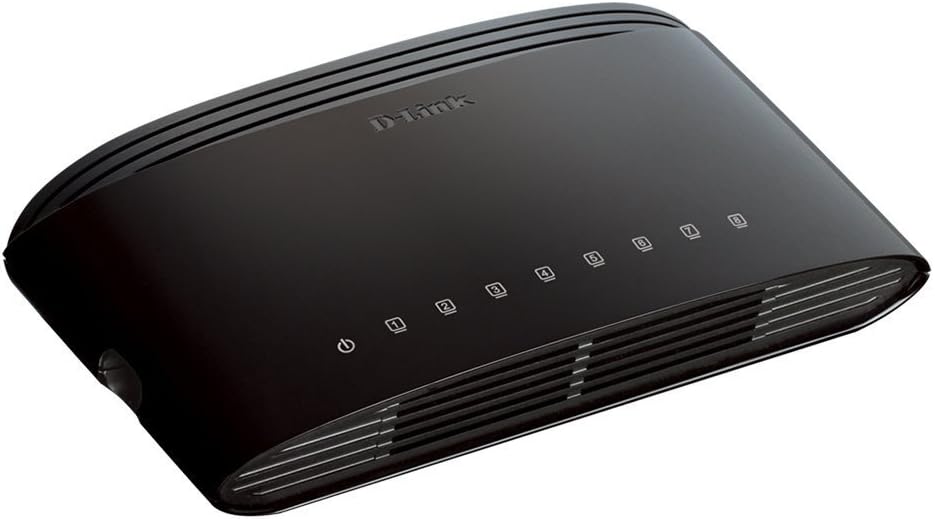
Малюнок 1: Спереду view of the D-Link DES-1008E switch, showing the power indicator and eight port status LEDs.

Малюнок 2: Задня частина view of the D-Link DES-1008E switch, illustrating the eight Ethernet ports for device connections.
The D-Link DES-1008E is a plug-and-play device, requiring no software installation or configuration. Once connected, your devices should automatically detect the network connection.
4. Керування комутатором
The DES-1008E operates automatically once powered on and connected. It functions as an unmanaged switch, meaning it requires no user intervention for basic network traffic management.
Світлодіодні індикатори:
- Світлодіод живлення: Illuminates green when the switch is receiving power.
- Світлодіоди портів (1-8): Each port has an associated LED. This LED illuminates green when a device is connected to the port and flashes to indicate network activity (data transmission).
5. Технічне обслуговування
To ensure optimal performance and longevity of your D-Link DES-1008E switch, consider the following maintenance guidelines:
- Прибирання: Gently wipe the exterior of the switch with a soft, dry cloth. Avoid using liquid or aerosol cleaners directly on the device.
- Вентиляція: Ensure that the ventilation slots on the switch are not blocked. Proper airflow prevents overheating.
- Середовище: Operate the switch within its specified temperature and humidity ranges. Avoid exposing it to direct sunlight, excessive heat, or moisture.
- Цикл живлення: Якщо з комутатором виникли проблеми, просте вимкнення та вимкнення живлення (відключення та повторне підключення адаптера живлення) часто може вирішити незначні проблеми.
6. Вирішення проблем
If you encounter issues with your D-Link DES-1008E switch, refer to the following troubleshooting tips:
- Немає живлення:
- Переконайтеся, що адаптер живлення надійно підключено як до комутатора, так і до справної електричної розетки.
- Перевірте справність електричної розетки, підключивши інший пристрій.
- Перевірте адаптер живлення на наявність видимих пошкоджень.
- Немає з'єднання/активності на порту:
- Переконайтеся, що кабель Ethernet надійно підключено як до порту комутатора, так і до підключеного пристрою.
- Спробуйте інший кабель Ethernet, щоб виключити несправність кабелю.
- Connect a different device to the same port to check if the port is functional.
- Переконайтеся, що підключений пристрій увімкнено, а його мережевий адаптер увімкнено.
- Повільна продуктивність мережі:
- Переконайтеся, що всі підключені пристрої працюють з очікуваною швидкістю.
- Перевірте наявність надмірного мережевого трафіку або програм, що інтенсивно використовують пропускну здатність, запущених на підключених пристроях.
- Ensure your internet service provider (ISP) is delivering the expected speeds to your router.
- High-Pitched Sound from Power Adapter:
- Some users have reported a high-pitched sound from the included power adapter. If this occurs, consider using an alternative 5V power supply with compatible specifications. Ensure the replacement power supply meets the voltage and current requirements of the switch to avoid damage.
7. Технічні характеристики
| Номер моделі | DES-1008E |
| Кількість портів | 8 |
| Стандарт Ethernet | Швидкісний Ethernet 10/100 Мбіт/с |
| Швидкість передачі даних | Up to 200 Mbps (full-duplex) |
| Комутаційна здатність | 1.6 Гбіт/с |
| Розмір таблиці MAC-адрес | 1K записів |
| Вхідна потужність | 5 В постійного струму |
| Вага товару | 9.44 унції |
| Колір | чорний |
8. Гарантія та підтримка
The D-Link DES-1008E 8-Port Fast Ethernet Desktop Switch comes with a Обмежена довічна гарантія. For detailed warranty terms and conditions, please refer to the warranty information provided with your product or visit the official D-Link webсайт.
For technical support, product registration, or to download the latest firmware and documentation, please visit the D-Link support website or contact D-Link customer service in your region. Support contact information can typically be found on the D-Link official webсайт.