
1. Вступ і даліview
The Sper Scientific 840020 Light Meter is designed for accurate and stable measurement of visible light levels. It provides fast response and displays results on an extra-large LCD with a bar graph. This meter is capable of reading LED light sources and features a color and cosine corrected sensor that meets C.I.E. photopic spectrum standards.
Key features include RS232 computer output, Min/Max recording, auto power-off, external zero adjustment, and a hold function. The unit comes with a detachable sensor for convenience and includes a soft padded case with a shoulder strap.

Figure 1: Sper Scientific 840020 Light Meter with its detachable sensor unit.
2. Налаштування
2.1 Встановлення батареї
- Знайдіть кришку відсіку для батарейок на задній панелі глюкометра.
- Зсуньте або відкріпіть кришку, щоб відкрити її.
- Вставте батарейку 9 В, дотримуючись правильної полярності (+/-).
- Надійно закрийте кришку батарейного відсіку.
2.2 Підключення датчика
The light meter utilizes a detachable sensor for flexible positioning and measurement. The sensor connects to the main unit via a 44-inch cord.
- Locate the 'PROBE INPUT' port on the top end of the meter.
- Align the connector of the detachable sensor cord with the input port.
- Gently push the connector into the port until it is firmly seated.
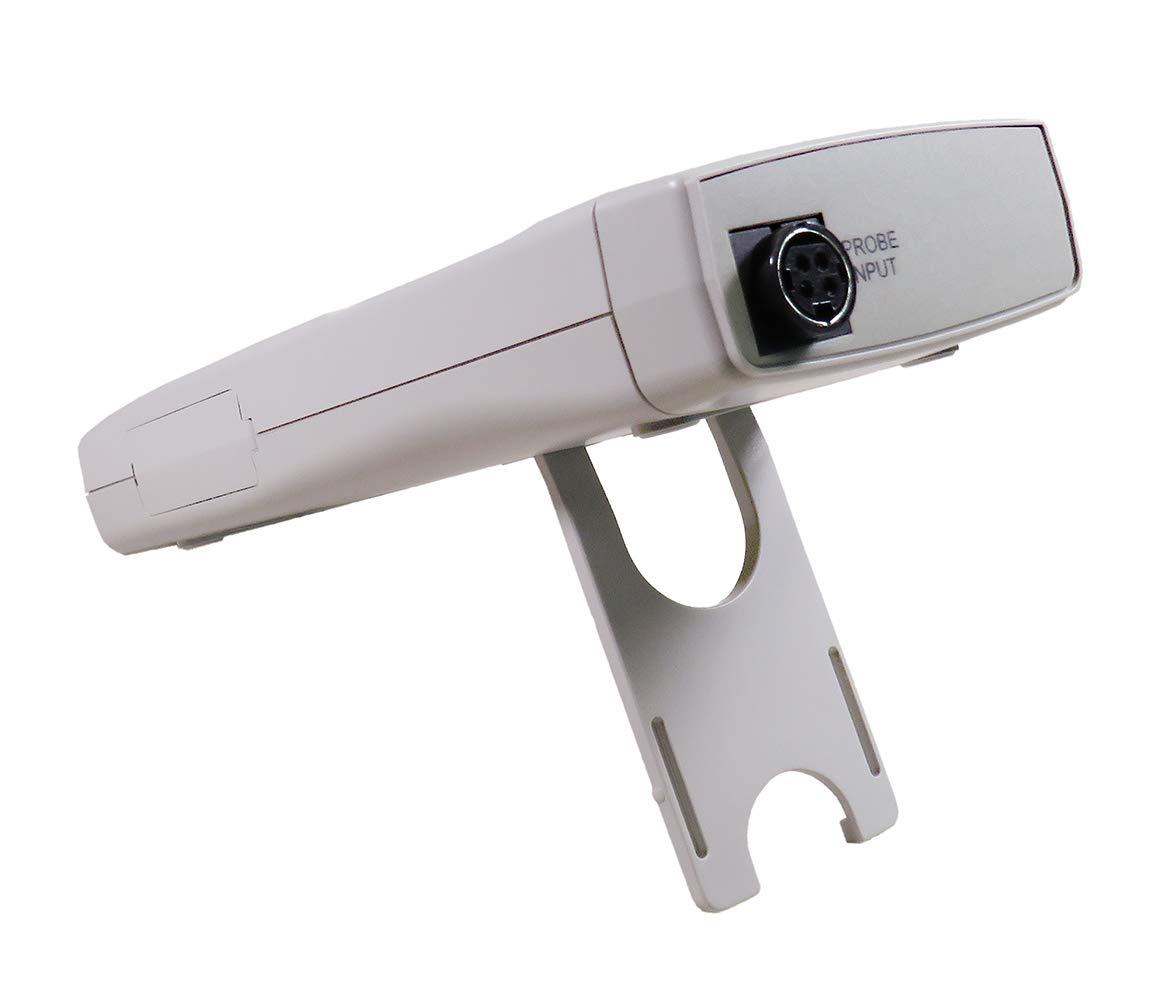
Малюнок 2: Задня частина view of the meter, highlighting the probe input connection.
2.3 Початкове ввімкнення
After battery and sensor installation, press the ПОТУЖНІСТЬ button to turn on the device. The LCD will illuminate and display the current light reading.
3. Інструкція з експлуатації
3.1 Увімкнення/вимкнення живлення
- Натисніть ПОТУЖНІСТЬ для включення лічильника.
- Натисніть ПОТУЖНІСТЬ button again to turn the meter off. The meter also features an auto power-off function to conserve battery life.
3.2 Lux / Foot-Candle Selection
- Натисніть ЛЮКС/ФК button to toggle between Lux and Foot-Candle measurement units. The selected unit will be indicated on the LCD.
3.3 Вибір діапазону
- Натисніть RANGE button to cycle through available measurement ranges. Select a range appropriate for the light intensity being measured to ensure accuracy.
3.4 Функція утримання
- Натисніть ТРИМАТИ кнопку, щоб зафіксувати поточне значення на дисплеї.
- Прес ТРИМАТИ again to release the reading and resume live measurement.
3.5 Min/Max Recording
- Натисніть REC/MAX/MIN button once to enter recording mode. The 'REC' indicator will appear.
- Прес REC/MAX/MIN again to display the maximum recorded value ('MAX').
- Прес REC/MAX/MIN a third time to display the minimum recorded value ('MIN').
- Натисніть і утримуйте REC/MAX/MIN to exit recording mode.
3.6 External Zero Adjustment
- To perform an external zero adjustment, ensure the sensor is covered or placed in complete darkness.
- Натисніть НУЛЬ button. The display should read zero. This calibrates the meter for accurate low-light measurements.
3.7 RS232 Computer Output
The meter is equipped with an RS232 output port for connecting to a computer for data logging and analysis. A compatible RS232 cable and software (not included) are required.
- Locate the RS232 output port on the side of the meter, typically covered by a protective flap.
- Open the flap and connect the RS232 cable.
- Refer to the software's instructions for data transfer and configuration.

Малюнок 3: Збільшений план view of the RS232 output port with its protective cover open.
3.8 Кріплення на штатив
The meter includes a tripod back for stable, hands-free operation. Attach the meter to a standard photographic tripod using the integrated mounting point.
4. Технічне обслуговування
4.1 Очищення
- Wipe the meter and sensor with a soft, dry cloth.
- Не використовуйте абразивні засоби для чищення або розчинники, оскільки вони можуть пошкодити casinг або датчик.
4.2 Заміна батареї
- When the low battery indicator appears on the LCD, replace the 9V battery as described in Section 2.1.
- Вийміть батарейку, якщо глюкометр не використовуватиметься протягом тривалого часу, щоб запобігти витіканню.
4.3 Догляд за датчиком
- Keep the sensor clean and free from dust or debris, as this can affect measurement accuracy.
- Use the provided sensor cover when the meter is not in use to protect the sensor element.
4.4 Зберігання
- Store the meter in its soft padded case to protect it from physical damage.
- Зберігати в прохолодному, сухому місці, подалі від прямих сонячних променів та екстремальних температур.
5. Вирішення проблем
- Немає дисплея / лічильник не вмикається:
Check battery installation and ensure the 9V battery has sufficient charge. Replace if necessary. - Неточні показання:
Ensure the sensor is clean and unobstructed. Perform an external zero adjustment (Section 3.6). Verify the correct measurement unit (Lux/FC) and range are selected. - "OVER RANGE" Indication:
The light intensity exceeds the current measurement range. Press the RANGE button to select a higher range. - "LOW BATTERY" Indication:
The 9V battery needs to be replaced. Refer to Section 4.2 for battery replacement instructions. - RS232 Communication Issues:
Ensure the RS232 cable is securely connected to both the meter and the computer. Verify that the correct software and driver are installed and configured properly on the computer.
6. Технічні характеристики
The following table outlines the technical specifications for the Sper Scientific 840020 Light Meter:

Figure 4: Detailed specifications for Lux and Foot-Candle measurements.
| Особливість | Специфікація |
|---|---|
| Номер моделі | 840020 |
| Одиниці вимірювання | Lux, Foot-Candle (FC) |
| Range (Lux) | До 10 000 люкс |
| Range (Foot-Candle) | Up to 40,000 FC |
| Роздільна здатність (люкс) | 0.01 / 1 Lux (depending on range) |
| Resolution (FC) | 0.001 / 1 FC (depending on range) |
| Точність | ±(3% + 0.5% FS) |
| Тип датчика | Color and Cosine Corrected, meets C.I.E. photopic spectrum |
| Дисплей | Extra large LCD (1½" high, 38.1 mm) with bar graph |
| Вихід | RS232 computer output |
| Джерело живлення | 9В акумулятор |
| Розміри | 7¾" × 2¾" × 1¼" (197 × 70 × 32 mm) |
| вага | 10 унції (283 г) |
| Аксесуари в комплекті | 9V battery, instructions, soft padded case with shoulder strap, detachable sensor with 44" cord and cover |
7. Гарантія та підтримка
7.1 Calibration Certificate
A N.I.S.T. traceable certificate of calibration is available for the Sper Scientific 840020 Light Meter, ensuring its accuracy and compliance with national standards.
7.2 Технічна підтримка
For technical assistance, troubleshooting beyond this manual, or inquiries regarding warranty service, please contact Sper Scientific customer support. Refer to the product packaging or the official Sper Scientific webсайт для отримання актуальної контактної інформації.