
1. Вступ
The BUFFALO Giga Switching Hub LSW3-GT-24NSR is a 24-port Gigabit Ethernet switch designed for high-speed network environments. It is ideal for small to medium-sized offices and workplaces requiring robust and reliable network connectivity. This device supports full Gigabit speeds across all ports, ensuring efficient data transfer.
Key features include a fanless design for silent operation and enhanced reliability, as well as a loop detection function to prevent network disruptions caused by accidental network loops.
2. Інформація про безпеку
Please read and understand the following safety precautions before using the device to prevent injury or damage.
- Джерело живлення: Використовуйте лише наданий адаптер живлення. Переконайтеся, що розетка відповідає зазначеній напрузі.tage вимоги.
- Вентиляція: Не блокуйте вентиляційні отвори. Забезпечте достатній потік повітря навколо пристрою, щоб запобігти перегріву.
- Середовище: Avoid exposing the device to water, high humidity, extreme temperatures, or direct sunlight.
- Обробка: Do not drop or subject the device to strong impacts. Do not attempt to open or repair the device yourself. Refer all servicing to qualified personnel.
- Кабелі: Ensure all network cables are properly connected and secured.
3. Вміст упаковки
Перевірте наявність усіх елементів в упаковці:
- BUFFALO Giga Switching Hub LSW3-GT-24NSR Unit
- Кабель живлення
- Rack Mount Brackets (if included with your model)
- Гумові ніжки (для розміщення на робочому столі)
4. Налаштування
4.1 Фізичне встановлення
The LSW3-GT-24NSR can be installed on a desktop or mounted in a 19-inch equipment rack.
Розміщення на робочому столі:
- Attach the included rubber feet to the bottom of the unit to prevent slipping and provide stability.
- Place the unit on a flat, stable surface with adequate ventilation.
Монтаж в стійку:
- Attach the rack mount brackets to the sides of the unit using the provided screws.
- Secure the unit into a standard 19-inch equipment rack using appropriate rack screws (not included).
4.2 Підключення мережевих кабелів
Connect your network devices (computers, servers, other switches) to any of the 24 RJ-45 ports on the front panel using standard Ethernet cables (Category 5e or higher recommended for Gigabit speeds).

Рисунок 1: Передня панель зверхуview with 24 Ethernet Ports and Status LEDs.
4.3 Підключення живлення
- Connect the power cable to the AC IN port on the rear of the device.
- Підключіть інший кінець кабелю живлення до відповідної розетки.
- The device will power on automatically. The POWER LED on the front panel should illuminate.

Рисунок 2: Задня панельview with AC IN Power Port.
5. Інструкція з експлуатації
5.1 світлодіодні індикатори
The front panel features several LED indicators to monitor the status of the switch and its ports.
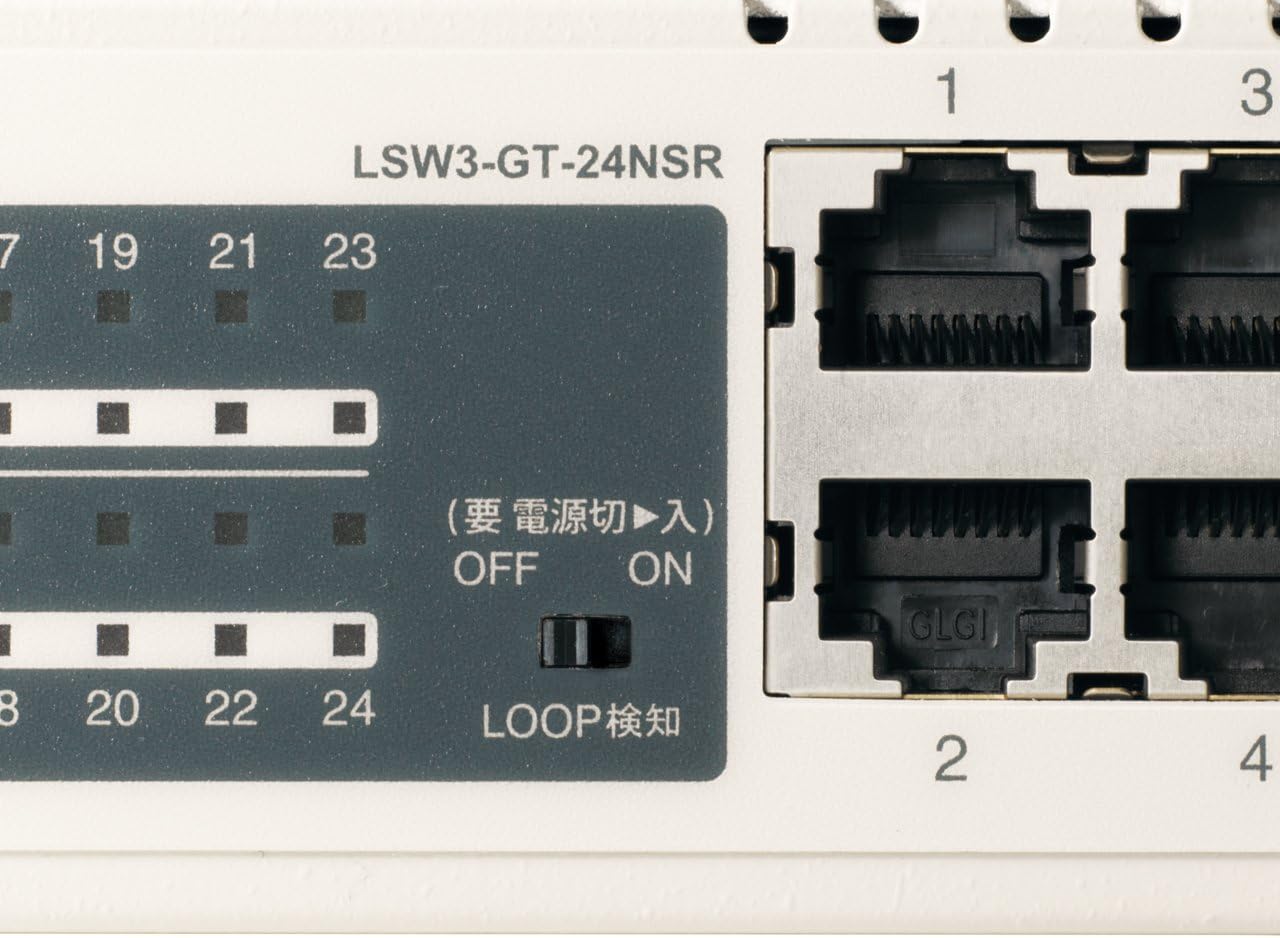
Малюнок 3: Детально view of LED Indicators and Loop Detection Switch.
| Назва світлодіода | Статус | опис |
|---|---|---|
| ПОТУЖНІСТЬ | On | Пристрій увімкнено. |
| ПОСИЛАННЯ / ДІЯ (на порт) | On | A network device is connected and a link is established. |
| Блимає | Дані передаються або приймаються через порт. | |
| 1000/100/10М (на порт) | Зелений | Port is operating at 1000 Mbps (Gigabit Ethernet). |
| Помаранчевий | Port is operating at 100 Mbps (Fast Ethernet). | |
| Вимкнено | Port is operating at 10 Mbps (Ethernet). | |
| LOOP DETECT | On | A network loop has been detected. |
5.2 Функція виявлення петлі
The LSW3-GT-24NSR features a hardware switch for enabling or disabling the loop detection function. This function helps prevent network instability caused by accidental network loops.
Figure 4: Loop Detection Switch (ON/OFF).
- ON: Loop detection is active. If a loop is detected, the corresponding port will be automatically shut down to prevent network broadcast storms, and the LOOP DETECT LED will illuminate.
- ВИМКНЕНО: Loop detection is disabled.
It is recommended to keep the loop detection function ON for network stability.
6. Технічне обслуговування
6.1 Очищення пристрою
To maintain optimal performance, periodically clean the exterior of the switch.
- Перед чищенням від’єднайте кабель живлення.
- Використовуйте м’яку суху тканину, щоб протерти поверхню.
- Do not use liquid cleaners, aerosols, or solvents, as these may damage the casing або внутрішні компоненти.
6.2 Екологічні міркування
Ensure the device is operated within its specified environmental conditions:
- температура: 0°C до 40°C (32°F до 104°F)
- вологість: від 10% до 85% (без конденсації)
7. Вирішення проблем
If you encounter issues with your BUFFALO Giga Switching Hub, refer to the following common problems and solutions.
7.1 Немає живлення
- Симптом: Індикатор POWER не горить.
- рішення: Check if the power cable is securely connected to both the device and the power outlet. Ensure the power outlet is functional.
7.2 No Link or Slow Speed on a Port
- Симптом: The LINK/ACT LED for a connected port is off, or the 1000/100/10M LED indicates a lower speed than expected (e.g., 100M instead of 1000M).
- рішення:
- Переконайтеся, що кабель Ethernet надійно підключено з обох кінців.
- Try a different Ethernet cable. Ensure it is a Category 5e or higher cable for Gigabit speeds.
- Підключіть пристрій до іншого порту на комутаторі.
- Check the network adapter settings on the connected device (computer, server) to ensure it is configured for auto-negotiation or the correct speed.
7.3 Network Instability / LOOP DETECT LED is On
- Симптом: The LOOP DETECT LED is illuminated, and network performance is degraded or unstable.
- рішення:
- A network loop has been detected. This typically occurs when two ports on the same switch (or different switches) are connected to each other, creating an infinite data path.
- Carefully inspect your network cabling to identify and remove any redundant connections that form a loop.
- If the loop detection switch is ON, the affected port will be automatically shut down. Once the loop is resolved, the port should resume normal operation.
8. Технічні характеристики
| Особливість | опис |
|---|---|
| Бренд | БУЙВОЛ |
| Номер моделі | LSW3-GT-24NSR |
| Кількість портів | 24 портів 10/100/1000BASE-T RJ-45 |
| Комутаційна здатність | 48 Gbps (Non-blocking) |
| Швидкість пересилання | 35.7 Mpps |
| Розмір таблиці MAC-адрес | 8K записів |
| Підтримка рамки Jumbo | До 9 КБ |
| особливості | Auto-MDI/MDIX, Auto-Negotiation, Loop Detection Function, Fanless Design |
| Джерело живлення | Внутрішнє джерело живлення змінного струму |
| Розміри (Ш x Г x В) | (Specific dimensions not provided in source, typical for 1U rackmount) |
| вага | (Specific weight not provided in source) |
| Робоча температура | від 0°C до 40°C |
| Робоча вологість | від 10% до 85% (без конденсації) |
9. Гарантія та підтримка
This BUFFALO product is covered by a manufacturer's warranty. Please refer to the warranty card included with your product or visit the official BUFFALO webсайт для отримання детальних гарантійних умов.
For technical support, product registration, or further assistance, please visit the official BUFFALO support webсайт або зверніться до їхнього відділу обслуговування клієнтів. Контактну інформацію зазвичай можна знайти на сайті виробника webсайту або в упаковці продукту.