
вступ
This manual provides detailed instructions for the operation and maintenance of your Calypso K5558/2 Digital Quartz Watch. Please read this manual thoroughly to ensure proper use and to maximize the lifespan of your watch. This watch features a digital display, backlight, stopwatch, intermediate times, and an alarm function, all housed in a durable plastic case with a multicolored rubber strap.
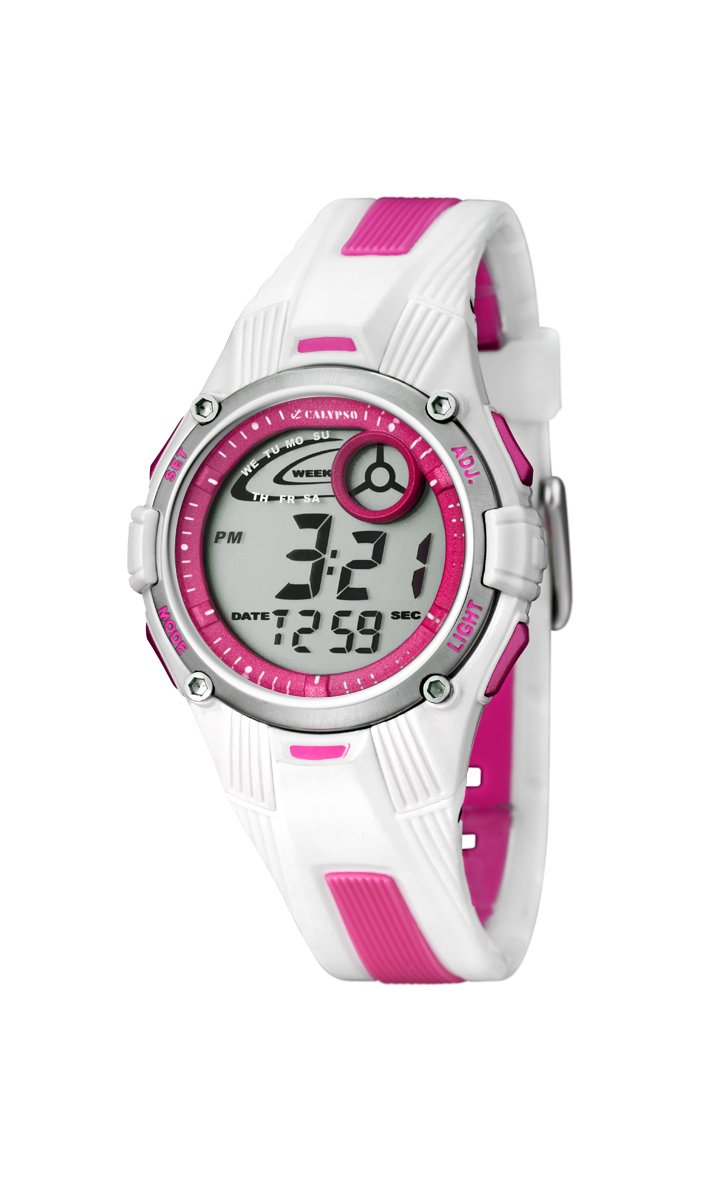
Зображення: спереду view of the Calypso K5558/2 Digital Quartz Watch. This image shows the watch's digital display and the overall design.
Налаштування
Початкова активація
Your Calypso K5558/2 watch comes with a battery pre-installed. If the display is not active, gently press any button to activate it. If the watch remains inactive, the battery may need to be replaced (refer to the Maintenance section).
Налаштування часу та дати
- Увійти в режим налаштування: Натисніть і утримуйте РЕЖИМ button (usually located on the bottom left) until the seconds start flashing.
- Налаштувати секунди: Натисніть СКИДАННЯ button (usually top right) to reset the seconds to zero.
- Вибрати наступний елемент: Натисніть РЕЖИМ button again to move to the next setting item (e.g., hours, minutes, month, date, day).
- Змінити значення: Використовуйте ПОЧАТОК button (usually top left) to increase the value of the flashing item.
- Підтвердити налаштування: Продовжуйте натискати РЕЖИМ to cycle through all settings. Once all adjustments are made, press РЕЖИМ востаннє, щоб вийти з режиму налаштування.

Зображення: Кутове view of the Calypso K5558/2 Digital Quartz Watch, showing the watch face and side buttons.
Інструкція з експлуатації
Time Display Modes
Натисніть РЕЖИМ button to cycle through different display modes: Time, Stopwatch, and Alarm.
Використання підсвічування
Щоб підсвітити дисплей в умовах слабкого освітлення, натисніть кнопку СВІТЛО button (usually located on the top right). The backlight will remain active for a few seconds.
Stopwatch Function (Chronometer and Intermediate Times)
- Увійдіть у режим секундоміра: Натисніть РЕЖИМ button until "00:00:00" appears on the display.
- Старт/Зупинка: Натисніть ПОЧАТОК кнопку, щоб розпочати відлік часу. Натисніть її ще раз, щоб призупинити.
- Час кола/проміжного часу: Поки секундомір працює, натисніть кнопку СКИДАННЯ button to record an intermediate (lap/split) time. The display will show the lap time for a few seconds before returning to the running total.
- Скинути: When the stopwatch is paused, press the СКИДАННЯ button to clear the time to "00:00:00".
Встановлення та використання сигналізації
- Увійти в режим тривоги: Натисніть РЕЖИМ button until the alarm time is displayed (e.g., "AL").
- Встановити час будильника: Натисніть і утримуйте СКИДАННЯ button until the alarm hours start flashing. Use the ПОЧАТОК button to adjust the hours. Press РЕЖИМ щоб перейти до хвилин та налаштувати за допомогою ПОЧАТОК.
- Увімкнути/вимкнути будильник: У режимі будильника натисніть ПОЧАТОК button to toggle the alarm ON/OFF. An alarm icon (e.g., a bell) will appear on the display when activated.
- Stop Alarm Sound: Коли лунає будильник, натисніть будь-яку кнопку, щоб його зупинити.
Водонепроникність
This watch is water-resistant up to 100 meters (10 ATM). This means it is suitable for swimming and snorkeling. Не натискайте жодних кнопок, поки годинник занурений у воду. Уникайте контакту годинника з гарячою водою або парою, оскільки це може пошкодити водонепроникні ущільнення.
Технічне обслуговування
Чищення годинника
Регулярно протирайте корпус і ремінець годинника м’якою губкоюamp cloth. For stubborn dirt, a mild soap solution can be used, followed by rinsing with clean water and drying thoroughly. Avoid using harsh chemicals or abrasive cleaners, as these can damage the watch materials.
Догляд за ремінцем
The rubber strap may show signs of discoloration over time, especially lighter colors, due to exposure to dirt, sweat, and UV light. Regular cleaning can help mitigate this. If discoloration becomes significant or the strap shows signs of wear, consider replacing it with an official Calypso replacement strap.
Заміна батареї
When the display becomes dim or the watch stops functioning, the battery may need replacement. This watch uses a "C" type battery. Battery replacement should ideally be performed by a qualified watch technician to ensure proper sealing and maintain water resistance. Attempting to replace the battery yourself may void any implied warranty and compromise the watch's water resistance.
Усунення несправностей
| проблема | Можлива причина | Рішення |
|---|---|---|
| Дисплей порожній або тьмяний. | Низький або розряджений акумулятор. | Замініть батарею (див. розділ «Технічне обслуговування»). |
| Кнопки не реагують. | Годинник може бути в режимі блокування або мати внутрішню несправність. | Спробуйте міцно натиснути всі кнопки. Якщо проблема не зникає, зверніться до техніка. |
| Час неточний. | Неправильне налаштування часу або низький заряд батареї. | Reset the time (refer to Setup section). If problem continues, replace battery. |
| Вода всередині годинника. | Water resistance compromised (e.g., buttons pressed underwater, seals damaged). | Негайно віднесіть годинник кваліфікованому техніку для перевірки та ремонту. Не намагайтеся висушити його самостійно. |
Технічні характеристики
- Номер моделі: K5558/2
- Тип дисплея: цифровий
- Тип руху: Кварц
- Матеріал корпусу: пластик
- Матеріал ремінця: Rubber (Multicolored)
- Діаметр корпусу: 36 міліметрів
- Товщина корпусу: 10 міліметрів
- Глибина водонепроникності: 100 метрів (10 атм)
- Особливості: Alarm, Stopwatch, Backlight, Intermediate Times
- Тип застібки: Пряжка
- Джерело живлення: Battery Powered (1 C battery included)
- Вага товару: 34 грамів
Гарантія та підтримка
Гарантія: This product is sold without a manufacturer's warranty ("Pas de garantie"). Please refer to your retailer's return policy for any initial defects.
підтримка: For further assistance or inquiries regarding your Calypso K5558/2 watch, please contact your point of purchase or visit the official Calypso webсайт з інформацією про обслуговування клієнтів.