
ВТех 80-109744
VTech Schulstart Laptop E Instruction Manual
Модель: 80-109744
1. Вступ
This manual provides essential information for the safe and effective use of your VTech Schulstart Laptop E. This learning computer is designed for children aged 6 and up, offering 160 educational games in both German and English. It covers subjects such as letters, words, mathematics, nature, science, and creativity.
Будь ласка, уважно прочитайте цей посібник перед використанням пристрою та збережіть його для подальшого використання.
2. Інформація про безпеку
УВАГА: Choking hazard due to small parts that can be swallowed. Not suitable for children under 36 months.
УВАГА: Strangulation hazard. Keep packaging materials away from children.
- Завжди слідкуйте за дітьми під час використання.
- Не піддавайте пристрій дії екстремальних температур або прямих сонячних променів.
- Тримайте пристрій сухим. Не занурюйте його у воду або інші рідини.
- Протирайте пристрій м’якою сухою тканиною. Не використовуйте абразивні засоби для чищення.
- Переконайтеся, що батарейки вставлені правильно відповідно до позначеної полярності.
- Негайно вийміть розряджені батареї.
- Не змішуйте старі та нові батареї або різні типи батарейок.
- Неперезаряджувані батареї не підлягають перезарядці.
- Акумуляторні батареї можна заряджати лише під наглядом дорослих.
- Вийміть акумулятори з іграшки перед зарядкою.
- Клеми живлення не повинні замикатися накоротко.
3. Вміст упаковки
The VTech Schulstart Laptop E package includes:
- 1 x VTech Schulstart Laptop E
- 1 x Cursor Mouse
- 3 x AA Demonstration Batteries (for test purposes only)
Note: A VTech power adapter and VTech laptop bag are sold separately and are not included.
4. Налаштування
4.1 Встановлення батареї
The device requires 3 AA batteries. The included demonstration batteries are for testing purposes only and should be replaced with new batteries for regular use.
- Знайдіть відсік для батареї на нижній панелі ноутбука.
- За допомогою викрутки відкрийте кришку батарейного відсіку.
- Remove the old demonstration batteries (if present).
- Вставте 3 нові батарейки типу АА, дотримуючись правильної полярності (+/-), як зазначено всередині відсіку.
- Встановіть на місце кришку батарейного відсіку та закріпіть її гвинтом.

Figure 4.1: Battery installation guide. Replace demonstration batteries with new ones for extended play.
4.2 Connecting the Cursor Mouse
The VTech Schulstart Laptop E comes with a wired cursor mouse for interactive play.
- Locate the mouse port on the side of the laptop.
- Carefully insert the mouse connector into the port.
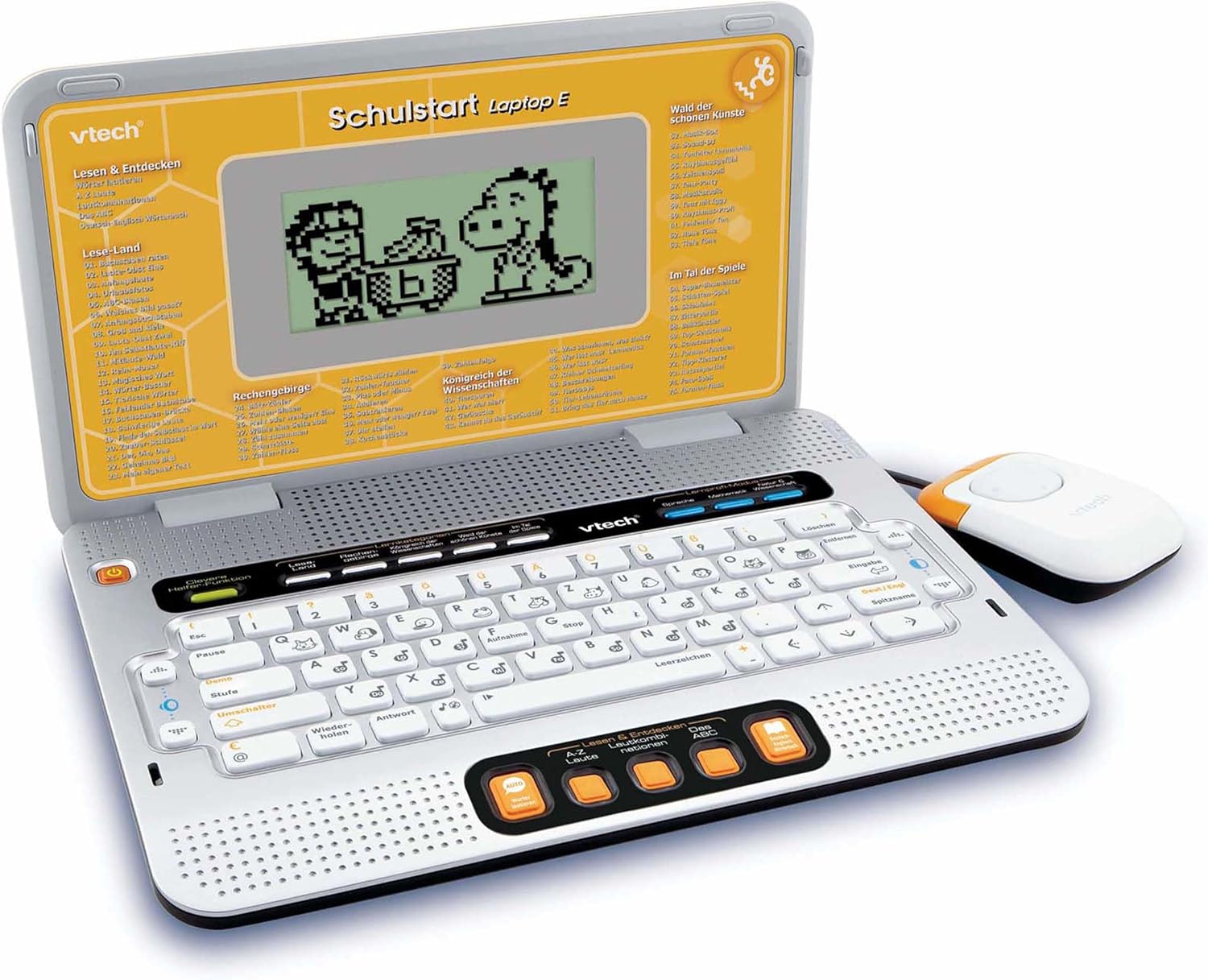
Figure 4.2: VTech Schulstart Laptop E with connected cursor mouse.
5. Інструкція з експлуатації
5.1 Увімкнення/вимкнення живлення
To turn on the laptop, press the потужність button, usually located on the top left of the keyboard area. To turn off, press the потужність button again or the laptop will automatically shut down after a period of inactivity to conserve battery life.
5.2 Вибір мови
The VTech Schulstart Laptop E supports both German and English. You can switch between languages using the dedicated language selection button or through the settings menu, if available. Refer to the on-screen prompts for initial setup.
5.3 Game Categories and Selection
The laptop features 160 educational games categorized as follows:
- Language Tools: 5 програми
- Letters & Words: 23 програми
- Математика: 16 програми
- Nature & Science: 12 програми
- Творчість: 12 програми
- Logic & Games: 12 програми
Use the arrow keys and the Enter button on the keyboard, or the cursor mouse, to navigate through the menu and select a game.

Figure 5.1: Navigating game categories on the VTech Schulstart Laptop E.
5.4 Tutor Function and Learning Modes
The laptop includes a Tutor function and a Learning Pro mode to enhance the learning experience:
- Tutor Function: Features 5 direct-dial keys for language tools (sounds, phonics, sound combinations, ABC with example words, German-English dictionary). These programs assist with letter pronunciation and reading.
- Learning Pro Mode: Offers progressive learning through increasing difficulty levels, adapting to the child's progress.
- Smart Helper Function: Provides additional hints and tips in many educational games upon request.

Figure 5.2: Child using the VTech Schulstart Laptop E's interactive learning features.
6. Технічне обслуговування
6.1 Очищення
To clean the VTech Schulstart Laptop E, use a soft, slightly damp тканиною. Не використовуйте агресивні хімікати або абразивні засоби для чищення. Перед чищенням переконайтеся, що пристрій вимкнено та від’єднано від джерела живлення.
6.2 Зберігання
Store the laptop in a cool, dry place away from direct sunlight and extreme temperatures. If the device will not be used for an extended period, remove the batteries to prevent leakage.

Figure 6.1: Optional VTech laptop bag for storage and transport (sold separately).
7. Вирішення проблем
| проблема | Можлива причина | Рішення |
|---|---|---|
| Пристрій не вмикається. |
|
|
| Екран порожній або мерехтить. |
|
|
| Keys or mouse not responding. |
|
|
| Sound is distorted or absent. |
|
|
8. Технічні характеристики
- Номер моделі: 80-109744
- Розміри (Д x Ш x В): 4 x 28 x 20 см (1.57 x 11.02 x 7.87 дюйма)
- вага: 1.29 кг (2.84 фунта)
- Рекомендований вік: 6 років і старше
- Акумулятори: 3 x AA (not included for regular use)
- мови: німецька, англійська
- Кількість ігор: 160
- Дата виходу: 31 липня 2010 р
9. Гарантія та підтримка
Щоб отримати інформацію про гарантію та підтримку клієнтів, зверніться до офіційного представника VTech. website or contact your local VTech distributor. Keep your purchase receipt as proof of purchase.
VTech Official Webсайт: www.vtech.com
Пов'язані документи - 80-109744
 |
VTech Rattle & Waggle Learning Pup Parent's Guide This parent's guide provides comprehensive information for the VTech Rattle & Waggle Learning Pup™ toy, including setup, features, activities, songs, maintenance, and troubleshooting. |
 |
Chompers the Number Dino™ Instruction Manual | VTech Learning Toy Official instruction manual for VTech's Chompers the Number Dino™ toy. Learn how to set up, play, and troubleshoot this educational toy that teaches numbers, counting, colors, and food names. |
 |
Кібершпигунський ноутбук VTech: навчальний шпигунський ноутбук для дітей Ознайомтеся з VTech Cyber Spy Notebook – навчальним електронним ноутбуком, який пропонує понад 100 завдань англійською, іспанською, французькою та німецькою мовами. Дізнайтеся про його функції, налаштування та ігри в цьому вичерпному посібнику користувача. |
 |
Інструкція з експлуатації VTech LearnBook Pro Instruction manual for the VTech LearnBook Pro, a kid-friendly electronic learning laptop featuring over 80 educational games and activities covering vocabulary, maths, science, logic, music, and French language learning. |
 |
Chompers the Number Dino™ Instruction Manual - VTech Instruction manual for VTech's Chompers the Number Dino™ (Model 5320), an educational toy that teaches numbers, counting, colors, and food names through interactive play. |
 |
VTech Learn & Dance Dino Parent's Guide - Features, Setup, and Songs Comprehensive parent's guide for the VTech Learn & Dance Dino toy. Learn about features, setup, battery installation, activities, song lyrics, care, and troubleshooting. |
Ask a question about this manual
Ask about setup, troubleshooting, compatibility, parts, safety, or missing instructions. Manuals+ will review the question and use this page’s manual context to help answer it.