
вступ
Дякуємо за покупкуasing the Optimus F-1760 16-inch Wave Oscillating Stand Fan. This manual provides important information regarding the safe operation, assembly, maintenance, and troubleshooting of your fan. Please read these instructions thoroughly before use and retain them for future reference.

Image: The Optimus F-1760 stand fan positioned in a bedroom, showcasing its design and size relative to furniture.
Важливі інструкції з безпеки
Користуючись електричними приладами, слід завжди дотримуватися основних запобіжних заходів, щоб зменшити ризик виникнення пожежі, ураження електричним струмом і травмування людей, зокрема:
- Прочитайте всі інструкції перед використанням цього вентилятора.
- Використовуйте цей вентилятор лише так, як описано в цьому посібнику. Інше використання, не рекомендоване, може призвести до пожежі, ураження електричним струмом або травмування людей.
- Щоб запобігти ураженню електричним струмом, не ставте вентилятор у вікно, не занурюйте пристрій, вилку чи шнур у воду та не розпилюйте на них рідини.
- Необхідний ретельний нагляд, коли будь-який прилад використовується дітьми або поблизу них.
- Від’єднуйте вентилятор від розетки, коли він не використовується, під час переміщення вентилятора з одного місця в інше та перед чищенням.
- Do not operate fan in the presence of explosive and/or flammable fumes.
- Не розміщуйте вентилятор або будь -які частини поблизу відкритого вогню, кухонних приладів чи інших нагрівальних приладів.
- Do not operate fan with a damaged cord or plug, or after the fan malfunctions or has been dropped or damaged in any manner.
- Уникайте контакту з рухомими частинами.
- Щоб від’єднати, візьміть вилку та витягніть її з розетки. Ніколи не смикайте за шнур.
- Завжди використовуйте на сухій рівній поверхні.
- Не вішайте та не встановлюйте вентилятор на стіну або стелю.
- Не працюйте без правильно встановлених решіток вентилятора.
- This product employs overload protection (fuse). A blown fuse indicates an overload or short-circuit situation. If the fuse blows, unplug the product from the outlet. Replace the fuse as per the servicing instructions (follow product marking for proper fuse rating) and check the product. If the replacement fuse blows, a short-circuit may be present and the product should be discarded or returned to an authorized service facility for examination and/or repair.
Налаштування та збірка
The Optimus F-1760 fan requires minimal assembly. Ensure all components are present and undamaged before proceeding.
- Основна збірка: Attach the weighted base legs to the main pole. Ensure they are securely fastened to provide stability. The base is designed to be sturdy, with weights at the ends of the feet.
- Регулювання висоти: The fan's height can be adjusted. Loosen the height adjustment knob on the pole, extend or retract the pole to the desired height, and then securely tighten the knob.
- Кріплення головки вентилятора: Ensure the fan head is securely attached to the top of the pole. The motor housing and fan blade are plastic, while the grill is metal.
- Розміщення: Place the fan on a dry, level surface. Ensure there is adequate space around the fan for proper air circulation and oscillation.
Інструкція з експлуатації
The Optimus F-1760 fan offers multiple control options and features for customized comfort.
Панель керування
The fan features a 4-position push-button switch on the pole for basic operation.
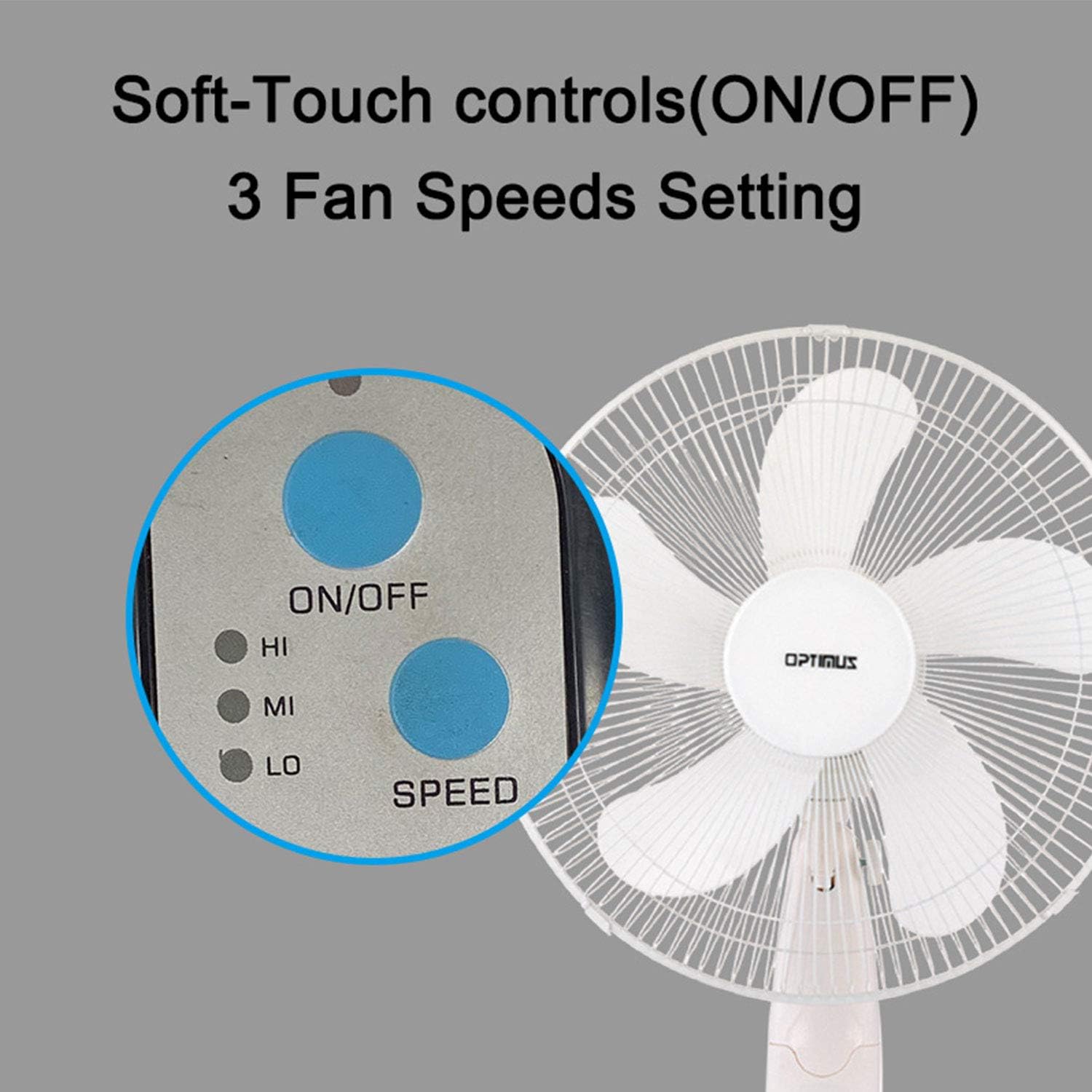
Image: The fan's soft-touch control panel, showing buttons for ON/OFF and SPEED, with indicators for High (HI), Medium (MI), and Low (LO) fan speeds.
- УВІМК./ВИМК.: Натисніть, щоб увімкнути або вимкнути вентилятор.
- Налаштування швидкості: Select from Low, Medium, or High speeds. The 3-speed, energy-saving, whisper-quiet operation motor provides efficient airflow.
Пульт дистанційного керування
The fan comes with a remote control for convenient operation from a distance. (Batteries not included).

Image: The remote control for the fan, featuring buttons for Mode, Time, Speed, and ON/OFF functions.
- УВІМК./ВИМК.: Вмикає або вимикає вентилятор.
- ШВИДКІСТЬ: Cycles through the three fan speeds (Low, Medium, High).
- РЕЖИМ: Selects between different wind modes.
- ЧАС: Activates and sets the shut-off timer.
Режими вітру
The fan offers three distinct wind modes to suit your preference:

Image: The fan's control panel highlighting the MODE button and indicators for Normal, Natural, and Sleep wind modes.
- Нормальний режим: The fan blows at a constant speed based on your selected setting.
- Природний режим: The fan speed fluctuates to mimic a natural breeze.
- Режим сну: The fan operates at a lower, quieter speed, ideal for sleeping, with gentle speed variations.
Коливання
The F-1760 features unique wave oscillation for comprehensive air distribution.

Image: A diagram illustrating the fan's capability for both vertical (up/down) and horizontal (left/right) wave oscillation, providing wider air coverage.
- Up/Down & Left/Right Wave Oscillating: Activates a unique oscillation pattern that moves the fan head both horizontally and vertically, distributing air throughout the room.
- To stop oscillation, press the oscillation button again.
Функція таймера
Налаштуйте вентилятор на автоматичне вимкнення через заданий період.

Image: The fan's control panel showing the TIME button and indicators for 1 hour (1H), 2 hours (2H), and 4 hours (4H) timer settings. The fan can be programmed for up to 7 hours.
- The timer can be set for 1, 2, 4, or up to 7 hours. Press the TIME button repeatedly to cycle through the desired duration.
Технічне обслуговування та очищення
Регулярне очищення допомагає підтримувати продуктивність вентилятора та подовжує термін його служби.
- Перед очищенням: Завжди відключайте вентилятор від електричної розетки перед чищенням.
- Зовнішнє очищення: Використовуйте м'який, damp тканиною для протирання зовнішніх поверхонь вентилятора. Не використовуйте абразивні засоби для чищення або розчинники.
- Чищення гриля: The metal grill can be cleaned with a soft brush or vacuum cleaner to remove dust. For thorough cleaning, the grill may need to be carefully removed.
- Очищення леза: If necessary, the fan blades can be cleaned. Ensure the fan is completely off and unplugged. The care instructions specify "Hand Wash" for components.
- Зберігання: Якщо вентилятор не використовується протягом тривалого часу, зберігайте його в прохолодному, сухому місці, бажано в оригінальній упаковці.
Усунення несправностей
| проблема | Можлива причина | Рішення |
|---|---|---|
| Вентилятор не вмикається. | No power supply. Blown fuse. | Ensure the fan is plugged into a working outlet. Check the fuse in the plug and replace if necessary (refer to safety instructions for fuse replacement). |
| Fan operates but air movement is weak. | Low speed setting. Dust accumulation on blades/grill. | Збільште швидкість вентилятора. Очистіть лопаті вентилятора та решітки відповідно до інструкцій з технічного обслуговування. |
| Пульт дистанційного керування не працює. | Dead batteries. Obstruction between remote and fan. | Replace batteries in the remote control. Ensure a clear line of sight between the remote and the fan's receiver. |
| Fan changes speed automatically or unexpectedly. | Interference from other remote controls (e.g., TV remote). | This fan may respond to frequencies from other remote controls. Try operating the fan manually or repositioning the fan/other devices to minimize interference. |
| Fan makes clicking noises during oscillation. | Normal operation of oscillation gears. | A slight clicking noise from the oscillation gears can occur during normal operation. If the noise is excessive or new, ensure the fan head is securely attached. |
| Fan feels unstable. | Base not properly assembled or tightened. Uneven surface. | Ensure all base components are securely fastened and the fan is placed on a firm, level surface. |
Технічні характеристики
- Назва моделі: Ф-1760
- Бренд: Оптимус
- Діаметр вентилятора: 16 дюймів
- Конструкція електричного вентилятора: Підлоговий вентилятор
- Джерело живлення: Провідний електричний
- Wattage: 60 Вт
- томtage: 6 вольт
- Кількість лопаток: 3
- Налаштування швидкості: 3 RPM (Low, Medium, High)
- Метод контролю: Пульт, кнопка
- Особливості: Up/Down & Left/Right Wave Oscillating, Adjustable Height, Timer Function (up to 7 hours), Wind Modes (Normal, Natural, Sleep)
- Внутрішнє/зовнішнє використання: закритий
- Вага товару: 9.9 фунта
- Включені компоненти: Продукт, Інструкція
Інформація про гарантію
This Optimus F-1760 fan comes with a 1 рік обмеженої гарантії з дати покупки. Ця гарантія поширюється на дефекти матеріалів та виготовлення за умов нормального використання. Вона не поширюється на пошкодження, спричинені неправильним використанням, нещасним випадком, зміною або несанкціонованим ремонтом. Будь ласка, збережіть підтвердження покупки для пред'явлення претензій по гарантії.
Підтримка клієнтів
For technical assistance, warranty claims, or questions regarding your Optimus F-1760 fan, please contact Optimus customer service. Refer to the product packaging or the official Optimus webсайт для отримання найактуальнішої контактної інформації.