
вступ
Дякуємо за покупкуasing the Snakebyte Wireless Bluetooth Premium PS3 Controller. This manual provides detailed instructions for setting up, operating, maintaining, and troubleshooting your new controller. Please read this manual thoroughly before use to ensure optimal performance and longevity of your device.
Вміст упаковки
Будь ласка, перевірте наявність усіх предметів у упаковці:
- Snakebyte Wireless Bluetooth Premium PS3 Controller
- USB Charging Cable (approximately 3 meters)
- Інструкція з експлуатації (цей документ)

Image: The Snakebyte Wireless Bluetooth Premium PS3 Controller shown in its retail blister packaging, indicating the product and included cable.
Налаштування
1. Заряджання контролера
Before initial use, fully charge the controller. Connect the supplied USB charging cable to the controller's charging port and the other end to a USB port on your PlayStation 3 console or a compatible USB power adapter. The indicator lights on the controller will show charging status and turn off or change color when fully charged.
2. Підключення до PlayStation 3
To connect the controller wirelessly to your PlayStation 3 console:
- Переконайтеся, що ваша консоль PlayStation 3 увімкнена.
- Connect the controller to the PS3 console using the supplied USB charging cable. This will register the controller with the console.
- Натисніть Кнопка PS (located in the center of the controller) once. The controller will power on and attempt to establish a connection.
- Once the controller is registered and connected, the indicator lights will illuminate, typically assigning a player number.
- You can now disconnect the USB cable for wireless gameplay. If the connection is lost, reconnect the USB cable and press the PS button again.

Зображення: спереду view of the Snakebyte Wireless Bluetooth Premium PS3 Controller, showing the button layout including the central PS button.
Інструкція з експлуатації
Схема та функції контролера
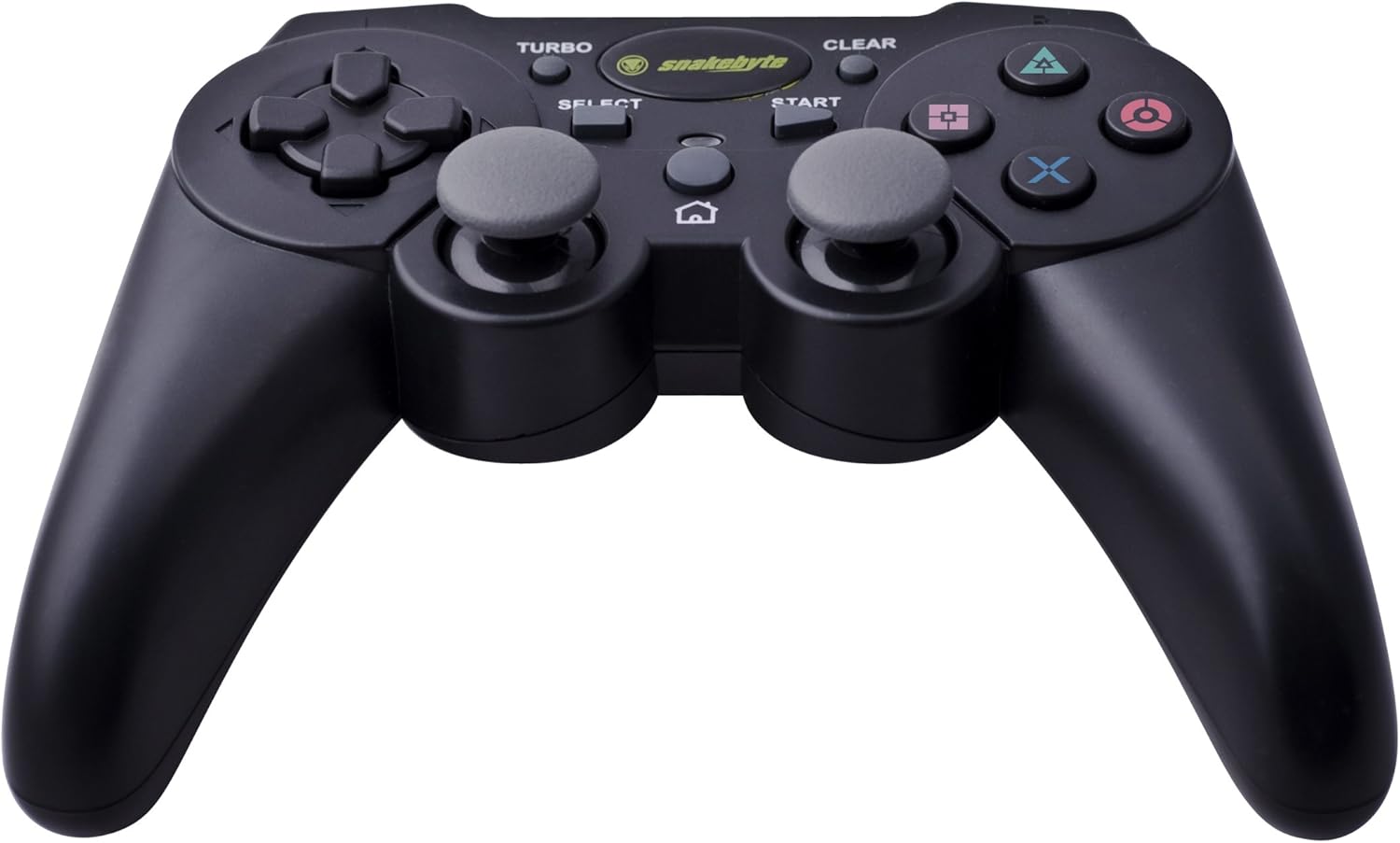
Image: The Snakebyte Wireless Bluetooth Premium PS3 Controller, highlighting the dual analog sticks and various buttons.
- Спрямований джойстик (D-Pad): For precise directional input in games.
- Лівий аналоговий стік: Первинний контроль руху.
- Правий аналоговий стік: Camera control or secondary movement.
- Кнопки дій (Трикутник, Коло, Хрест, Квадрат): Дії, специфічні для гри.
- Кнопки L1/R1: Shoulder buttons for various in-game functions.
- Тригери L2/R2: Analog triggers for pressure-sensitive input, often used for acceleration/braking or aiming/firing.
- Кнопка ПУСК: Pauses games or opens menus.
- Кнопка ВИБІР: Opens in-game maps, inventories, or other menus.
- Кнопка PS: Powers on the controller, accesses the PS3 XMB (Cross Media Bar) menu, or turns off the controller/console.
- Кнопка TURBO: Activates the turbo function for other buttons.
- Кнопка CLEAR: Deactivates the turbo function.
Турбофункція
The controller features a TURBO function, allowing a selected button to register multiple presses rapidly with a single hold. This can be useful for certain game mechanics.
- To activate TURBO: Press and hold the Кнопка ТУРБО, then press the desired action button (e.g., Cross, Square, Circle, Triangle, L1, R1, L2, R2). Release both buttons. The selected button will now have the TURBO function enabled.
- To deactivate TURBO for a specific button: Press and hold the Кнопка CLEAR, then press the button for which TURBO is currently active. Release both buttons.
- To deactivate all TURBO functions: Press the Кнопка CLEAR once without holding it down.
Motion Sensing and Vibration Feedback
This controller supports motion sensing capabilities, allowing for intuitive control in compatible games. It also provides vibration feedback to enhance immersion during gameplay, reacting to in-game events such as impacts or explosions.
Увімкнення та вимкнення
- Щоб увімкнути живлення: натисніть кнопку Кнопка PS.
- To power off: The controller will automatically enter sleep mode after a period of inactivity to conserve battery. Alternatively, you can hold the Кнопка PS for several seconds to bring up the PS3 menu, where you can choose to turn off the controller.
Технічне обслуговування
- Прибирання: Використовуйте м’яку суху тканину для очищення контролера. Не використовуйте абразивні засоби для чищення або розчинники.
- Зберігання: Зберігайте контролер у прохолодному, сухому місці, подалі від прямих сонячних променів та екстремальних температур.
- Догляд за акумулятором: Щоб продовжити термін служби батареї, уникайте частого повного розряджання контролера. Регулярно заряджайте його, навіть якщо він не використовується постійно.
- Уникайте пошкоджень: Do not drop the controller or expose it to excessive force or moisture.
Усунення несправностей
| проблема | Можливе рішення |
|---|---|
| Контролер не підключається бездротовим способом. |
|
| Кнопки або аналогові джойстики не реагують. |
|
| Контролер не заряджається. |
|
Скидання контролера
If the controller behaves erratically or becomes unresponsive, you can perform a reset. Locate the small reset button on the back of the controller (often in a small hole). Use a thin, pointed object (like a straightened paperclip) to press and hold the reset button for a few seconds. This will restart the controller's internal electronics.
Технічні характеристики
- Бренд: Snakebyte
- Номер моделі: SB904714
- Сумісна платформа: Sony PlayStation 3
- Підключення: Бездротовий (Bluetooth)
- Кількість кнопок: 16
- Розміри (Д x Ш x В): Приблизно 23.01 x 16.31 x 8.51 см (9.06 x 6.42 x 3.35 дюйма)
- вага: Приблизно 419.99 г (0.93 фунта)
- колір: чорний
Гарантія та підтримка
For warranty information and technical support, please refer to the documentation provided with your purchase or contact your retailer. You may also visit the official Snakebyte webсайт для отримання додаткової допомоги та інформації про продукт.