
вступ
This manual provides detailed instructions for the proper setup, operation, and maintenance of your Sharp EL-1607R Printing Calculator. Please read this manual thoroughly before using the calculator to ensure optimal performance and longevity.
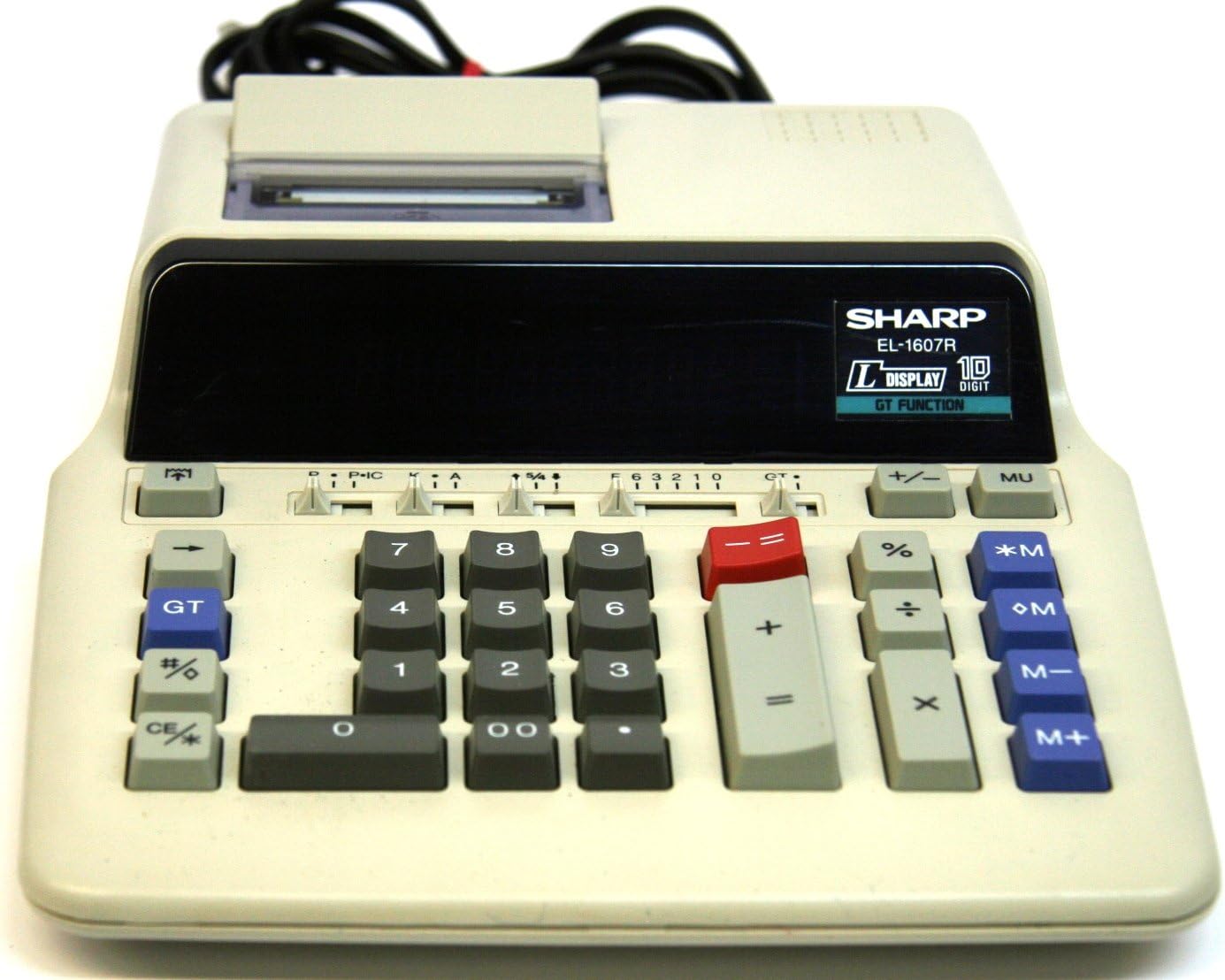
Figure 1: Sharp EL-1607R Printing Calculator Overview
This image displays the Sharp EL-1607R Printing Calculator, highlighting its compact design, the 10-digit display area, the numeric keypad, function keys, and the integrated paper roll printer at the top. The power cord is visible at the rear.
1. Налаштування
1.1 Підключення живлення
The Sharp EL-1607R calculator operates on AC power. Connect the power cord securely to the calculator's power input and then to a standard electrical outlet.
1.2 Встановлення рулону паперу
- Open the printer cover located at the top rear of the calculator.
- Вставте новий рулон паперу у відсік, переконавшись, що папір подається знизу рулону.
- Feed the leading edge of the paper into the printer slot until it emerges from the front.
- Закрийте кришку принтера.
Figure 2: Printer Compartment (Top View)
This image provides a closer look at the top section of the calculator, specifically the printer compartment where the paper roll is installed. The feed mechanism is visible.
1.3 Встановлення/заміна ролика з чорнилом
The EL-1607R uses a two-color ink roller for printing. If printing becomes faint or colors are incorrect, replace the ink roller.
- Переконайтеся, що калькулятор вимкнено.
- Відкрийте кришку принтера.
- Carefully remove the old ink roller by lifting it out.
- Unpack the new ink roller and insert it into the designated slot, ensuring it clicks into place.
- Закрийте кришку принтера.
2. Інструкція з експлуатації
2.1 Розташування клавіатури
Малюнок 3: Клавіатура перекритаview
This image focuses on the main keypad of the Sharp EL-1607R, detailing the arrangement of numeric keys (0-9, 00), arithmetic operators (+, -, x, ÷), percentage (%), memory keys (*M, +M, -M, M+), Grand Total (GT), and clear keys (CE/C).
2.2 Основні арифметичні операції
- Доповнення (+): Введіть першу цифру, натисніть +, введіть друге число, натисніть =.
- Віднімання (-): Введіть першу цифру, натисніть -, введіть друге число, натисніть =.
- Множення (x): Введіть першу цифру, натисніть x, введіть друге число, натисніть =.
- Ділення (÷): Введіть першу цифру, натисніть ÷, введіть друге число, натисніть =.
2.3 Функції пам'яті
The calculator includes independent memory functions:
- М+: Додає відображене значення до пам'яті.
- М-: Віднімає відображене значення з пам'яті.
- *M (Memory Recall/Clear): Натисніть один раз, щоб викликати вміст пам’яті. Натисніть двічі, щоб очистити пам’ять.
- OM (Memory Clear): Очищає вміст пам'яті.
2.4 Загальна сума (GT)
The GT key accumulates the results of all calculations performed using the = ключ. Прес GT to display the grand total. Pressing GT again clears the grand total memory.
2.5 відсоткиtage Calculations (%)
Для розрахунку процtages, enter the number, press x, введіть відсотокtagзначення, а потім натисніть %. наприкладample, to calculate 15% of 200: 200 x 15 % =
2.6 Decimal and Rounding Selectors
Located above the numeric keypad, these sliders control decimal places and rounding behavior.
- Decimal Selector (F, 6, 3, 2, 1, 0, A):
- F (Floating): Decimal point floats automatically.
- 6, 3, 2, 1, 0: Встановлює кількість знаків після коми.
- A (Add Mode): Automatically adds a decimal point two places from the right for addition and subtraction.
- Rounding Selector (5/4, Cut, Up):
- 5/4 (Round Up/Down): Rounds up if the next digit is 5 or greater, otherwise rounds down.
- Вирізати: Truncates the number at the selected decimal place.
- Вгору: Always rounds up at the selected decimal place.
Figure 4: Decimal and Rounding Selectors
This image highlights the slider switches for decimal point selection (F, 6, 3, 2, 1, 0, A) and rounding control (5/4, Cut, Up) on the Sharp EL-1607R, located above the main numeric keys.
2.7 Item Count (IC)
The IC switch (often combined with P) enables or disables the item count feature, which tracks the number of entries in a calculation series.
2.8 Clear Entry / Clear All (CE/C)
The CE/C key has dual functionality:
- Press once to clear the last entered number (Clear Entry).
- Press twice to clear the entire calculation and reset the calculator (Clear All).
3. Технічне обслуговування
3.1 Очищення
Щоб зберегти зовнішній вигляд та функціональність калькулятора:
- Протріть зовні м’якою сухою тканиною.
- Для стійкого бруду злегкаampuk тканину змочіть водою або м’яким неабразивним миючим засобом.
- Не використовуйте сильні розчинники або абразивні засоби для чищення.
- Avoid spraying liquids directly onto the calculator.
3.2 Заміна витратних матеріалів
Refer to sections 1.2 (Paper Roll Installation) and 1.3 (Ink Roller Installation/Replacement) for detailed instructions on replacing these components.
4. Вирішення проблем
| проблема | Можлива причина | Рішення |
|---|---|---|
| Калькулятор не вмикається. | Відсутнє живлення або слабке з’єднання. | Ensure the power cord is securely connected to both the calculator and a working electrical outlet. |
| Printing is faint or unclear. | Ink roller needs replacement. | Replace the ink roller as described in section 1.3. |
| Paper does not feed correctly. | Paper roll incorrectly installed or jammed. | Reinstall the paper roll correctly (section 1.2). Check for any paper jams and clear them carefully. |
| Неправильні результати розрахунків. | Incorrect decimal or rounding settings. | Verify the decimal and rounding selector settings (section 2.6). Clear all calculations using CE/C двічі. |
5. Технічні характеристики
- модель: EL-1607R (also known as EL2607RIII)
- Дисплей: 10-Digit Fluorescent Display
- Друк: 2-Color Printing
- Джерело живлення: AC Power (Note: Product specifications list 'Battery Powered'. The image shows a power cord, suggesting AC operation or an optional AC adapter for this model.)
- Розміри: 27.41 x 22 x 0.1 cm (Note: The 0.1 cm thickness may refer to packaging or a specific component, as the device itself is thicker.)
- вага: 2.83 кг
- Виробник: Гострий
- ASIN: B001VGD5PY
- UPC: 074000021075
6. Гарантія та підтримка
Щоб отримати інформацію про гарантію та технічну підтримку, зверніться до документації, що додається до вашої покупки, або відвідайте офіційний веб-сайт Sharp. webсайт. Зберігайте чек про покупку як підтвердження покупки для гарантійних претензій.
Виробник: Корпорація Sharp


