
1. Introduction to the HP 48SX
This document serves as Volume II of the comprehensive user manual for the HP 48SX Scientific Expandable Calculator. It is designed to guide users through the advanced functionalities, programming capabilities, and intricate operations of this powerful scientific instrument. Familiarity with basic calculator operations, as covered in Volume I, is recommended for optimal use of this manual.
The HP 48SX is renowned for its Reverse Polish Notation (RPN) entry system, extensive graphing capabilities, and expandability via memory cards. This volume delves deeper into these features, enabling users to unlock the full potential of their calculator for complex scientific, engineering, and mathematical tasks.
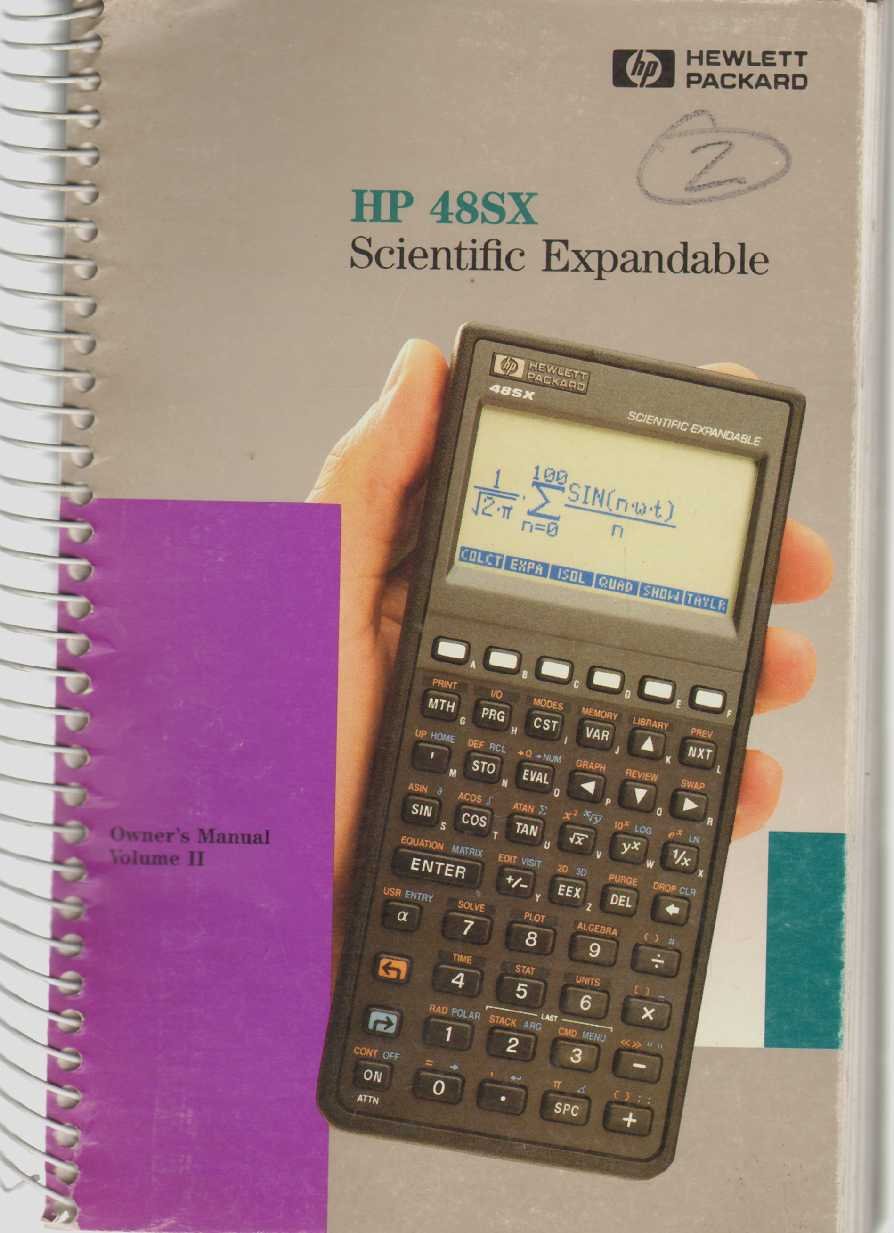
Figure 1: The HP 48SX Scientific Expandable Calculator. This image displays the calculator's physical layout, including its keypad, display, and expansion slots.
2. Налаштування та початкова конфігурація
2.1 Встановлення батареї
The HP 48SX operates on three AAA batteries. Proper installation is crucial for functionality.
- Знайдіть кришку відсіку для батарейок на задній панелі калькулятора.
- Зсуньте кришку у напрямку, вказаному стрілкою.
- Insert three fresh AAA batteries, ensuring correct polarity (+/-) as marked inside the compartment.
- Встановіть кришку батарейного відсіку назад, переконавшись, що вона надійно зафіксувалася.
2.2 Initial Power-On and Display Adjustment
Після встановлення батареї натисніть кнопку ON key to power on the calculator. The display contrast can be adjusted for optimal viewінж.
- To increase contrast: Press and hold the ON потім натисніть клавішу + ключ.
- To decrease contrast: Press and hold the ON потім натисніть клавішу - ключ.
2.3 Memory Card Installation (Optional)
The HP 48SX features two expansion slots for memory cards, allowing for increased storage and specialized applications.
- Переконайтеся, що калькулятор вимкнено.
- Locate the expansion slots on the top edge of the calculator.
- Carefully insert the memory card into an available slot, ensuring the correct orientation. Do not force the card.
- Press firmly until the card is seated securely.
- Power on the calculator. The system should detect the new memory card.
3. Operating the HP 48SX: Advanced Functions
This section covers advanced operations, building upon the basic functions detailed in Volume I.
3.1 Understanding the RPN Stack
The HP 48SX utilizes Reverse Polish Notation (RPN), where operands are entered before the operator. The stack is a fundamental concept in RPN, holding intermediate results.
- Entering Numbers: Type the number, then press ENTER. This pushes the number onto the stack.
- Виконання операцій: Enter the operands, then press the desired operator key (e.g., +, -, *, /). The operation is performed on the top two stack levels, and the result replaces them.
- Stack Manipulation: Keys like КРАПЛЯ, ОБМІН, РОЛ, і DUP are used to manage stack contents.
3.2 Advanced Mathematical Functions
Access advanced functions via the SHIFT keys (left-shift LS and right-shift RS) and menus.
- Тригонометричні функції: ГРІХ, COS, TAN and their inverses are directly accessible or via shifted keys. Ensure the correct angle mode (degrees, radians, grads) is selected using the РЕЖИМИ меню.
- Логарифмічні функції: LN (natural logarithm) and LOG (base 10 logarithm) are available.
- Комплексні числа: The HP 48SX supports complex number arithmetic. Enter complex numbers as (real, imaginary).
- Матричні операції: Create and manipulate matrices using the МАТРИЦЯ menu. Operations include addition, subtraction, multiplication, inversion, and determinants.
3.3 Побудова графіків функцій
The calculator can plot various types of graphs.
- Прес СЮЖЕТ to access the plotting menu.
- Select the desired plot type (e.g., ФУНКЦІЯ, ПАРАМЕТРИЧНИЙ, ПОЛЯРНИЙ, CONIC).
- Enter the function(s) to be plotted.
- Відрегулюйте viewing window (X-RANGE, Y-RANGE) as needed.
- Прес ЖЕРЕЮ щоб відобразити графік.
3.4 Programming with RPL
The HP 48SX uses RPL (Reverse Polish Lisp) for programming. Programs are stored as objects.
- To create a new program, enter << (left-shift АЛЬФА [) followed by the program commands, and then >> (right-shift АЛЬФА ]).
- Store the program by typing its name (e.g., 'MYPROG') and pressing STO.
- To execute a program, type its name and press EVAL, or press the corresponding softkey if assigned.
- Common programming constructs include IF...THEN...ELSE...END, FOR...NEXT, і DO...UNTIL...END.
4. Технічне обслуговування та догляд
4.1 Cleaning the Calculator
To ensure longevity and proper function, keep your HP 48SX clean.
- Злегка протріть м’якою тканиною без ворсу dampводою або м’яким, неабразивним засобом для чищення.
- Avoid harsh chemicals, solvents, or abrasive materials, as these can damage the display or casing.
- Do not spray cleaning solutions directly onto the calculator.
4.2 Заміна батареї
Replace batteries promptly when the low battery indicator appears on the display to prevent data loss.
- Виконайте кроки з встановлення акумулятора, описані в розділі 2.1.
- It is recommended to replace all three AAA batteries simultaneously.
- Утилізуйте старі батарейки відповідно до місцевих правил.
4.3 Зберігання
When not in use for extended periods, store the calculator in a cool, dry place, away from direct sunlight and extreme temperatures. Consider removing batteries if storing for several months to prevent leakage.
5. Усунення поширених проблем
This section addresses common problems and their solutions.
5.1 Калькулятор не вмикається
- Перевірте батареї: Переконайтеся, що батарейки правильно встановлені та не розряджені. За потреби замініть їх.
- Контакти акумулятора: Verify that battery contacts are clean and free of corrosion.
- Hard Reset: If the calculator is unresponsive, perform a hard reset by removing all batteries for a few minutes, then reinserting them. Note that this may clear user data.
5.2 Проблеми з дисплеєм
- Adjust Contrast: Використовуйте НА + і ON - key combinations to adjust display contrast (refer to Section 2.2).
- Слабкий дисплей: This often indicates low battery power. Replace batteries.
- Garbled Display: A hard reset (see 5.1) may resolve temporary display glitches.
5.3 Incorrect Calculation Results
- Режим кута: For trigonometric functions, ensure the calculator is in the correct angle mode (degrees, radians, or grads). Check the РЕЖИМИ меню.
- RPN Stack: Verify the order of operations and contents of the RPN stack. Incorrect stack manipulation is a common source of errors.
- Одиниці вимірювання: Confirm that units are consistent for physical calculations.
- Program Errors: If using a program, review the program code for logical or syntax errors.
6. Технічні характеристики
The following specifications pertain to the HP 48SX Scientific Expandable Calculator.
| Особливість | Деталь |
|---|---|
| Модель | HP 48SX |
| Тип | Scientific Expandable Graphing Calculator |
| Система входу | Зворотна польська нотація (RPN) |
| Дисплей | LCD, 8 lines x 22 characters (approx. 131 x 64 pixels) |
| Пам'ять | 32 KB RAM (expandable via memory cards) |
| Слоти розширення | 2 (for RAM or ROM cards) |
| Джерело живлення | 3 х ААА батарейки |
| Підключення | Serial port (for data transfer to computers or other HP calculators) |
| Розміри (прибл.) | 180 x 80 x 25 мм (7.1 x 3.1 x 1.0 дюймів) |
| Вага (прибл.) | 200 г (7.1 унції) |
Примітка: Технічні характеристики можуть бути змінені без попередження.