
1. Вступ
Thank you for choosing the TFA Dostmann Digital Weather Station 35.1065. This device provides accurate indoor temperature, humidity, time, date, and a weather trend forecast. Please read this manual carefully before using the device to ensure proper operation and to prevent damage.
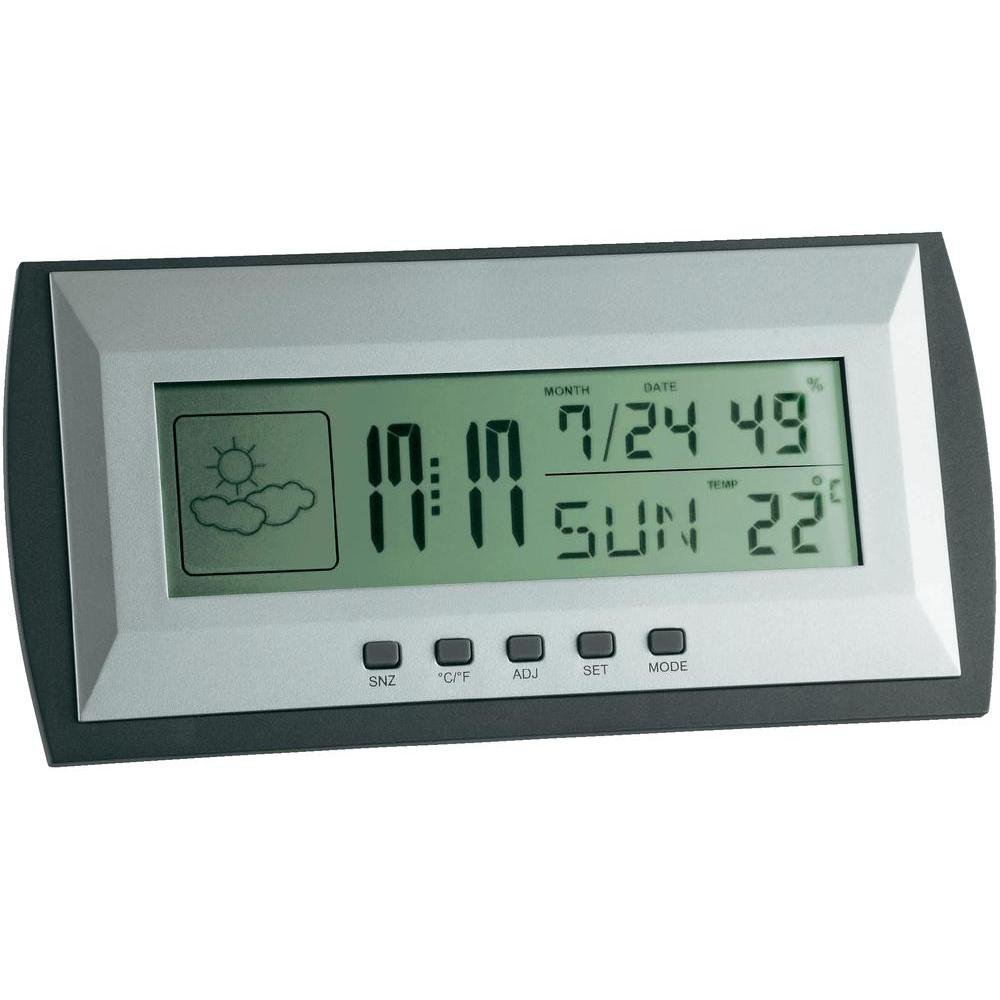
Figure 1: TFA Dostmann Digital Weather Station 35.1065 on a wooden desk. This image shows the weather station displaying time, date, and weather information in a typical home or office setting.
2. Інформація про безпеку
- Збережіть цей посібник для подальшого використання.
- Не піддавайте пристрій впливу екстремальних температур, вібрацій або ударів.
- Уникайте прямих сонячних променів і вологи.
- Не занурюйте пристрій у воду.
- Не намагайтеся самостійно ремонтувати або модифікувати пристрій. Зверніться до кваліфікованого персоналу для обслуговування.
- Утилізуйте використані батареї відповідно до місцевих правил.
3. Налаштування
3.1 Вміст упаковки
Переконайтеся, що всі елементи присутні:
- TFA Dostmann Digital Weather Station 35.1065
- 2 батарейки типу АА
- Посібник користувача (цей документ)
3.2 Встановлення батареї
- Locate the battery compartment cover on the back of the weather station.
- Відкрийте кришку.
- Insert two (2) AA batteries, observing the correct polarity (+ and - markings).
- Надійно закрийте кришку батарейного відсіку.
Пристрій автоматично увімкнеться та відобразить початкові показники.
3.3 Початкові налаштування (час, дата, одиниця вимірювання температури)
Upon first power-on or after battery replacement, you may need to set the time, date, and preferred temperature unit.
- Натисніть і утримуйте НАБІР button for a few seconds to enter setting mode. The digit to be set will flash.
- Використовуйте ПРИСЛ button to adjust the flashing value (e.g., hour, minute, year, month, day).
- Натисніть НАБІР знову натисніть кнопку, щоб підтвердити налаштування та перейти до наступного параметра.
- Repeat steps 2 and 3 until all desired settings (time, date) are configured.
- Щоб перемикатися між градусами Цельсія (°C) та Фаренгейта (°F), натисніть кнопку ° C / ° F кнопку.
4. Експлуатація метеостанції
4.1 Дисплей закінчивсяview
РК-дисплей відображає різну інформацію:
- час: Поточний час у 12-годинному або 24-годинному форматі.
- Дата: Current month, day, and day of the week.
- температура: Indoor temperature, displayed in °C or °F.
- вологість: Відсоток вологості в приміщенніtage.
- Значок прогнозу погоди: Indicates a trend forecast (e.g., sunny, cloudy, rainy). This is a prediction based on atmospheric pressure changes and may not always reflect actual weather.
4.2 Функції кнопок
- SNZ (Snooze): Activates the snooze function for the alarm.
- °C/°F: Перемикає між відображенням температури за Цельсієм та Фаренгейтом.
- ADJ (Adjust): Used to adjust values during setting mode.
- НАСТРОЙКА: Enters and confirms settings.
- РЕЖИМ: Switches between different display modes (e.g., time, alarm time).
4.3 Налаштування будильника
- Натисніть РЕЖИМ button repeatedly until the alarm time is displayed.
- Натисніть і утримуйте НАБІР кнопка. Година будильника блиматиме.
- Використовуйте ПРИСЛ кнопку, щоб встановити потрібну годину будильника.
- Прес НАБІР щоб підтвердити та перейти до хвилин.
- використання ПРИСЛ щоб встановити потрібні хвилини будильника.
- Прес НАБІР щоб підтвердити та вийти з налаштування будильника.
- Щоб увімкнути/вимкнути будильник, натисніть кнопку ПРИСЛ button while the alarm time is displayed. An alarm icon will appear/disappear.
5. Технічне обслуговування
5.1 Очищення
Очистіть пристрій м’якою, damp cloth. Do not use abrasive cleaners or solvents. Ensure no water enters the device.
5.2 Заміна батареї
When the display becomes dim or the device stops functioning, replace the batteries. Follow the steps in Section 3.2. Always replace both batteries at the same time with new AA batteries.
5.3 Зберігання
If the device will not be used for an extended period, remove the batteries to prevent leakage and damage. Store in a cool, dry place.
6. Вирішення проблем
| проблема | Можлива причина | Рішення |
|---|---|---|
| Немає дисплея або дисплей тьмяний. | Батарейки низький заряд або неправильно встановлені. | Замініть батарейки на нові, дотримуючись правильної полярності. |
| Неправильний час/дата. | Час/дата встановлені неправильно. | Refer to Section 3.3 to set the time and date. |
| Неточні показники температури/вологості. | Device placed near heat sources, vents, or in direct sunlight. | Relocate the weather station to a stable indoor environment away from extreme temperature fluctuations. Allow time for readings to stabilize. |
| Weather forecast icon seems incorrect. | Weather forecast is a trend prediction based on atmospheric pressure, not a real-time forecast. | Understand that the icon indicates a general trend over the next 12-24 hours, not current conditions. |
7. Технічні характеристики

Figure 2: TFA Dostmann Digital Weather Station 35.1065 with dimensions. This image provides a detailed view of the device, including its width (18 cm), height (9 cm), and depth (3.81 cm).
- Бренд: ТФА Достман
- модель: 35.1065
- Джерело живлення: Battery-powered (2 x AA batteries, included)
- матеріал: пластик
- Особливості: Trend forecast
- Тип дисплея: ЖК
- Розміри предмета (Д x Ш x В): 3.8 см х 18 см х 9 см
- Вага товару: 164 грамів
- Включені компоненти: Weather station, batteries, user manual
- Рекомендоване використання: Домашній офіс
- Особливе використання: Date, Humidity, Temperature, Time
- Країна походження: Китай
8. Гарантія та підтримка
For warranty information, please refer to the documentation provided at the time of purchase or visit the official TFA Dostmann website. For technical support or further assistance, please contact TFA Dostmann customer service through their official channels.
Official TFA Dostmann Webсайт: www.tfa-dostmann.de