
вступ
Thank you for choosing the TFA Dostmann 30.3016.01 Wave Radio Thermometer. This device provides accurate indoor and outdoor temperature readings, along with time and date display. It utilizes a wireless outdoor sensor to transmit temperature data to the main unit. Please read this manual carefully to ensure proper setup and operation.
The main unit measures indoor temperature, while the wireless outdoor transmitter measures outdoor temperature. This system helps monitor your living climate and can contribute to energy saving by optimizing heating. The device also stores minimum and maximum temperature values and displays the current time and date.
Інформація про безпеку
- Тримайте пристрій і батареї в недоступному для дітей місці.
- Не піддавайте пристрій впливу екстремальних температур, вібрацій або ударів.
- Уникайте прямих сонячних променів і вологи.
- Не занурюйте пристрій у воду.
- Replace batteries promptly when indicated to prevent leakage. Dispose of used batteries according to local regulations.
- Не намагайтеся ремонтувати або модифікувати пристрій. Зверніться до кваліфікованого персоналу для обслуговування.
Налаштування
1. Встановлення батареї
The main unit requires 2 x 1.5V AA batteries, and the outdoor transmitter requires 2 x 1.5V AA batteries. Batteries are included with the product.
- Відкрийте кришку відсіку для батарейок на задній панелі основного пристрою.
- Вставте 2 батарейки типу АА, дотримуючись правильної полярності (+/-).
- Закрийте кришку батарейного відсіку.
- Repeat the process for the outdoor transmitter.
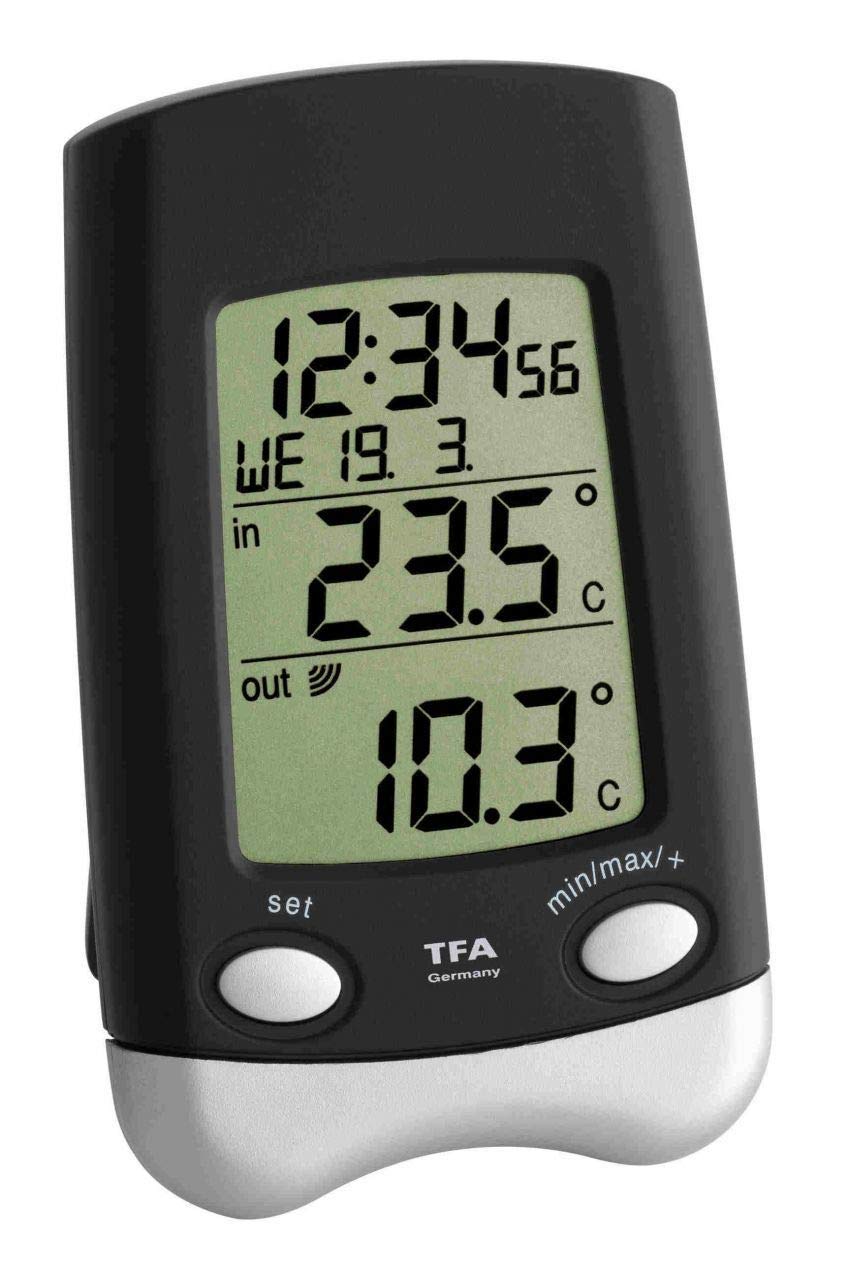
Image: Main unit of the TFA Dostmann 30.3016.01 Wave Radio Thermometer. This shows the front display and overall design.

Image: The wireless outdoor sensor (model 30.3159.IT) for the TFA Dostmann Wave Radio Thermometer. This sensor transmits outdoor temperature data to the main unit.
2. Initial Synchronization and Placement
After battery insertion, the main unit will automatically search for the outdoor sensor and the radio time signal. This process may take a few minutes.
- Place the outdoor transmitter in a sheltered location, away from direct sunlight and rain, to ensure accurate readings and prolong its lifespan. Ensure it is mounted vertically as designed to prevent water ingress into the battery compartment.
- Position the main unit indoors, away from electronic devices that might cause interference (e.g., TVs, computers).
- Ensure the distance between the main unit and the outdoor sensor is within the effective transmission range (typically up to 100 meters in open air, less with obstacles).
- The time and date will automatically synchronize via the radio signal.
Інструкція з експлуатації
Відображення інформації
На дисплеї відображається така інформація:
- Температура в приміщенні: Measured by the main unit's internal sensor.
- Зовнішня температура: Received from the wireless outdoor transmitter.
- час: Automatically synchronized via radio signal.
- Date and Day of the Week: Automatically synchronized via radio signal.
Viewing Minimum and Maximum Values
The device stores the highest (maximum) and lowest (minimum) temperatures recorded since the last reset. To view ці значення:
- Press the "MAX/MIN" button (or similar, refer to device buttons) once to display the maximum recorded indoor and outdoor temperatures.
- Press the "MAX/MIN" button again to display the minimum recorded indoor and outdoor temperatures.
- To clear the recorded maximum and minimum values, press and hold the "MAX/MIN" button for a few seconds while the respective values are displayed.
Manual Time and Date Setting (if automatic synchronization fails)
In rare cases where the radio time signal is not received, you may need to set the time and date manually. Refer to the specific buttons on your device (e.g., "SET", "MODE", "UP", "DOWN").
- Press and hold the "SET" or "MODE" button until the time display starts flashing.
- Use the "UP" or "DOWN" buttons to adjust the hour, then press "SET" or "MODE" to confirm and move to the minutes.
- Повторіть для хвилин, року, місяця та дня.
- Press "SET" or "MODE" one last time to exit the setting mode.
Технічне обслуговування
прибирання
Очистіть пристрій м’якою, damp тканиною. Не використовуйте абразивні засоби для чищення або розчинники. Переконайтеся, що волога не потрапляє всередину пристрою.
Заміна батареї
When the battery indicator appears on the display, replace the batteries in both the main unit and the outdoor sensor. Always replace all batteries at the same time to ensure optimal performance.
- Відкрийте батарейний відсік.
- Вийміть старі батареї та утилізуйте їх належним чином.
- Insert new 1.5V AA batteries, observing correct polarity.
- Закрийте батарейний відсік.
- After replacing batteries, the units may need to re-synchronize. This usually happens automatically within a few minutes.
Усунення несправностей
| проблема | Можлива причина | Рішення |
|---|---|---|
| No outdoor temperature display or "---" shown. |
|
|
| Incorrect time or date display. |
|
|
| Buttons are unresponsive or erratic. |
|
|
| Temperature readings fluctuate significantly or are inaccurate. |
|
|
Технічні характеристики
- модель: 30.3016.01
- Бренд: ТФА Достман
- Outdoor Temperature Measurement Range: від -40 до +60 °C (від -40 до +140 °F)
- Indoor Temperature Measurement Range: від -10 до +60 °C (від +14 до +140 °F)
- Точність температури: 1 °C
- матеріал: пластик
- Частота передачі: 868 МГц
- Outdoor Transmitter Model: 30.3159.IT
- Варіанти монтажу: Wall hanging or freestanding
- Розміри (основний блок): (L) 70 x (W) 30 (66) x (H) 115 mm
- Batteries (Main Unit): 2 x 1.5V AA (included)
- Батарейки (передавач): 2 x 1.5V AA (included)
- вага: 101 g (main unit, without batteries)
- Технологія підключення: Радіочастота (РФ)
Гарантія та підтримка
Продукція TFA Dostmann виготовляється з високою якістю та точністю. Щоб отримати інформацію про гарантію та технічну підтримку, зверніться до офіційного представника TFA Dostmann. website or contact their customer service directly. The contact details can usually be found in the packaging or on the manufacturer's webсайт.
Виробник: ТФА Достман
Офіційний Webсайт: www.tfa-dostmann.de (This is a general link, specific support pages may vary by region).