
1. Вступ
Дякуємо за покупкуasing the GPX CDP6806DT Personal CD Player. This manual provides important safety instructions, operational guidelines, and maintenance procedures to ensure optimal performance and longevity of your device. Please read this manual thoroughly before using the product and retain it for future reference.
2. Інформація про безпеку
Важливі інструкції з безпеки
- Не піддавайте пристрій впливу води або вологи.
- Уникайте розміщення пристрою поблизу джерел тепла, таких як радіатори, обігрівачі, печі або інші прилади (включаючи ampліфікатори), які виробляють тепло.
- Не намагайтеся розбирати або модифікувати пристрій. Звертайтеся до кваліфікованого сервісного персоналу для проведення будь-яких робіт з обслуговування.
- Use only the specified batteries (2 x AA batteries). Ensure correct polarity when inserting batteries.
- Вийміть батареї, якщо пристрій не використовуватиметься протягом тривалого часу.
- Уникайте прослуховування музики на високій гучності протягом тривалого часу, щоб запобігти пошкодженню слуху.
- Чистіть пристрій лише сухою тканиною.
3. Вміст упаковки
Carefully unpack your GPX CDP6806DT Personal CD Player and ensure all items are present:
- GPX CDP6806DT Personal CD Player
- Посібник користувача (цей документ)
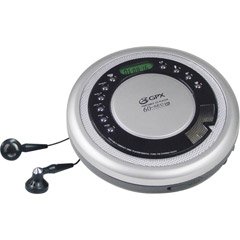
Figure 1: GPX CDP6806DT Personal CD Player. This image illustrates the compact design and general appearance of the device.
4. Елементи керування та функції
Familiarize yourself with the controls and features of your GPX CDP6806DT for optimal use.
- РК-дисплей: 6-digit display for track number, time, and FM frequency.
- PLAY/PAUSE (►/−): Press to start or pause CD playback.
- СТОП (■): Press to stop CD playback.
- SKIP/SEARCH (◀◀/▶▶): Press to skip tracks. Hold to search within a track.
- ОБ'ЄМ (+/-): Регулює вихідний рівень звуку.
- MODE/PROG: Selects playback mode (Repeat, Random) or programs CD tracks.
- FM TUNER (ON/OFF/BAND): Switches to FM radio mode, turns FM on/off, or changes FM band.
- PRESET (+/-): Navigates saved FM radio presets.
- Відсік для компакт-дисків: Area for inserting audio CDs.
- Батарейний відсік: Located on the bottom, holds 2 AA batteries.
- Гніздо для навушників (3.5 мм): Підключає навушники для прослуховування музики в приватному режимі.
Figure 2: GPX CDP6806DT Controls Layout. This image provides a visual reference for the location of various buttons and ports on the device.
5. Налаштування
5.1 Встановлення батареї
The GPX CDP6806DT requires two (2) AA batteries (not included) for portable operation.
- Знайдіть батарейний відсік на нижній панелі пристрою.
- Відкрийте кришку батарейного відсіку.
- Вставте дві батарейки типу АА, дотримуючись правильної полярності (+ та -), як зазначено всередині відсіку.
- Надійно закрийте кришку батарейного відсіку.
5.2 Підключення навушників
For private listening, connect your 3.5mm stereo headphones (not included) to the headphone jack located on the side of the unit.
6. Інструкція з експлуатації
6.1 Відтворення CD
The unit supports CD and CD-R/RW disc formats.
- Open the CD compartment lid by gently pressing the OPEN button (if present, or lifting the lid).
- Помістіть компакт-диск на центральну шпіндель етикеткою догори.
- Щільно закривайте кришку відсіку для компакт-дисків до клацання.
- Натисніть ВІДТВОРЕННЯ/ПАУЗА (►/−) button to begin playback. The track number and elapsed time will appear on the LCD display.
- Щоб призупинити відтворення, натисніть ВІДТВОРЕННЯ/ПАУЗА (►/−). Натисніть ще раз, щоб відновити.
- Щоб зупинити відтворення, натисніть кнопку СТОП (■) кнопку.
- Щоб перейти до наступної доріжки, натисніть SKIP/SEARCH (▶▶).
- To go back to the beginning of the current track, press SKIP/SEARCH (◀◀) once. Press twice to go to the previous track.
- To search rapidly forward or backward within a track, hold down SKIP/SEARCH (▶▶) or (◀◀) відповідно.
- Відрегулюйте гучність за допомогою ГРОМКОСТЬ (+/-) контролю.
6.2 Робота FM-радіо
The unit features a digital FM tuner with station presets.
- Посуньте FM ТЮНЕР switch to the ON position or press the БЕНД щоб увійти в режим FM.
- Натисніть SKIP/SEARCH (▶▶) or (◀◀) кнопки для ручного налаштування на потрібну частоту.
- To auto-scan and save stations, hold down the ВІДТВОРЕННЯ/ПАУЗА (►/−) button (or refer to specific instructions for auto-scan if available on the device).
- To recall saved presets, use the ПРЕДУСТАНОВЛЕНО (+/-) кнопки.
6.3 CD Programming (24-Track)
Ви можете запрограмувати до 24 треків для відтворення в певному порядку.
- Коли відтворення компакт-диска зупинено, натисніть кнопку MODE/PROG кнопку. На дисплеї блиматиме напис «PROG».
- Використовуйте SKIP/SEARCH (▶▶) or (◀◀) кнопок, щоб вибрати першу доріжку, яку ви хочете запрограмувати.
- Прес MODE/PROG again to confirm the selection. The display will show the program number and the next available program slot.
- Repeat steps 2 and 3 to add up to 24 tracks to your program.
- After programming all desired tracks, press ВІДТВОРЕННЯ/ПАУЗА (►/−) щоб розпочати запрограмоване відтворення.
- To clear the program, press the СТОП (■) кнопку двічі.
6.4 Anti-Skip Protection (ASP)
The GPX CDP6806DT features a 60-second Anti-Skip Protection system. This system buffers audio data to minimize interruptions caused by minor shocks or vibrations during CD playback. The ASP activates automatically when a CD is playing.
7. Технічне обслуговування
7.1 Очищення пристрою
- Протріть зовнішню частину пристрою м’якою сухою тканиною.
- Не використовуйте абразивні засоби для чищення, віск або розчинники.
- If the CD lens needs cleaning, use a specialized CD lens cleaner disc or a soft, lint-free cloth designed for optical lenses.
7.2 Догляд за акумулятором
- Виймайте батарейки, якщо пристрій не використовується протягом тривалого часу, щоб запобігти витіканню.
- Не змішуйте старі та нові батареї або різні типи батарейок.
- Утилізуйте використані батареї відповідально відповідно до місцевих правил.
8. Вирішення проблем
If you experience issues with your GPX CDP6806DT, please consult the following table for common problems and solutions.
| проблема | Можлива причина / рішення |
|---|---|
| Пристрій не вмикається. | Check if batteries are inserted correctly with proper polarity. Ensure batteries are fresh and not depleted. |
| Немає звуку з навушників. | Ensure headphones are fully plugged into the headphone jack. Increase the volume level. Test with another pair of headphones. |
| Пропускання компакт-диска або переривання відтворення. | Ensure the CD is clean and free of scratches or smudges. Clean the CD with a soft, lint-free cloth. Ensure the unit is on a stable surface or held steadily during use. |
| Компакт-диск не відтворюється. | Ensure the CD is inserted correctly with the label side up. Close the CD compartment lid completely. Check if the CD is a supported format (CD, CD-R/RW). |
| Прийом FM-радіо поганий. | Extend the headphone cable as it acts as the antenna. Try moving to a different location. |
9. Технічні характеристики
- Бренд: GPX
- модель: CDP6806DT
- Підтримувані формати дисків: CD, CD-R / RW
- Захист від пропуску: 60 секунди
- Дисплей: РК-дисплей на 6 цифр
- радіо: Digital FM Tuner with Presets
- CD Programming: 24-колійний
- Джерело живлення: 2 батарейки типу АА (не входять в комплект)
- Підключення: 3.5mm Headphone Jack (Auxiliary)
10. Гарантія та підтримка
For detailed warranty information, please refer to the warranty card included with your original product packaging. For technical support, service inquiries, or to purchase replacement parts, please visit the official GPX website or contact their customer service department using the contact information provided in your product documentation.
Зберігайте підтвердження покупки для гарантійних претензій.