
вступ
This manual provides essential information for the installation, operation, and maintenance of the HP Procurve 3500yl-48G-PWR Managed Ethernet Switch. This device is designed to offer advanced intelligent edge switching capabilities, supporting demanding networking features such as Quality of Service (QoS) and security. It features a variety of Gigabit interfaces, integrated Power over Ethernet (PoE) on all 10/100/1000Base-T ports, and 10-Gigabit Ethernet (10-GbE) capability.
Продукт закінченийview
The HP Procurve 3500yl-48G-PWR is a robust managed Ethernet switch. It is equipped with 44 x 10/100/1000Base-T ports and 4 x 10/100/1000Base-T ports, providing extensive connectivity options for various network environments. The integrated PoE functionality simplifies deployment of IP phones, wireless access points, and other PoE-powered devices.
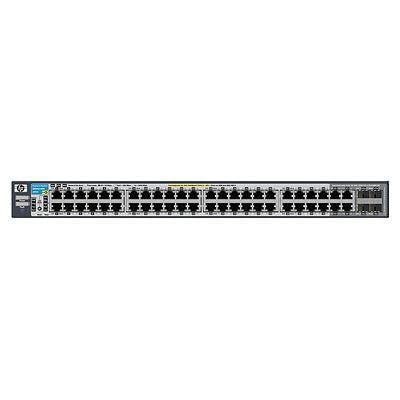
Малюнок 1: Спереду view of the HP Procurve 3500yl-48G-PWR Managed Ethernet Switch, showing the 48 Ethernet ports and status indicators.
Налаштування
1. Розпакування та перевірка
Carefully remove the switch from its packaging. Inspect the device for any signs of physical damage. Report any damage to your supplier immediately.
2. Монтаж у стійку (додатково)
The switch is designed for standard 19-inch rack mounting. Use the provided rack-mount kit and screws to secure the switch in the rack. Ensure adequate ventilation around the unit.
3. Підключення живлення
- Connect the power cord to the AC power inlet on the rear of the switch.
- Підключіть інший кінець шнура живлення до заземленої електричної розетки.
- Переконайтеся, що світлодіодний індикатор живлення на передній панелі світиться, що вказує на те, що комутатор отримує живлення.
4. Мережеві підключення
Connect Ethernet cables from your network devices (computers, servers, other switches, access points) to the RJ45 ports on the front panel of the switch. The switch supports 10/100/1000Base-T connections. For PoE devices, simply connect them to any of the 48 ports; the switch will automatically detect and provide power if the device is PoE-compatible.
5. Початковий доступ до конфігурації
For initial configuration, connect a console cable (typically RJ45 to DB9) from your management workstation to the console port on the switch. Use a terminal emulation program (e.g., PuTTY, Tera Term) with the following settings: 9600 baud, 8 data bits, no parity, 1 stop bit, no flow control. Alternatively, if the switch has a default IP address, you can connect via a web browser or SSH/Telnet after assigning your workstation an IP address in the same subnet.
Інструкція з експлуатації
1. Увімкніть живлення
Once connected to power, the switch will automatically power on. Observe the front panel LEDs for status indications.
2. Світлодіодні індикатори
- Світлодіод живлення: Показує стан живлення. Світиться зеленим світлом для нормальної роботи.
- Світлодіоди стану порту: Each port has an LED indicating link status and activity. Typically, solid green indicates a link, and blinking green indicates activity. Amber may indicate a 10/100 Mbps link, while green indicates a 1000 Mbps link, depending on the specific model's LED scheme. Refer to the detailed LED guide in the full product documentation for precise interpretations.
- Світлодіоди стану PoE: Indicate Power over Ethernet status for each port.
3. Basic Network Operation
The switch operates as a Layer 2 device, forwarding Ethernet frames between connected devices. With its managed capabilities, you can configure VLANs, Spanning Tree Protocol (STP), Link Aggregation (LAG), and other advanced features via the command-line interface (CLI) or web-інтерфейс управління.
4. Розширені функції
The Procurve 3500yl-48G-PWR supports advanced features such as Quality of Service (QoS) for prioritizing network traffic, robust security features to protect your network, and 10-GbE uplink capabilities (if equipped with optional modules) for high-bandwidth connections.
Технічне обслуговування
1. прибирання
Periodically clean the exterior of the switch with a soft, dry cloth. Do not use liquid or aerosol cleaners. Ensure ventilation openings are free from dust and obstructions to maintain proper airflow.
2. Оновлення мікропрограми
Регулярно перевіряйте виробника webсайт для оновлень мікропрограми. Підтримка оновленої версії мікропрограми забезпечує оптимальну продуктивність, безпеку та доступ до нових функцій. Уважно дотримуйтесь інструкцій, що надаються разом із пакетом оновлення мікропрограми.
3. Екологічні міркування
Operate the switch within its specified temperature range (up to 40 degrees Celsius). Avoid exposing the device to excessive heat, humidity, or direct sunlight. Ensure proper airflow around the unit to prevent overheating.
Усунення несправностей
1. Немає живлення
- Переконайтеся, що шнур живлення надійно підключений як до комутатора, так і до електричної розетки.
- Перевірте розетку за допомогою іншого пристрою, щоб переконатися в її справності.
- Ensure the power supply unit (if external) is properly connected and functional.
2. No Link on a Port
- Check the Ethernet cable for damage and ensure it is securely plugged into both the switch port and the connected device.
- Переконайтеся, що підключений пристрій увімкнено та працює належним чином.
- Try a different port on the switch or a different Ethernet cable.
- Check the port configuration in the switch's management interface to ensure it is enabled and correctly configured.
3. Проблеми з підключенням до мережі
- Confirm IP address settings on connected devices and the switch.
- Check for conflicting IP addresses on the network.
- Review switch configuration for VLANs, routing, or security policies that might be blocking traffic.
- Перезавантажте комутатор та підключені пристрої.
If issues persist, consult the comprehensive troubleshooting guide available on the manufacturer's support webсайт або зверніться до технічної підтримки.
Технічні характеристики
| Особливість | Специфікація |
|---|---|
| Бренд | HEWLETT PACKARD |
| Номер моделі | J8693A |
| Кількість портів | 48 (44 x 10/100/1000Base-T, 4 x 10/100/1000Base-T) |
| Швидкість передачі даних | 1000 мегабіт в секунду |
| Інтерфейс | PoE, RJ45 |
| Тип перемикача | Керований |
| томtage | 48 вольт (постійний струм) |
| Вага товару | 16.1 фунта |
| Верхня температура | 40 градусів Цельсія |
| Тип матеріалу корпусу | метал |
| Сумісні пристрої | Робочий стіл |
Гарантія та підтримка
This product is subject to the manufacturer's warranty policy. For specific details regarding warranty length and coverage, please contact the manufacturer directly. Please note that returns for non-defective items may be subject to a restocking fee. Any merchandise returned for repair and found not to be defective by technicians will incur a 25% restocking fee. By purchasing this product, you acknowledge and accept these procedures.
For technical support, documentation, and additional resources, please visit the official HP Procurve support webсайту або зв’яжіться зі своїм відділом обслуговування клієнтів.