
Coby CT-P9040 SVR
Coby CT-P9040 5.8 GHz Analog Cordless Phone User Manual
Model: CT-P9040 SVR
вступ
This manual provides comprehensive instructions for the setup, operation, and maintenance of your Coby CT-P9040 5.8 GHz Analog Cordless Phone. Please read this manual thoroughly before using your phone to ensure proper functionality and to prevent damage.
Вміст і компоненти пакета
Перш ніж почати, переконайтеся, що всі компоненти присутні в упаковці:
- Бездротова трубка
- Базовий блок
- Адаптер змінного струму
- Шнур телефонної лінії
- Акумуляторна батарея
- Посібник користувача (цей документ)
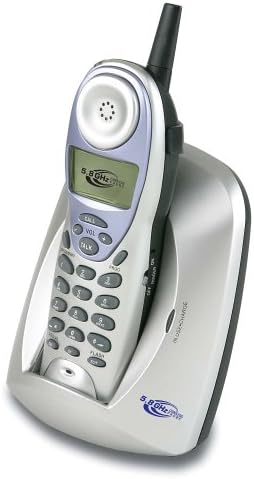
Image: The Coby CT-P9040 cordless phone, showing the handset docked in its silver base unit. The handset features a display screen, numeric keypad, and function buttons. The base unit has a charging cradle for the handset.
Посібник із налаштування
1. Встановлення батареї
- Знайдіть батарейний відсік на задній панелі слухавки.
- Відкрийте кришку батарейного відсіку.
- Connect the rechargeable battery pack connector to the jack inside the compartment.
- Place the battery pack into the compartment and close the cover securely.
2. Підключення базового блоку
- Connect one end of the telephone line cord to the "LINE" jack on the back of the base unit.
- Підключіть інший кінець телефонного шнура до стандартної телефонної розетки.
- Connect the AC power adapter to the "DC IN" jack on the back of the base unit.
- Підключіть адаптер змінного струму до стандартної електричної розетки.
3. Початкове заряджання
Place the handset in the base unit's charging cradle. Ensure the "IN CHARGE" indicator light on the base unit illuminates, indicating proper charging. For optimal battery performance, charge the handset for at least 12-14 hours before initial use.
Інструкція з експлуатації
Здійснення дзвінка
- Pick up the handset from the base unit or press the ПОГОВОРИТИ кнопку.
- Прислухайтесь до тону набору.
- Наберіть потрібний номер телефону.
- Щоб завершити дзвінок, натисніть ПОГОВОРИТИ button again or place the handset back in the base unit.
Відповідь на дзвінок
Коли дзвонить телефон, підніміть слухавку або натисніть ПОГОВОРИТИ кнопку, щоб відповісти на дзвінок.
Функція повторного набору
Щоб повторно набрати останній набраний номер, натисніть ПОВТОРЕНИЙ кнопку на трубці.
Регулювання гучності
Під час дзвінка використовуйте ГУЧНІСТЬ + і ГУЧНІСТЬ - buttons on the handset to adjust the earpiece volume.
Функція спалаху
Натисніть СПАЛАХ button to use call waiting or transfer calls if supported by your telephone service provider.
Storing Phone Numbers (Speed Dial)
Your phone can store up to 10 numbers for frequently called contacts. Refer to the detailed instructions in the full manual for programming speed dial entries.
Технічне обслуговування та догляд
- Тримайте телефон подалі від джерел тепла, прямих сонячних променів та вологи.
- Протирайте поверхні телефону м’якою губкоюamp тканина. Не використовуйте абразивні засоби чи розчинники.
- Ensure the charging contacts on the handset and base unit are clean to maintain proper charging.
- If the phone will not be used for an extended period, remove the battery from the handset.
Усунення несправностей
| проблема | Можлива причина | Рішення |
|---|---|---|
| Немає гудка | Телефонний кабель від’єднано. | Переконайтеся, що телефонний шнур надійно підключено як до базового блоку, так і до розетки. |
| Телефон не заряджається | Handset not properly seated in cradle or dirty charging contacts. | Reseat the handset in the base unit. Clean the charging contacts on both the handset and base unit with a dry cloth. |
| Погана якість звуку / Статичні перешкоди | Interference from other electronic devices or out of range. | Move the base unit away from other electronic devices (e.g., microwaves, Wi-Fi routers). Move closer to the base unit. |
| Не вдається здійснювати/приймати дзвінки | Power adapter disconnected or battery low. | Check if the AC power adapter is securely plugged in. Ensure the handset battery is fully charged. |
Технічні характеристики
- модель: CT-P9040 SVR
- Частота: 5.8 GHz Analog
- Канали: 40 Channel Auto Scan
- Пам'ять: 10-number speed dial storage
- функції: Flash, Redial, Pause, Tone/Pulse Switch
- Гніздо для гарнітури: Built-in 2.5mm
- Монтаж: Desk and Wall Mountable
- Розміри (Д x Ш x В): 5 x 8 x 4 дюймів
- вага: 1.8 фунта
- колір: Срібло
- Ідентифікатор абонента: Не підтримується
- Багаторядкова операція: Однорядкова операція
Гарантія та підтримка
For warranty information and technical support, please refer to the warranty card included with your product or visit the official Coby webсайт. Зберігайте чек про покупку як підтвердження покупки для гарантійних претензій.
For further assistance, you may contact Coby customer service. Contact details are typically available on the manufacturer's webсайту або в упаковці продукту.
Ask a question about this manual
Ask about setup, troubleshooting, compatibility, parts, safety, or missing instructions. Manuals+ will review the question and use this page’s manual context to help answer it.