
вступ
The Altec Lansing VS4221 is a 2.1 speaker system designed to provide enhanced audio for computers, gaming systems, and other compatible devices. This system includes two satellite speakers and one subwoofer, offering a balanced audio experience with clear highs, rich mids, and deep bass. It features a wireless remote for convenient control and multiple input options for versatile connectivity.
Вміст упаковки
Before beginning setup, please verify that all components are present in the package:
- One (1) Altec Lansing VS4221 Subwoofer
- Two (2) Altec Lansing VS4221 Satellite Speakers
- Один (1) бездротовий пульт дистанційного керування
- One (1) Remote Control Caddy
- Audio Input Cables (color-coded)
- Кабель живлення
Інструкції з налаштування
- Розташування динаміків: Place the subwoofer on the floor, ideally near a wall or in a corner for optimal bass response. Position the two satellite speakers on either side of your listening area, such as on a desk or shelf. The satellite speakers feature pivoting stands, allowing you to adjust their angle to direct sound towards your ears.
- Connecting Satellite Speakers to Subwoofer: Connect the cables from the satellite speakers to the corresponding output jacks on the back of the subwoofer. Ensure a secure connection.
- Підключення до джерела звуку:
- For computers, MP3 players, or devices with a 3.5mm headphone jack: Use the provided 3.5mm audio cable to connect the audio output of your device to the 3.5mm input jack on the subwoofer.
- For televisions or video gaming systems with RCA outputs: Use RCA cables (not necessarily included, but the system supports them) to connect the audio output of your TV or gaming system to the RCA input jacks on the subwoofer. The cables are color-coded for easy installation (typically red for right, white for left).
- Підключення до живлення: Підключіть кабель живлення до входу живлення сабвуфера, а потім підключіть інший кінець до стандартної електричної розетки.
- Початкове ввімкнення: Turn on the speaker system using the power button, which may be located on the subwoofer or controlled via the wireless remote.
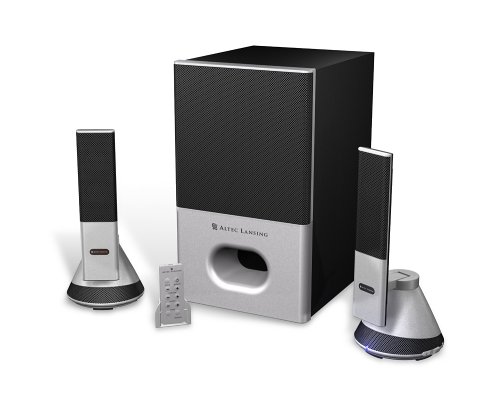
Image: The Altec Lansing VS4221 2.1 Speaker System, showing the subwoofer and two satellite speakers. The satellite speakers are designed with pivoting stands for directional sound.
Інструкція з експлуатації
Using the Wireless Remote Control
The VS4221 system includes a wireless remote control for convenient adjustment of audio settings. Place the remote in its caddy when not in use to prevent misplacement.
- Живлення/режим очікування: Press the power button on the remote to turn the system on or put it into standby mode.
- Основний том: Use the volume up (+) and volume down (-) buttons to adjust the overall sound level.
- Регулювання басів: Adjust the bass level to your preference using the dedicated bass control buttons.
- Контроль високих частот: Adjust the treble level for crisp high frequencies using the dedicated treble control buttons.
- Гучність: Activate or deactivate the loudness feature to enhance bass and treble at lower volumes.
Використання роз'єму для навушників
A headphone jack is integrated into the system, typically on one of the satellite speakers or the remote caddy. Plugging in headphones will mute the speakers, allowing for private listening. Unplugging headphones will restore audio through the speakers.
Технічне обслуговування
- Прибирання: Використовуйте м’яку суху тканину для очищення поверхонь динаміків та сабвуфера. Уникайте використання рідких засобів для чищення або абразивних матеріалів, оскільки вони можуть пошкодити покриття або внутрішні компоненти.
- Розміщення: Ensure the speakers are placed on stable surfaces to prevent accidental falls. Avoid placing them in direct sunlight, near heat sources, or in areas with high humidity.
- Управління кабелем: Тримайте кабелі організованими та не сплутованим, щоб запобігти пошкодженню та забезпечити належне підключення.
Усунення несправностей
| проблема | Можлива причина | Рішення |
|---|---|---|
| Немає звуку з динаміків. |
|
|
| Спотворений або нечіткий звук. |
|
|
| Wireless remote not responding. |
|
|
Технічні характеристики
| Особливість | Деталь |
|---|---|
| Номер моделі | VS4221 |
| Тип динаміка | 2.1 Speaker System (Two Satellite Speakers, One Subwoofer) |
| Режим аудіовиходу | Стерео |
| Максимальна вихідна потужність динаміка | 35 Вт |
| Співвідношення сигнал-шум | 80 дБ |
| Драйвер сабвуфера | 3-inch down-firing |
| Драйвери сателітних динаміків | Micro Drivers (for highs), 3-inch Midrange Driver (concealed) |
| Технологія підключення | Wired (3.5mm, RCA inputs) |
| Спосіб контролю | Wireless Remote Control, Built-in Controls |
| Сумісні пристрої | Smartphone, Tablet, Laptop, MP3 Player, Desktop, Television, Projector |
| Джерело живлення | AC |
| Вага товару | 12.3 фунта |
| Колір | чорний |
| UPC | 021986941538 |
Гарантія та підтримка
The Altec Lansing VS4221 speaker system comes with a Обмежена гарантія. For specific details regarding warranty coverage, duration, and terms, please refer to the warranty card included with your product or visit the official Altec Lansing webсайт.
For technical support, troubleshooting assistance beyond this manual, or service inquiries, please contact Altec Lansing customer support through their official channels. Keep your purchase receipt and product model number (VS4221) readily available when seeking support.