1. Вступ
The Radial J48 MK2 is an active direct box designed to convert unbalanced instrument signals into balanced, low-impedance signals suitable for professional mixing consoles and recording equipment. It operates on 48V phantom power, providing a wide, distortion-free frequency response and dynamic range for various instruments. This manual provides essential information for the proper setup, operation, and maintenance of your J48 MK2.
2. Інформація про безпеку
Please read and understand all safety instructions before operating this device.
- Пропозиція 65 Попередження: Цей продукт може містити хімічні речовини, відомі штату Каліфорнія, що спричиняють рак та вроджені вади або інший репродуктивний шкоду.
- Не піддавайте пристрій впливу дощу або вологи.
- Do not open the chassis; there are no user-serviceable parts inside. Refer all servicing to qualified personnel.
- Забезпечте належну вентиляцію навколо пристрою під час роботи.
- Use only with 48V phantom power sources as intended.
3. Продукт закінчивсяview
The Radial J48 MK2 is engineered for optimal performance with modern instruments, offering robust construction and transparent audio conversion. Its features include a unique switch-mode power supply for high rail voltage, ensuring signal integrity even with dynamic sources.
Ключові характеристики:
- Active 48-Volt phantom powered operation.
- High rail voltage to prevent clipping with powerful instruments.
- Low inter-modulation distortion for clear audio.
- Innovative merge function for stereo-to-mono summing.
- 80Hz high-pass roll-off filter to reduce low-frequency rumble.
- Rugged alloy steel construction for durability.
Елементи керування та роз’єми:

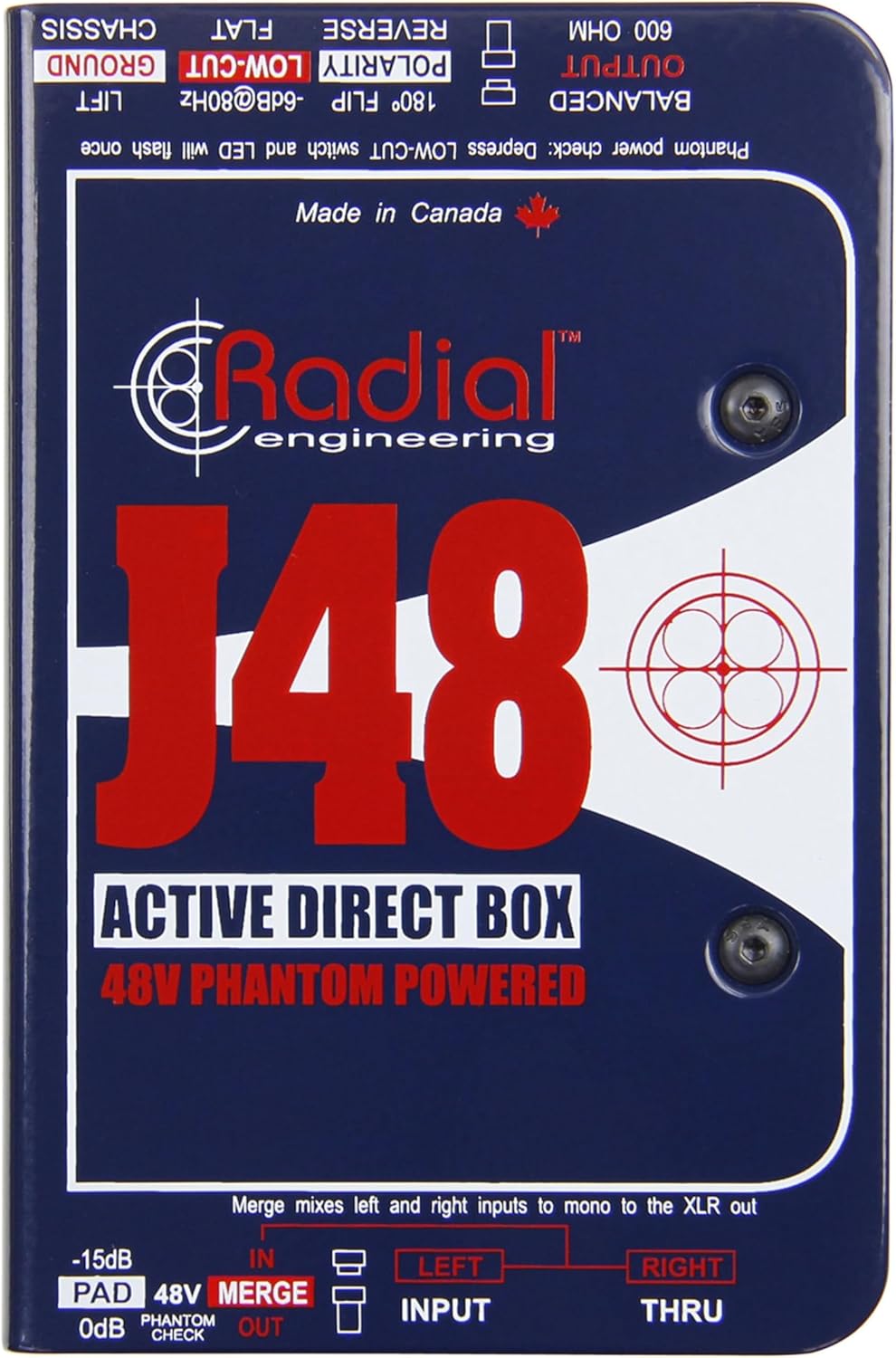
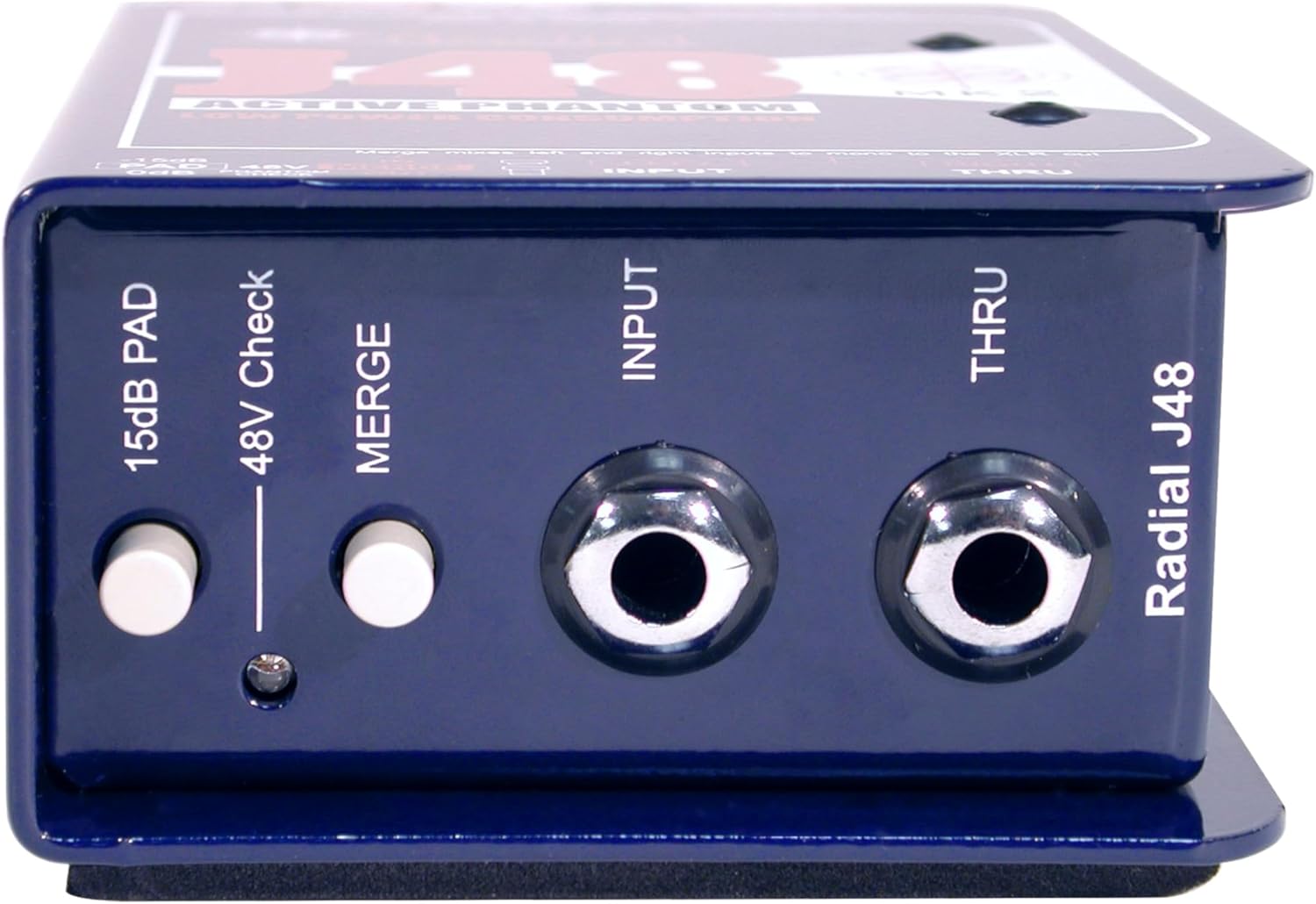
- INPUT (1/4" Jack): Connect your instrument or audio source here.
- THRU (1/4" Jack): Provides a direct, unprocessed signal to feed an instrument amplifier or monitor.
- -15dB PAD Switch: Attenuates the input signal by 15dB for high-output sources, preventing overload.
- 48V Phantom Check LED: Illuminates momentarily when 48V phantom power is detected.
- MERGE Button: Combines the LEFT and RIGHT 1/4" inputs into a mono signal, sent to the XLR output.
- BALANCED OUTPUT (XLR): Provides a balanced, low-impedance output signal to a mixing console or audio interface.
- 180° POLARITY FLIP Switch: Reverses the polarity of the XLR output signal, useful for phase correction.
- LOW-CUT (-6dB@80Hz) Switch: Activates an 80Hz high-pass filter to reduce unwanted low-frequency rumble or mud.
- Перемикач GROUND LIFT: Disconnects the audio ground from the chassis ground to eliminate hum and buzz caused by ground loops.
4. Налаштування
Follow these steps to connect your Radial J48 MK2:
- Підключити інструмент: Plug your instrument (e.g., guitar, bass, keyboard) into the ВХІД 1/4" jack on the J48 MK2.
- Підключитися до Amplifier (необов'язково): If you wish to send your instrument's signal to an on-stage ampживлення або монітор, підключіть кабель 1/4 дюйма від THRU jack on the J48 MK2 to your ampвнесок ліфіера.
- Підключення до мікшера/озвучувальної системи: Connect a balanced XLR cable from the ЗБАЛАНСОВАНИЙ ВИХІД of the J48 MK2 to an XLR input on your mixing console or audio interface.
- Активуйте фантомне живлення: Ensure that the connected mixing console or audio interface provides 48V phantom power to the XLR input. The 48V Phantom Check LED on the J48 MK2 will briefly illuminate to confirm power reception. The J48 MK2 requires 48V phantom power for operation.
5. Інструкція з експлуатації
Optimize your sound using the J48 MK2's controls:
- Using the -15dB PAD: If your instrument has a very high output (e.g., active pickups, high-output keyboards), engage the -15 дБ PAD switch. This reduces the input signal level, preventing distortion and ensuring a clean signal to the mixer.
- MERGE Function: For instruments with stereo outputs (e.g., some keyboards or media players) that you want to sum to a single mono XLR output, press the ОБ'ЄДНАТИ button. Connect the left output to the INPUT jack and the right output to the THRU jack. The J48 MK2 will then combine these into a mono signal at the XLR output.
- POLARITY FLIP (180°): In multi-microphone or multi-DI setups, phase cancellation can occur, leading to a thin or hollow sound. If you suspect phase issues, engage the 180° POLARITY FLIP switch to invert the phase of the XLR output. Listen for an improvement in low-end response or overall clarity.
- LOW-CUT Filter: To reduce unwanted low-frequency noise, stage rumble, or to clean up the low-end of an instrument's signal, engage the НИЗЬКИЙ ЗРІЗ switch. This activates an 80Hz high-pass filter, removing frequencies below 80Hz.
- ЗЕМЛЯ: If you experience hum or buzz in your audio signal, it may be due to a ground loop. Engage the ПІДНІМНИК switch to disconnect the audio ground from the chassis ground. If the hum persists, try disengaging it, as sometimes lifting the ground can introduce noise in certain setups.
6. Технічне обслуговування
The Radial J48 MK2 is built for durability and requires minimal maintenance.
- Прибирання: Використовуйте м’яку суху тканину для очищення зовнішньої частини пристрою. Уникайте абразивних засобів для чищення або розчинників.
- Зберігання: Зберігайте пристрій у сухому місці, подалі від екстремальних температур та прямих сонячних променів.
- Огляд: Periodically check cables and connectors for wear or damage.
There are no user-serviceable parts inside the J48 MK2. Any internal servicing should be performed by authorized Radial Engineering technicians.
7. Вирішення проблем
If you encounter issues with your J48 MK2, refer to the following common problems and solutions:
- Немає звуку:
- Ensure 48V phantom power is active on the mixer's XLR input. The 48V Phantom Check LED should briefly flash upon connection.
- Check all cable connections (instrument to INPUT, J48 OUTPUT to mixer).
- Verify the instrument is working and its volume is up.
- Ensure the mixer channel is unmuted and its gain is appropriately set.
- Гудіння або дзижчання:
- Увімкнути або вимкнути ПІДНІМНИК switch to break potential ground loops.
- Переконайтеся, що все обладнання належним чином заземлено.
- Перевірте наявність несправних кабелів.
- Спотворений звук:
- Залучіть -15 дБ PAD switch if your instrument has a high output level.
- Reduce the input gain on your mixing console.
- Check for damaged cables or faulty equipment.
- Thin or Hollow Sound:
- If using multiple microphones or DIs, try engaging the 180° POLARITY FLIP switch to correct phase issues.
If problems persist, contact Radial Engineering support for further assistance.
8. Технічні характеристики
| Номер моделі | 8003001 рандів |
| Вага товару | 1.58 фунта (0.72 кг) |
| Розміри продукту | 6.5 x 4.1 x 3.1 дюйми (16.5 x 10.4 x 7.9 см) |
| Вимоги до живлення | Фантомне живлення 48 В |
| Тип роз'єму | 1/4" TS (Input/Thru), 3-Pin XLR (Output) |
| Тип матеріалу | легована сталь |
| Назва кольору | Синій |
| Панель введення | -15 дБ |
| Фільтр низької частоти | -6 дБ при 80 Гц |
9. Гарантія та підтримка
For warranty information, technical support, or service inquiries, please contact Radial Engineering directly through their official webсайту або уповноважених дистриб'юторів. Зберігайте чек про покупку як підтвердження покупки для гарантійних претензій.