
Важлива інформація з безпеки
Будь ласка, уважно прочитайте всі інструкції перед використанням цього пристрою. Зберігайте цей посібник для подальшого використання.
- Не піддавайте пристрій дії дощу або вологи, щоб запобігти пожежі або ураження електричним струмом.
- Do not block ventilation openings. Ensure proper airflow around the unit.
- Use only the power adapters supplied with the unit. Using unauthorized adapters may damage the device and void the warranty.
- Уникайте розміщення пристрою на нестійких поверхнях.
- Не намагайтеся обслуговувати пристрій самостійно. Довірте всі послуги кваліфікованому персоналу.
- Утилізуйте батареї належним чином відповідно до місцевих правил.
Вміст упаковки
Перевірте наявність усіх елементів в упаковці:
- Coby TFDVD-7700 Portable DVD Player
- Повнофункціональний пульт дистанційного керування
- Батарея пульта дистанційного керування
- Літій-іонний акумулятор
- Шнур живлення змінного струму
- 100-240V UL Adapter
- DC Car/Boat Charger
- Car/Boat AC/DC Adapter and Cassette Audio Adapter
- 2 Sets of Stereo Headphones
- Headphone Jack Splitter
- Сумка для перенесення
- Headrest Mounting Pouch
- Посібник користувача (цей документ)
Продукт закінченийview
The Coby TFDVD-7700 is a 7-inch side-loading portable DVD player designed for entertainment on the go. It features a widescreen TFT LCD display and built-in stereo speakers.
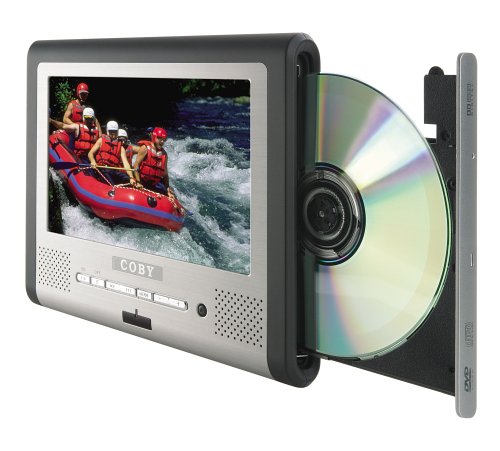
малюнок 1: Coby TFDVD-7700 Portable DVD Player and its remote control. The player features a 7-inch screen, control buttons below the screen, and a side-loading DVD slot. The remote control has numerous buttons for full functionality.
Ключові характеристики:
- 7-inch Widescreen TFT LCD Display
- Side-loading DVD Mechanism
- Multi-format Playback (DVD, MP3 CD, JPEG CD)
- Вбудовані стереодинаміки
- Composite Video Output for external display connection
- Повнофункціональний пульт дистанційного керування
- Перезаряджуваний літій-іонний акумулятор
- Picture Zoom and Parental Controls
Налаштування
1. Зарядка батареї
- Connect the 100-240V UL adapter to the DC IN port on the DVD player.
- Підключіть адаптер до стандартної розетки.
- Allow the unit to charge fully before first use (approximately 3-4 hours). The charging indicator light will typically change color or turn off when charging is complete.
- For in-car use, connect the DC car charger to the DC IN port and plug it into your vehicle's cigarette lighter socket.
2. Inserting the Remote Control Battery
- Відкрийте батарейний відсік на задній панелі пульта дистанційного керування.
- Insert the supplied battery, ensuring correct polarity (+/-).
- Надійно закрийте батарейний відсік.
3. Підключення до зовнішнього дисплея (додатково)
- Locate the composite video output port on the DVD player.
- Connect a composite video cable (not always included, may need to be purchased separately) from the player's video output to the video input of your TV or monitor.
- Ensure your TV/monitor is set to the correct input source.
Інструкція з експлуатації
1. Увімкнення/вимкнення живлення
- To power on, slide the POWER switch to the ON position or press the POWER button on the remote.
- To power off, slide the POWER switch to the OFF position or press the POWER button on the remote.
2. Вставлення диска
- With the unit powered on, gently insert a DVD, MP3 CD, or JPEG CD into the side-loading disc slot with the label side facing up.
- Програвач автоматично розпізнає диск і розпочне відтворення або відобразить меню диска.
3. Основні елементи керування відтворенням
Use the buttons on the unit or the remote control:
- ВІДТВОРЕННЯ/ПАУЗА: Натисніть, щоб почати або призупинити відтворення.
- СТІЙ: Натисніть, щоб зупинити відтворення.
- ПРОПУСТИТИ (<< / >>): Натисніть, щоб перейти до попереднього або наступного розділу/доріжки.
- ШВИДКА ПЕРЕМОТКА ВПЕРЕД/НАЗАД: Натисніть і утримуйте для перемотування вперед або назад.
- ОБ'ЄМ (+/-): Відрегулюйте гучність звуку.
4. Використання навушників
- Plug one or both sets of stereo headphones into the headphone jack(s).
- Use the headphone splitter to connect both sets of headphones to a single jack if needed.
- Adjust volume to a comfortable level to prevent hearing damage.
5. Розширені функції
- МЕНЮ: Access the disc's main menu.
- НАЛАШТУВАННЯ: Access the player's system settings (e.g., language, display settings, parental controls).
- ЗООМ: Enlarge a portion of the screen during video playback.
- КУТ: Змінити viewing angle on discs that support multiple angles.
- ПІДЗВАГА: Select different subtitle tracks.
- SLOW/FAST MOTION: Control playback speed.
Технічне обслуговування
1. Очищення пристрою
- Протріть зовнішню частину пристрою м’якою сухою тканиною.
- Для стійких слідів, dampen the cloth slightly with water, then wipe dry immediately.
- Не використовуйте абразивні засоби для чищення, віск або розчинники.
- To clean the screen, use a soft, lint-free cloth specifically designed for LCD screens.
2. Догляд за дисками
- Тримайте диски за краї, щоб уникнути відбитків пальців.
- Keep discs in their cases when not in use.
- Протирайте брудні диски м’якою тканиною без ворсу, рухаючись від центру до країв.
3. Догляд за акумулятором
- Recharge the battery regularly, even if the unit is not used frequently, to maintain battery life.
- Уникайте багаторазового повного розряджання акумулятора.
- Зберігайте пристрій у прохолодному, сухому місці, якщо він не використовується протягом тривалого часу.
Усунення несправностей
If you encounter issues with your Coby TFDVD-7700, refer to the following common problems and solutions:
| проблема | Можлива причина | Рішення |
|---|---|---|
| Пристрій не вмикається. | Battery is discharged; Power adapter not connected; Power switch is OFF. | Charge the battery; Connect the power adapter; Slide the POWER switch to ON. |
| No disc detected / Disc error. | Disc is dirty or scratched; Disc inserted incorrectly; Unsupported disc format. | Clean the disc; Reinsert disc with label side up; Ensure disc is DVD, MP3 CD, or JPEG CD. |
| Ні звуку. | Volume is too low; Headphones not connected properly; Mute function is active. | Increase volume; Reconnect headphones; Deactivate mute. |
| Зображення спотворене або чорне. | External display connection issue; Disc problem. | Check composite video cable connection and TV input; Try a different disc. |
| Не працює пульт дистанційного керування. | Battery is dead or inserted incorrectly; Obstruction between remote and player. | Replace or reinsert battery; Ensure clear line of sight to the player's IR sensor. |
Технічні характеристики
- модель: TFDVD-7700
- Розмір екрана: 7 Inches (Widescreen TFT LCD)
- Підтримувані типи носіїв: DVD, CD-R, CD-RW, SVCD, MP3 CD, JPEG CD
- Аудіовихід: Вбудовані стереодинаміки, роз'єм для навушників
- Відеовихід: Композитне відео
- Джерело живлення: AC Adapter (100-240V), DC Car Charger, Rechargeable Lithium-ion Battery
- Виробник: Кобі
Інформація про гарантію
This product is covered by a limited warranty. Please refer to the warranty card included in your original packaging for specific terms and conditions, including coverage period and service procedures. Typically, Coby products come with a 90-day warranty on parts and labor from the date of purchase.
Зберігайте чек про покупку як підтвердження покупки для гарантійних претензій.
Підтримка клієнтів
For technical assistance, troubleshooting beyond this manual, or warranty inquiries, please contact Coby customer support.
Please have your model number (TFDVD-7700) and proof of purchase ready when contacting support.
Contact information (phone number, website) would typically be provided on the manufacturer's official webсайті або в гарантійній документації.


