
1. Вступ
This manual provides instructions for the setup, operation, and maintenance of your Bose MediaMate Computer Speakers. These speakers are designed to enhance the audio experience for your computer, whether for music, movies, or gaming. The compact design and upward-angled sound projection optimize audio delivery for desktop use, occupying minimal desk space.
2. Інформація про безпеку
Please read and follow all safety instructions before using this product to prevent electric shock, fire, or injury. Keep this manual for future reference.
- Не піддавайте динаміки впливу води або вологи.
- Не розміщуйте динаміки поблизу джерел тепла, таких як радіатори, обігрівачі, печі чи інші прилади (включаючи ampліфікатори), які виробляють тепло.
- Використовуйте лише насадки/аксесуари, зазначені виробником.
- Відключайте цей пристрій від мережі під час грози або якщо він не використовується протягом тривалого часу.
- Звертайтеся до кваліфікованого сервісного персоналу. Обслуговування потрібне, якщо пристрій було пошкоджено будь-яким чином, наприклад, пошкоджено шнур живлення або вилка, була пролита рідина або всередину пристрою потрапили предмети, пристрій піддався впливу дощу або вологи, не працює належним чином , або було видалено.
3. Вміст упаковки
Перевірте наявність усіх предметів у вашій упаковці:
- Bose MediaMate Computer Speakers (2 units)
- Адаптер живлення
- Audio Cable (3.5mm stereo jack)
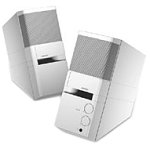
Image: The Bose MediaMate Computer Speakers in Gray. The image shows two compact speakers, one with visible volume and mix controls, and a headphone jack.
4. Налаштування
Follow these steps to set up your Bose MediaMate Computer Speakers:
- Розміщення: Place the speakers on a flat, stable surface on either side of your computer monitor. Ensure they are angled slightly upward towards your listening position for optimal sound.
- Підключення аудіокабелю: Connect the 3.5mm audio cable from the back of the primary speaker (the one with controls) to the audio output jack on your computer.
- Підключіть живлення: Plug the power adapter into the power input on the primary speaker, then plug the adapter into a wall outlet.
- Увімкнення: Turn on the speakers using the volume knob. The power indicator light should illuminate.
5. Інструкція з експлуатації
Once set up, operating your MediaMate speakers is straightforward:
- Регулювання гучності: Use the large knob labeled "VOLUME" on the front of the primary speaker to adjust the overall sound level.
- Контроль змішування: The "MIX" knob allows you to blend audio from two different sources if you have a second device connected to the auxiliary input.
- Роз'єм для навушників: For private listening, plug your headphones into the headphone jack located on the front of the primary speaker. This will mute the speakers.
- Подвійні входи: The speakers feature dual inputs, allowing you to connect and mix two audio sources simultaneously. For example, you can connect your computer and a portable music player.
6. Технічне обслуговування
To ensure the longevity and optimal performance of your speakers:
- Прибирання: Use a soft, dry cloth to clean the exterior surfaces of the speakers. Do not use liquid cleaners or aerosols.
- Пил: Regularly dust the speaker grilles to prevent accumulation that could affect sound quality.
- Зберігання: Якщо динаміки зберігатимуться протягом тривалого часу, від’єднайте їх від живлення та зберігайте у прохолодному сухому місці.
7. Вирішення проблем
If you encounter issues with your Bose MediaMate speakers, refer to the following common problems and solutions:
| проблема | Можлива причина | Рішення |
|---|---|---|
| Ні звуку |
|
|
| Спотворений звук |
|
|
| Працює лише один динамік |
|
|
8. Технічні характеристики
- Бренд: Бозе
- модель: MediaMate
- Підключення: 3.5mm Audio Input, AC Power
- Аудіовихід: Стерео
- Тип динаміка: Мультимедіа
- матеріал: метал
- Розмір динаміка: 6 Centimeters (Audio Driver)
- Вага товару: 3 фунта
- колір: Сірий
9. Гарантія та підтримка
Bose MediaMate Computer Speakers come with a limited warranty. For specific warranty details and duration, please refer to the warranty card included with your product or visit the official Bose webсайт.
For technical support, product registration, or service inquiries, please contact Bose customer service:
- телефон: 800-444-2673
- Webсайт: www.bose.com
Please have your product model number (MediaMate) and purchase date available when contacting support.