
Важлива інформація з безпеки
Please read all safety and operating instructions carefully before using this VCR. Retain this manual for future reference.
- Джерело живлення: Connect the VCR only to the power supply indicated on the label.
- Вентиляція: Забезпечте належну вентиляцію. Не блокуйте вентиляційні отвори.
- Вода і вологість: Do not expose the VCR to rain or moisture. Do not place objects filled with liquids on the VCR.
- Прибирання: Unplug the VCR from the wall outlet before cleaning. Use a dry cloth.
- Обслуговування: Не намагайтеся самостійно обслуговувати цей виріб. Зверніть усі послуги до кваліфікованого обслуговуючого персоналу.
Продукт закінченийview
The Sharp VC-A422 is a 4-head VCR designed for reliable playback and recording of VHS tapes. It features a user-friendly interface for easy operation.
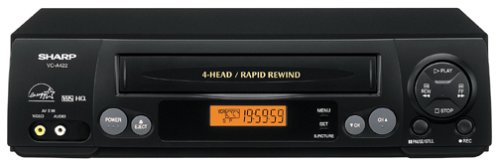
Зображення: спереду view of the Sharp VC-A422 4-Head VCR, showing the tape slot, display, and control buttons.
Налаштування
1. Розпакування та розміщення
- Carefully remove the VCR from its packaging.
- Place the VCR on a stable, level surface. Ensure there is adequate space around the unit for ventilation.
- Avoid placing the VCR near heat sources, direct sunlight, or areas with high humidity.
2. Підключення до телевізора
To connect your VCR to a television, you will typically use RCA audio/video cables (red, white, yellow) or a coaxial cable.
- RCA Connection (Recommended for best quality):
- Connect the yellow video output jack on the VCR to the yellow video input jack on your TV.
- Connect the white audio output jack on the VCR to the white audio input jack on your TV.
- Connect the red audio output jack on the VCR to the red audio input jack on your TV.
- Select the corresponding AV input on your television (e.g., Video 1, AV1, Input 1).
- Коаксіальне з'єднання:
- Connect a coaxial cable from the "RF Out" or "Antenna Out" jack on the VCR to the "Antenna In" or "RF In" jack on your TV.
- Connect your antenna or cable TV signal to the "RF In" or "Antenna In" jack on the VCR.
- Tune your television to channel 3 or 4 (depending on the VCR's output setting) to receive the VCR signal.
3. Підключення живлення
- Plug the VCR's power cord into a standard electrical outlet.
- The VCR should enter standby mode, indicated by a clock display or power light.
Інструкція з експлуатації
1. Базове відтворення
- Ensure the VCR is powered on and your TV is set to the correct input.
- Вставте VHS-касету у гніздо для касети. Відеомагнітофон автоматично завантажить касету.
- Натисніть ГРАТИ кнопку на відеомагнітофоні або пульті дистанційного керування.
- Щоб зупинити відтворення, натисніть кнопку СТІЙ кнопку.
- Щоб призупинити відтворення, натисніть ПАУЗА кнопку. Натисніть ще раз, щоб відновити.
- Щоб перемотати вперед або назад, натисніть FF (Швидке перемотування вперед) або REW (Rewind) button. Press ГРАТИ щоб відновити звичайне відтворення.
- Щоб вийняти касету, натисніть кнопку ВИЙТИ кнопку.
2. Програми запису
The Sharp VC-A422 allows for recording television programs. Ensure a blank or recordable VHS tape is inserted and its safety tab is intact.
- Tune the VCR to the desired channel using the VCR's tuner.
- Натисніть ЗАПИС button. The VCR will begin recording.
- Щоб припинити запис, натисніть кнопку СТІЙ кнопку.
- For timed recordings, refer to the VCR's on-screen programming guide (if available) or consult the full manual for detailed timer recording instructions.
Технічне обслуговування
Proper maintenance ensures the longevity and optimal performance of your VCR.
- Зовнішнє очищення: Wipe the exterior of the VCR with a soft, dry cloth. Do not use liquid cleaners or abrasive materials.
- Очищення голови: If picture quality degrades (e.g., snowy picture, lines), the video heads may be dirty. Use a dry-type VCR head cleaning cassette sparingly. Excessive use can wear down the heads.
- Догляд за стрічкою: Store VHS tapes in their cases, away from dust, direct sunlight, and strong magnetic fields. Avoid exposing tapes to extreme temperatures.
- Вентиляція: Keep the VCR's ventilation slots clear of obstructions to prevent overheating.
Усунення несправностей
If you encounter issues with your Sharp VC-A422 VCR, refer to the following common problems and solutions:
| проблема | Можлива причина | Рішення |
|---|---|---|
| Немає живлення | Power cord unplugged; power outlet not active. | Перевірте підключення шнура живлення. Перевірте розетку з іншим пристроєм. |
| Немає зображення чи звуку | Incorrect TV input selected; A/V cables loose or incorrectly connected. | Select correct TV input (e.g., AV1, Video 1). Ensure A/V cables are securely connected to matching color ports. |
| Snowy or distorted picture | Dirty video heads; poor tape quality; incorrect channel for coaxial connection. | Use a VCR head cleaning cassette. Try a different tape. If using coaxial, ensure TV is on channel 3 or 4. |
| Стрічка не витягується | Power failure; mechanical issue. | Ensure VCR is powered on. If problem persists, seek professional service. |
| Не вдається записати | Tape's safety tab removed; VCR not tuned to a channel. | Check if the safety tab on the VHS tape is intact (cover the notch with tape if removed). Ensure VCR tuner is set to the desired channel. |
Технічні характеристики
- Бренд: Гострий
- модель: VC-A422
- Голови: 4-Head (Video)
- Вага товару: 6 фунта
- Розміри упаковки: 15.55 x 11.02 x 5.24 дюймів
- ASIN: B00005LABU
- Дата першої доступності: 4 вересня 1999 р
Примітка: Технічні характеристики можуть бути змінені без попередження.
Інформація про гарантію
This Sharp product is covered by a limited warranty. For specific details regarding warranty coverage, duration, and terms, please refer to the warranty card included with your purchase or visit the official Sharp webсайт. Зберігайте чек про покупку для гарантійних претензій.
Підтримка клієнтів
For further assistance, technical support, or service inquiries, please contact Sharp customer support. You can find contact information on the official Sharp webсайті або в документації, що надається разом із вашим продуктом.
Visit the official Sharp store for more information: Офіційний магазин Sharp
Юридична відмова від відповідальності
ПОПЕРЕДЖЕННЯ ДЛЯ СПОЖИВАЧІВ: This television receiver has only an analog broadcast tuner and will require a converter box after February 17, 2009 to receive over-the-air broadcasts with an antenna because of the U.S.'s transition to digital broadcasting. Analog-only TVs should continue to work as before with cable and satellite TV services, gaming consoles, VCRs, DVD players, and similar products. For more information, call the Federal Communications Commission at 1-888-225-5322 (TTY: 1-888-835-5322), or visit the commission s digital-television Web сайт за адресою: www.dtv.gov.


