
1. Вступ і даліview
The Brother CTS-410-ES is a versatile 4-line executive phone system designed for efficient communication in office or home environments. It can function as a stand-alone unit or integrate into a larger system. Key features include a built-in caller ID, a 99-number call log, and a desktop data port for convenient access to line 4. This manual provides detailed instructions for setup, operation, maintenance, and troubleshooting to ensure optimal performance of your device.
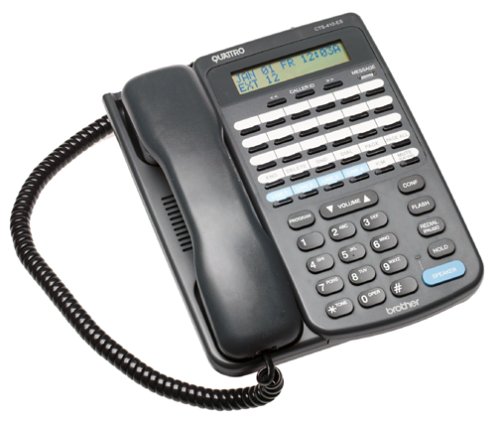
Фронт view of the Brother CTS-410-ES 4-line executive phone system, showing the keypad, display, and line buttons.
2. Інформація про безпеку
Please read and follow these safety precautions to prevent damage to the unit and ensure your safety:
- Не піддавайте пристрій впливу води або вологи.
- Уникайте розміщення пристрою поблизу джерел тепла або прямих сонячних променів.
- Використовуйте лише адаптер живлення, що постачається разом із пристроєм.
- Не намагайтеся самостійно відкривати або ремонтувати пристрій. Звертайтеся до кваліфікованого персоналу для проведення будь-яких робіт з обслуговування.
- Тримайте пристрій подалі від сильних електромагнітних полів.
3. Вміст упаковки
Переконайтеся, що ваш пакет містить такі елементи:
- Brother CTS-410-ES 4-Line Executive Phone System Unit
- Адаптер змінного струму
- Telephone Line Cords (typically 4)
- Noise-Canceling Headset
- Посібник користувача (цей документ)
4. Налаштування
Follow these steps to set up your Brother CTS-410-ES phone system:
- Підключіть живлення: Plug the AC power adapter into the power jack on the back of the phone unit, then plug the adapter into a standard electrical outlet.
- Підключення телефонних ліній: Connect each telephone line cord from your wall jacks to the corresponding line jacks (Line 1, Line 2, Line 3, Line 4) on the back of the phone unit.
- Підключення гарнітури: If using the included noise-canceling headset, plug it into the dedicated headset jack on the side or front of the phone unit.
- Початкове ввімкнення: The unit should power on automatically. The display will illuminate, and you may hear a brief self-test sequence.
5. Інструкція з експлуатації
This section details the various functions and operations of your phone system.
5.1 Основні функції викликів
- Здійснення дзвінка: Lift the handset or press the SPEAKER button. Select an available line button (Line 1-4). Dial the desired number.
- Відповідь на дзвінок: When the phone rings, lift the handset or press the SPEAKER button. The corresponding line button will flash.
- Завершення дзвінка: Place the handset back in the cradle or press the SPEAKER button again if using the speakerphone.
- Тримайте: During a call, press the HOLD button to place the call on hold. Press the flashing line button to resume the call.
5.2 Caller ID and Call Log
- Ідентифікатор абонента: When a call comes in, the caller's name and number will appear on the display (if available from your service provider).
- Журнал викликів: The system stores up to 99 incoming calls. Use the navigation buttons (e.g., UP/DOWN arrows) to scroll through the call log.
- Dialing from Call Log: Select an entry from the call log and press the DIAL or SPEAKER button to call back.
5.3 Speakerphone and Headset
- гучний зв'язок: Press the SPEAKER button to activate hands-free communication. Adjust volume using the volume controls.
- Робота гарнітури: With the headset connected, press the HEADSET button (if available) or simply lift the handset to activate the headset for calls.
5.4 Intercom and Paging
- Домофон: If multiple CTS-410-ES units are connected, use the INTERCOM function to communicate between units. Refer to your system's specific intercom setup.
- Пейджінг: Use the PAGING function to broadcast an announcement to other connected units.
5.5 Message Waiting Light and Data Port
- Message Waiting Light: A dedicated light will illuminate to indicate new messages (requires compatible voicemail service from your provider).
- Desktop Data Port: The data port provides quick access to Line 4, allowing you to connect a modem or other data device.
6. Технічне обслуговування
Proper maintenance ensures the longevity and performance of your phone system.
- Прибирання: Wipe the unit with a soft, dry cloth. Do not use liquid or aerosol cleaners.
- Зберігання: If storing the unit for an extended period, disconnect it from power and telephone lines. Store in a cool, dry place.
- Управління шнуром: Ensure all cords are free from kinks or damage. Replace damaged cords immediately.
7. Вирішення проблем
If you encounter issues with your phone system, try these common solutions:
| проблема | Можливе рішення |
|---|---|
| Немає гудка | Check all telephone line connections. Ensure the power adapter is securely plugged in. Test with a different phone line if possible. |
| Ідентифікатор абонента не відображається | Verify that Caller ID service is activated with your telephone service provider. Ensure the phone is connected to a compatible line. |
| Speakerphone audio is low or distorted | Adjust the speaker volume. Ensure the microphone is not obstructed. Move closer to the unit. |
| Message waiting light not working | Confirm that you have voicemail service with your provider and that it is properly configured. |
8. Технічні характеристики
Technical specifications for the Brother CTS-410-ES phone system:
| Особливість | Деталь |
|---|---|
| Бренд | Брат |
| Номер моделі | CTS-410-ES |
| Тип телефону | Проводиться |
| Кількість рядків | 4 |
| Джерело живлення | Провідний електричний |
| Тип дозвону | Одна клавіатура |
| Розміри предмета (Д x Ш x В) | 17.8 х 22.9 х 10.8 см |
| Тип автовідповідача | цифровий |
| Можливість конференц-дзвінків | 4 шлях |
| Багаторядкова робота | так |
| Ідентифікація абонента | так |
| Ємність запису | 20 Minutes (for answering system, if applicable) |
| Розширюється | Yes, with other optional CTS410ES units |
| Call Log Memory | 99 числа |
| Гніздо для гарнітури | так |
| Desktop Data Port | Yes (for Line 4) |
9. Гарантія та підтримка
This Brother CTS-410-ES product comes with a 90-денна обмежена гарантія. For warranty claims or technical assistance, please contact Brother customer support. Keep your purchase receipt as proof of purchase.
For further support, visit the official Brother support webсайт або зверніться до місцевого дилера.